6
DESCRIPTION OF PRODUCT
CONTROL KEYS
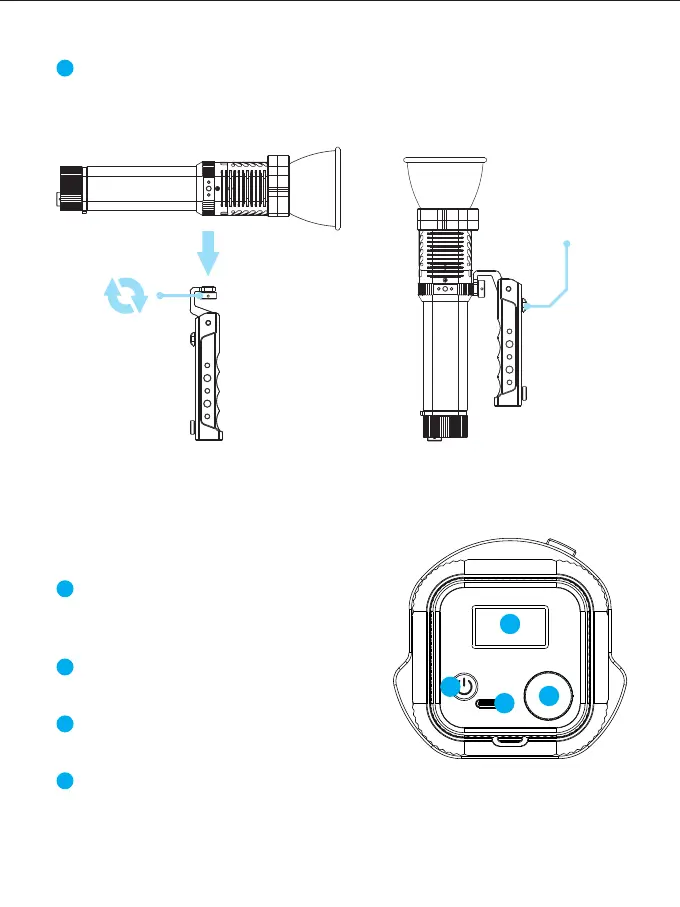
Angle adjustment
button
Turn the knob clockwise to fix the lamp on the handle, turn it counterclockwise
to remove it.
Slide the angle adjustment button downward to adjust the angle of the light.
2
1
2
3
4
1
2
3
4
Charging port: Use a Type-C universal
charger to connect to this port for charging
and firmware update.
ON/OFF key: Press and hold for 2 seconds
to turn ON/OFF the light.
Display: Shows current settings, modes and
parameters.
Knob: 【Rotate the knob】Select menus, mode or adjust parameters.
【Click the knob】Enter the menu or confirm the selection.
【Double-click the knob】 Return to the previous menu.
【Long press the knob】 Return to the main menu.



 To Next Page