7
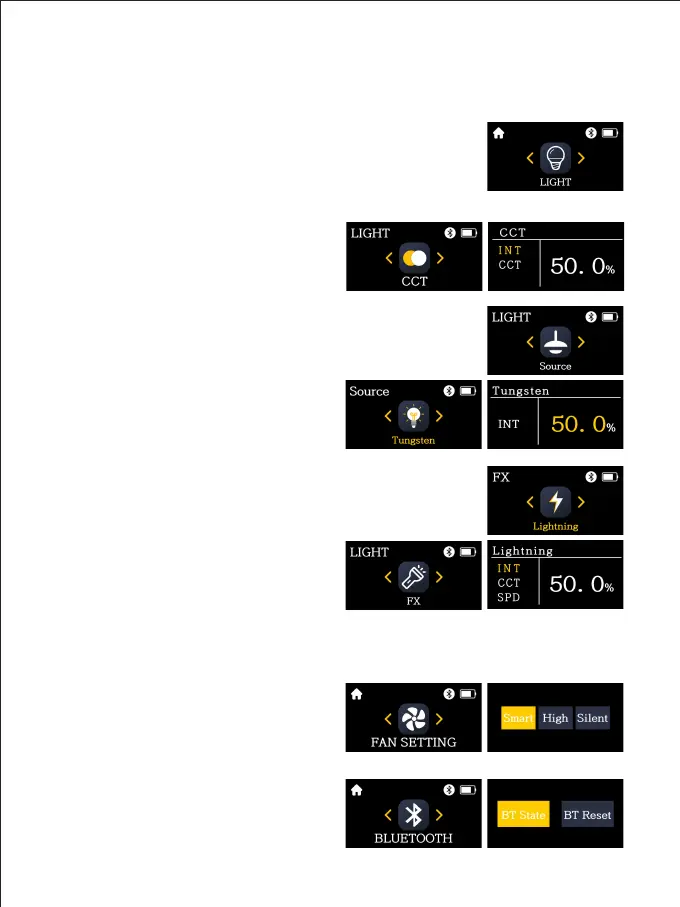
① LIGHT:
There are 3 lighting modes: CCT, light source, and light effect.
CCT: Allow you to adjust color temperature and brightness of the light.
INT: Short press and rotate the knob to
adjust the brightness of the light.
CCT: Short press and turn the knob to
adjust the color temperature of the light.
Source: Has 12 types of light sources:
Tungsten, HMI 5600, HMI 6000, Studio Lamps, Sodium Lamp,
Halogen, Arc Lamp, Candle, Sunset/Sunrise, Daylight, Overcast
Sky, CFL Cool White.
Source: Short press and turn the knob to
select the light source.
INT: After selecting the light source, rotate
the knob to adjust its brightness.
FX: Has 12 light effect types:
Lightning, CCT Loop, Candle, Bad Bulb, TV, Paparazzi, Explosion,
Pulsing, Strobe, Fire, Fireworks, Welding.
Light effect: Short press and turn the knob
to select light effect.
INT: After selecting the light effect, rotate
the knob to adjust its brightness.
CCT: Short press and turn the knob to
adjust the color temperature.
SPD: Short press and turn the knob to adjust the speed of light effects.
② FAN SETTINGS:
You can view and change the current fan
mode from:
Smart, High, Silent.
FUNCTION INTRODUCTION &
INSTRUCTIONS FOR USE
③ BLUETOOTH:
You can check the current Bluetooth status,
turn the Bluetooth function on/off, and
reset Bluetooth.



 To Next Page