29
GYSPOT ARCPULL 200
EN
The gas protection cover must not be mounted on the ground pad when welding without gas pro-
tection.
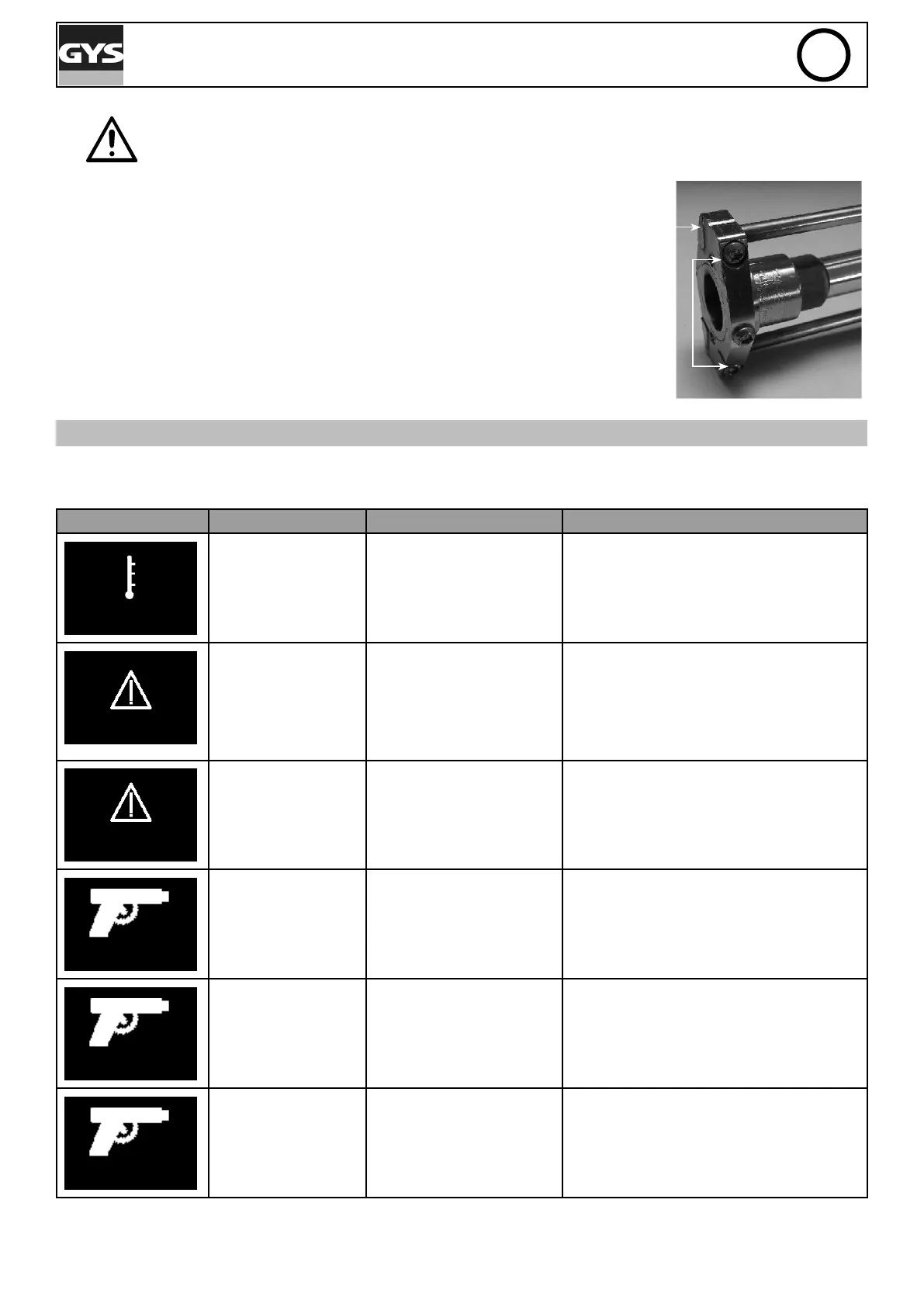
• Put the pad (equipped with its cover) at the end of the earth rods and
screw in the 2 clamping screws. It is recommended to place the pad
with the clamping screws pointing down to the bottom of the gun to
keep the positioning markings clearly visible.
Note: The use of the gas protective pad and earth rods is not necessary
when welding a pull ring.
Positioning
marking
Clamping screw
ERROR MESSAGE, ANOMALIES, CAUSES, SOLUTIONS
This device integrates a default management system. In the event of a default, error messages may be displayed.
Error code Meaning Causes Solutions
Generator thermal
protection
Maximum duty cycle
reached.
Wait for the indicator to turn off before
resuming welding operations.
Mains voltage
default.
Mains power is out of
range or one phase is
missing.
Have your electrical installation chec-
ked by a qualied person. The voltage
between phase and neutral must be
between 100V and 127Vac on a 110V sup-
ply network or between 200V and 265Vac
on a 230Vac supply network.
Keypad fault
A key on the keypad is
pushed when the machine
is switched on.
Ask a qualied person to check the key-
pad.
Communication fault
with the gun
Communication between
the gun and the power
source is not working.
Reconnect the gun and switch the ma-
chine back on. If the fault remains, ask a
qualied person to check the product.
Gun thermal protec-
tion.
Maximum duty cycle
reached.
Wait for the indicator to turn off before
resuming welding operations.
Gun motor fault.
Gun mechanism is bloc-
ked.
Reconnect the gun and switch the ma-
chine back on. If the fault remains, ask a
qualied person to check the product.
All operations requiring the removal of the machine’s cover and checking the electrical systems must be done by a
qualied technician.




 To Next Page