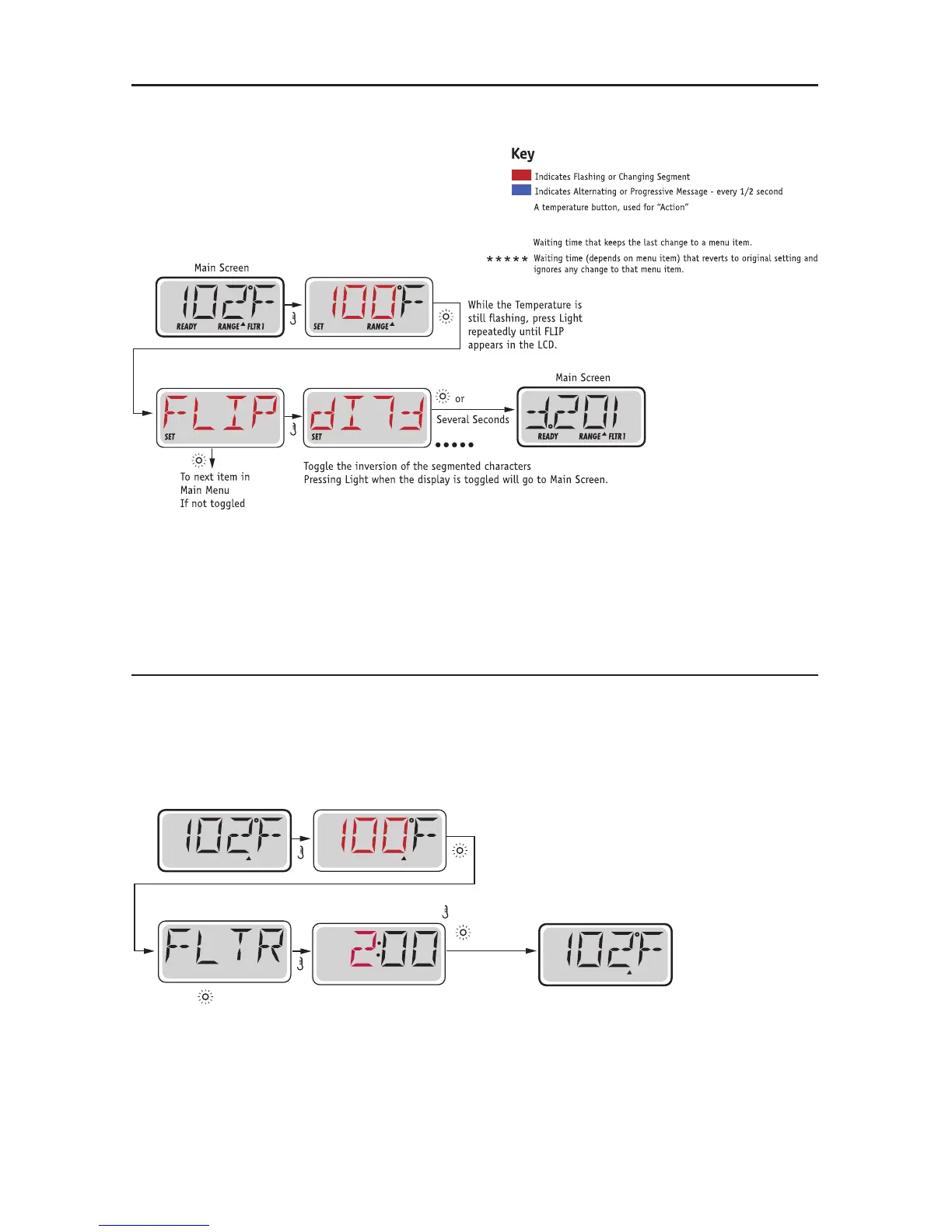
Adjusting Filtration
NOTE:
Some panels may have a dedicated FLIP button, which allows the user to flip the display with a
single button-press.
MAIN FILTRATION
Filter cycles are set using a duration. Each setting can be adjusted in 1 hour increments. Filter Cycle
1 and Filter Cycle 2 (if enabled) are set to the same duration.
Sets Filter length in hours
SET
FLTR12
While the Temperature is
still flashing, press Light
repeatedly until FLTR
appears in the LCD.
SET
RANGE
Main Screen
READY
RANGE
FLTR12
Main Screen
READY
RANGE
FLTR12
Waiting
Several Seconds
Reverts to Original Setting
To Set
*****
If Filter Cycle 2 is enabled, Filter 12 will appear in the LCD. If Filter is disabled, Filter 1 will appear.
PURGE CYCLES
In order to maintain sanitary conditions, secondary pumps will purge water from their respective
plumbing by running briefly at the beginning of each filter cycle.
Swim spa Controls
Flip (Invert Display)



 To Next Page