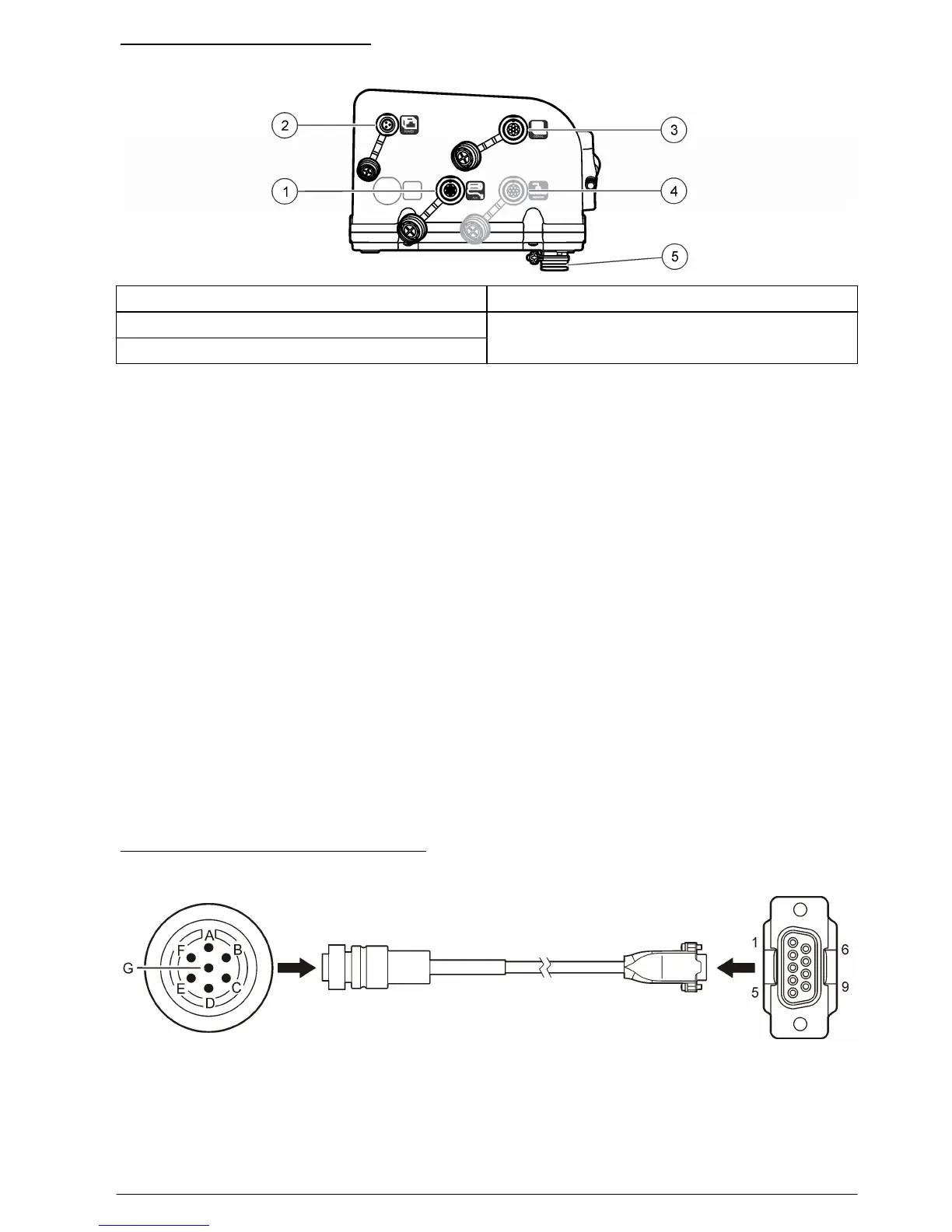
Figure 8 Controller connectors
1 Auxiliary device 4 SDI-12 device option
2 Power supply 5 Distributor/full bottle shut-off
3 Serial communications
Connect a flow meter
Connect a flow meter to the controller to start or stop the sampler when the sample flow goes above
or below a specified value.
Items to collect:
• Multi-purpose full cable for Sigma flow meters (or 980 half cable for the model 980 flow meter).
• Optional splitter for additional connections. Two or more splitters can be connected in series.
1. Connect one end of the cable to the flow meter. For the model 980 flow meter, refer to the model
980 flow meter user manual.
2. Connect the other end of the cable to the auxiliary device connector on the controller.
Note: If the flow meter has a 6-pin cable, use the 6-pin to 7-pin adapter cable.
Connect a PC or communications network
Connect a PC or a communications network to the controller to transfer data or to configure the
sampler.
Items to collect:
• Serial cable, 7-pin RS232 to DB-9 (refer to Figure 9). Connections: B to 5 (signal ground); D to
3 (RCD); F to 2 (TXD); G (ground).
1. Connect one end of the serial cable to the communications device or network.
2. Connect the other end of the cable to the serial communications connector on the controller.
Figure 9 Serial communications cable
English 13


 To Next Page