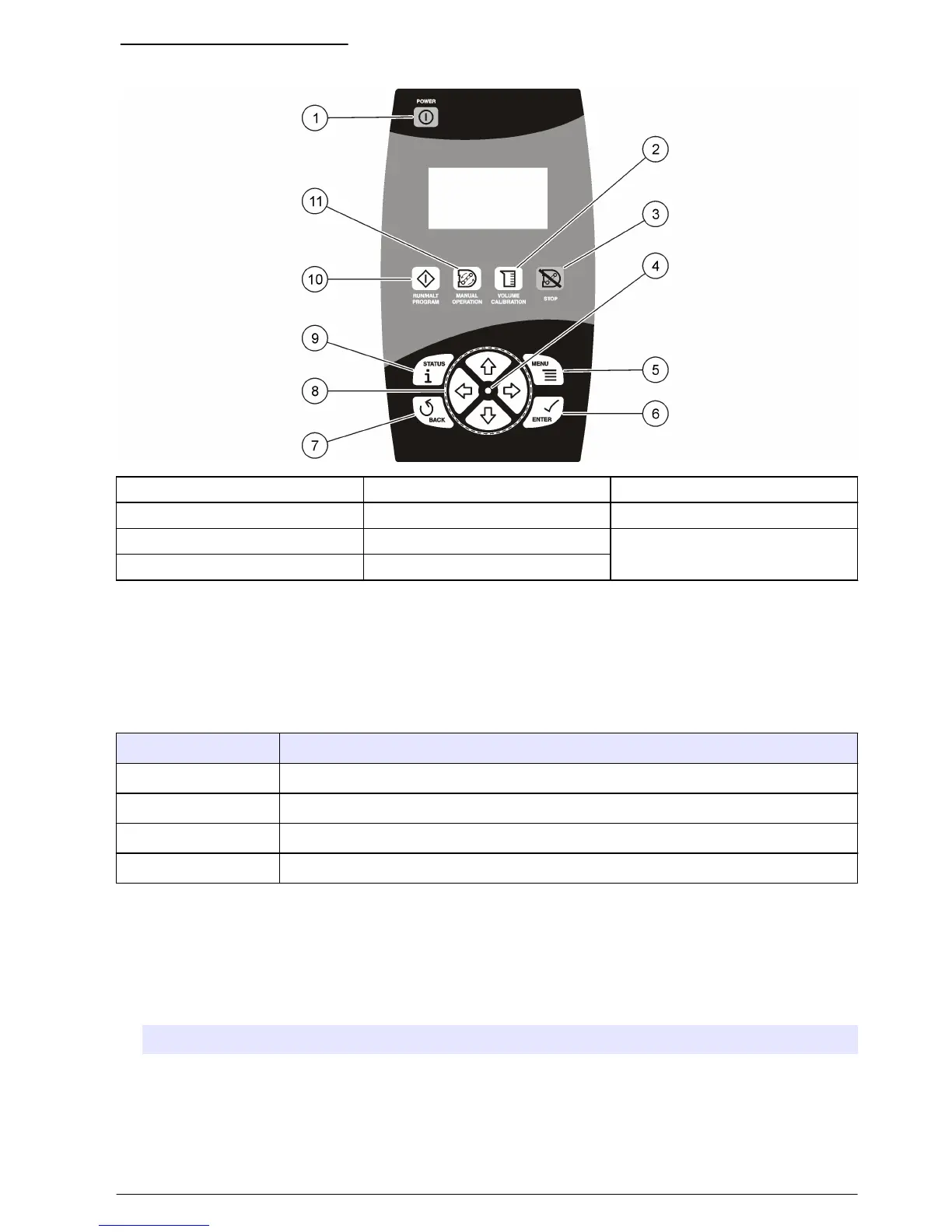
Figure 13 Controller keypad
1 POWER 5 MENU 9 STATUS
2 VOLUME CALIBRATION 6 ENTER 10 RUN/HALT PROGRAM
3 STOP 7 BACK 11 MANUAL OPERATION
4 LED 8 ARROW KEYS
Operation
Main menu overview
The main menu contains four options for sampler operation, monitoring or data management.
Table 1 Sampler menu overview
Menu option Description
Program setup Create, review or set up a sampling program
Status Display the status of the current program
Diagnostics Review and manage data or test the operation of components
System setup Change the controller settings or calibrate the liquid sensor
Configure the system settings
1. Push MENU.
2. Go to SYSTEM SETUP.
3. Change the applicable options.
Option Description
Time/date setup Set the time (24-hour format) and date.
Communication Select the baud rate (19200, 38400, 57600 or 115200) and protocol (Modbus RTU or
ASCII) for the serial port.
English 17


 To Next Page