Connect an SDI-12 device
N O T I C E
Measurement errors can occur due to electrical transients from sources such as lightning or large electrical
motors. These errors can cause unexpected sample acquisition or a missed sample when the controller is
programmed for setpoint sampling based on sonde measurements. Use a power line filter or connect the
controller to a different branch circuit to reduce the possibility of transients.
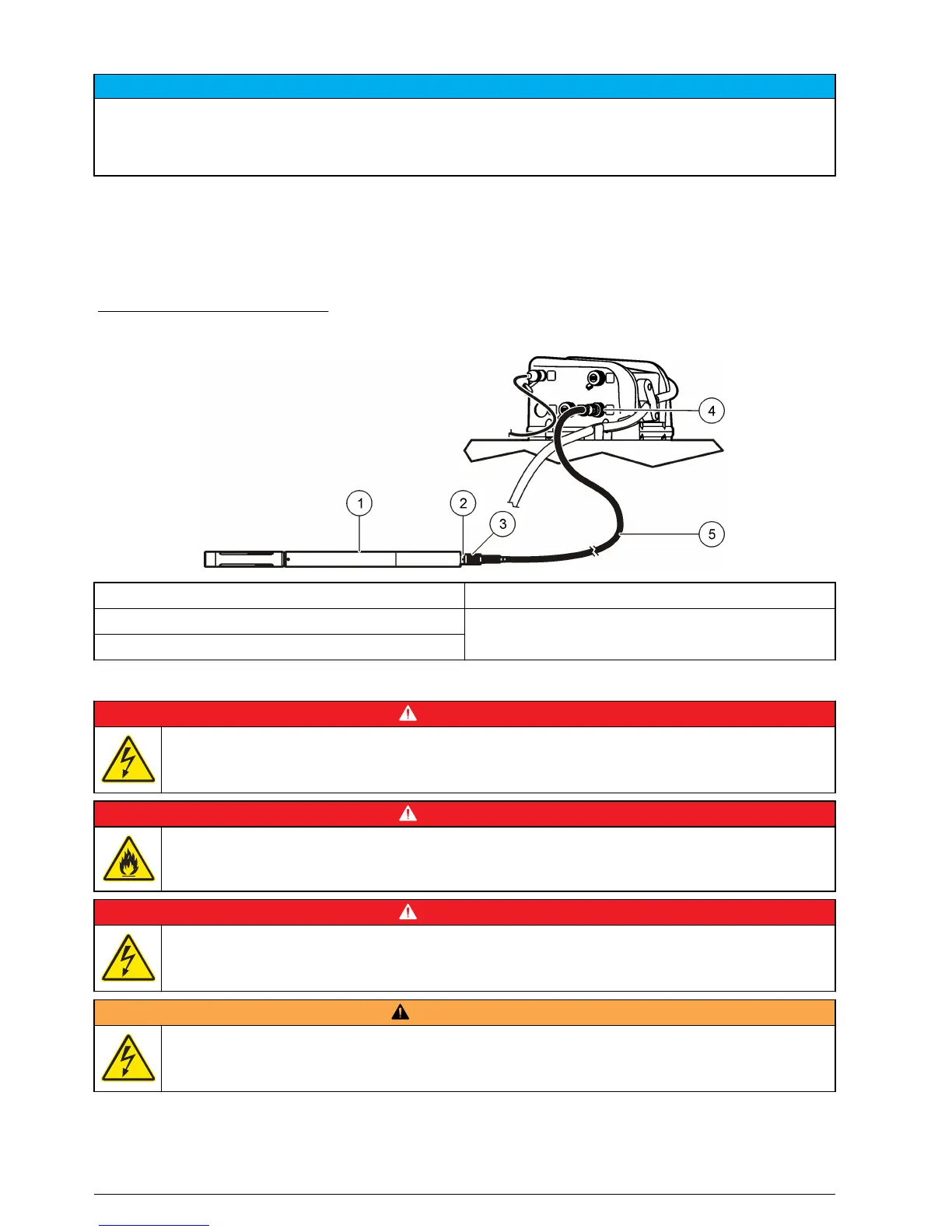
The controller supplies power to the SDI-12 device. Use the 15 m (50 ft) cable or the 30 m (100 ft)
cable to connect a sonde to the controller. Refer to Figure 10.
Note: A separate power supply for the sonde is necessary for data logging by the sonde.
The SDI-12 interface is enabled only when a connected device is found by the controller. The scan
for a sensor occurs automatically. The address that is assigned to the SDI-12 device is automatically
detected by the controller.
Figure 10 Sonde connection
1 Sonde 4 SDI-12 connector
2 Sonde bulkhead connector 5 15 or 30 m (50 or 100 ft) cable
3 6-pin cable connector
Connect the sampler to power
D A N G E R
Electrocution hazard. If this equipment is used outdoors or in potentially wet locations, a Ground Fault
Circuit Interrupt (GFCI/GFI) device must be used for connecting the equipment to its main power
source.
D A N G E R
Fire hazard. Install a 15 A circuit breaker in the power line. A circuit breaker can be the local power
disconnect, if located in close proximity to the equipment.
D A N G E R
Electrocution hazard. Protective Earth Ground (PE) connection is required.
W A R N I N G
Electrocution hazard. Make sure that there is easy access to the local power disconnect.
14 English


 To Next Page