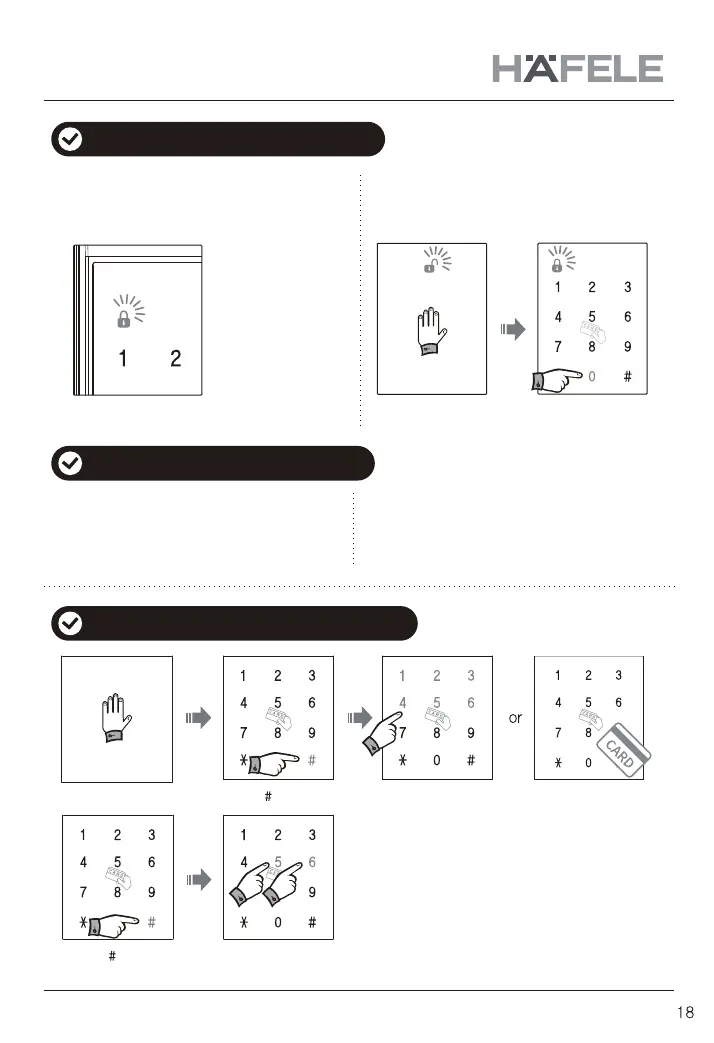
Input
secret code
(Ex : 123456)
or Touch the card key
5 : [Auto-locking] mode
6 : [Manual-locking] mode
Touch the front pad Press [ ]
Press [ ]
1. Lock the door at auto-locking mode 2. Lock door at manual-locking mode
2. In manual-locking mode
Close door and
touch the front pad
Press [ 0 ] button,
then door will be
locked
When the door is closed, it is locked automatically
with beeping sound.
At manual-locking mode, door is not locked
automatically even though the door is closed.
After closing door, press [Open/Close] button,
then door is locked with beep sound.
(Biririk~ )
When the door is closed, door is locked with
beep sound automatically
※ If the door is not
closed correctly,
warning sound
can be caused.
Please check and
confirm the door
closing status.
※ In Auto-locking mode, door will be locked
automatically after closing.
In Manual-locking mode, door will be locked
with pressing manual lock button after closing.
How to lock the door from outdoor
How to set auto/manual locking system
1. In auto-locking mode
How to lock the door from indoor


 To Next Page