Mortise Lock Exit Device
Installation Instructions
I-ED01553
Rev 4, Rev Date: 06/19/18 27390043 Page 3 of 10
1. CUT EXIT DEVICE TO LENGTH
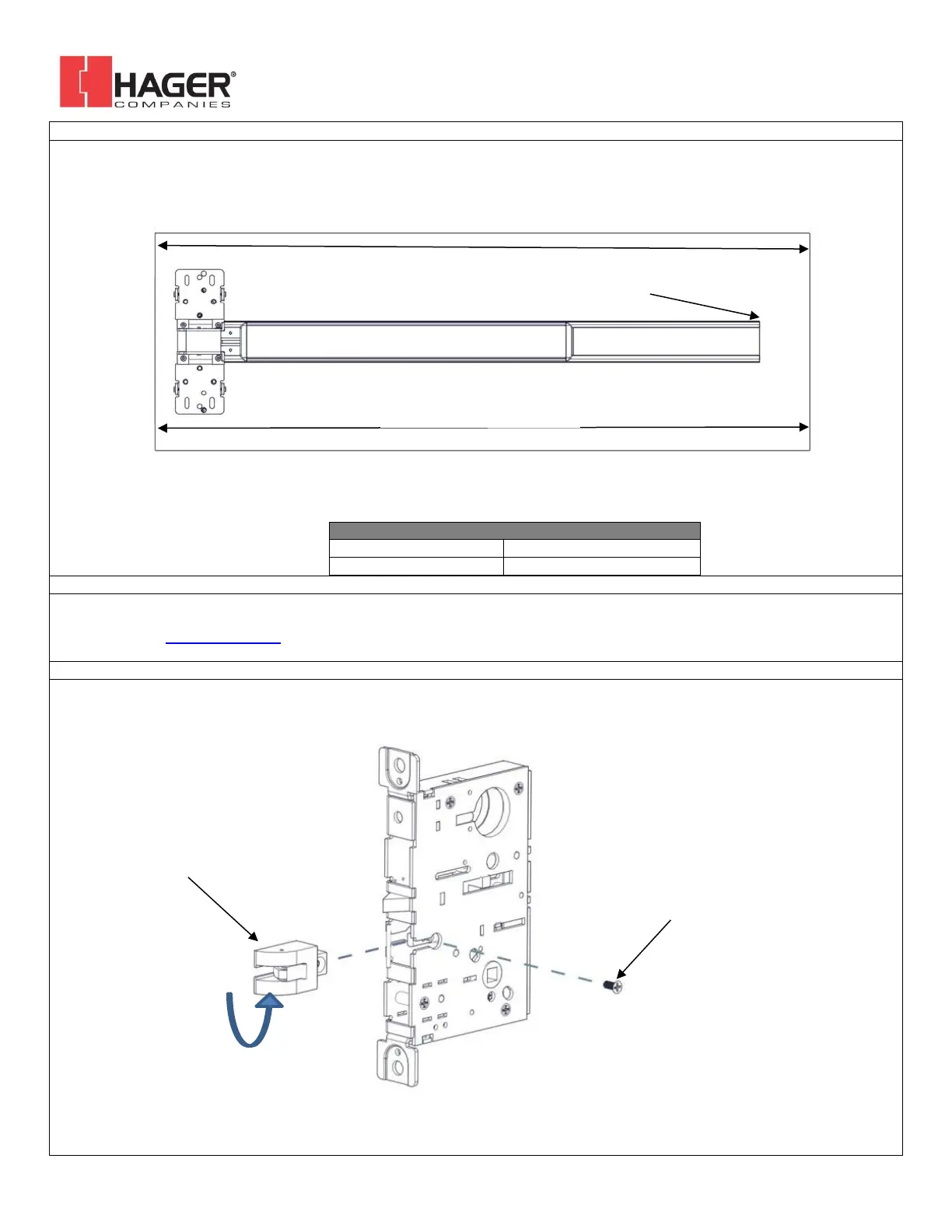
The exit device comes in two models, one sized for a 36” door width and one sized for a 48” door width. For other door widths, cut
the exit device to the appropriate length. Recommended overall length of the exit device is equal to the door width minus 4 inches.
Cut with a hack saw or metal cutting saw blade. Deburr edges.
DOOR WIDTH RANGE FOR EXIT DEVICES
The Hager Exit device is designed to fit a door and frame prepared for a Mortise Lock per ANSI/BHMA A156.115-2016. The holes and
cutouts specifically for the Hager Mortise Lock Exit Device are shown in the template T-ED01545 and in the Door Preparation Drawing
S-ED01546. See www.hagerco.com for additional information.
Lock supplied as Left Hand Reverse from factory. To change handing of the lock body, remove the latch retaining screw. Slide the
latch out of the lock, rotate the latch 180 degrees and slide it back into the lock. Reinstall latch retaining screw.



 To Next Page