MENU
CH+
CH-
VOL- VOL+
MENU
CH+
CH-
VOL- VOL+
Tuning(coutinued)
MFT
MFT(manual fine tune)
When you can't get a satisfactory picture and audio effect,
you can fine tune to obtain.
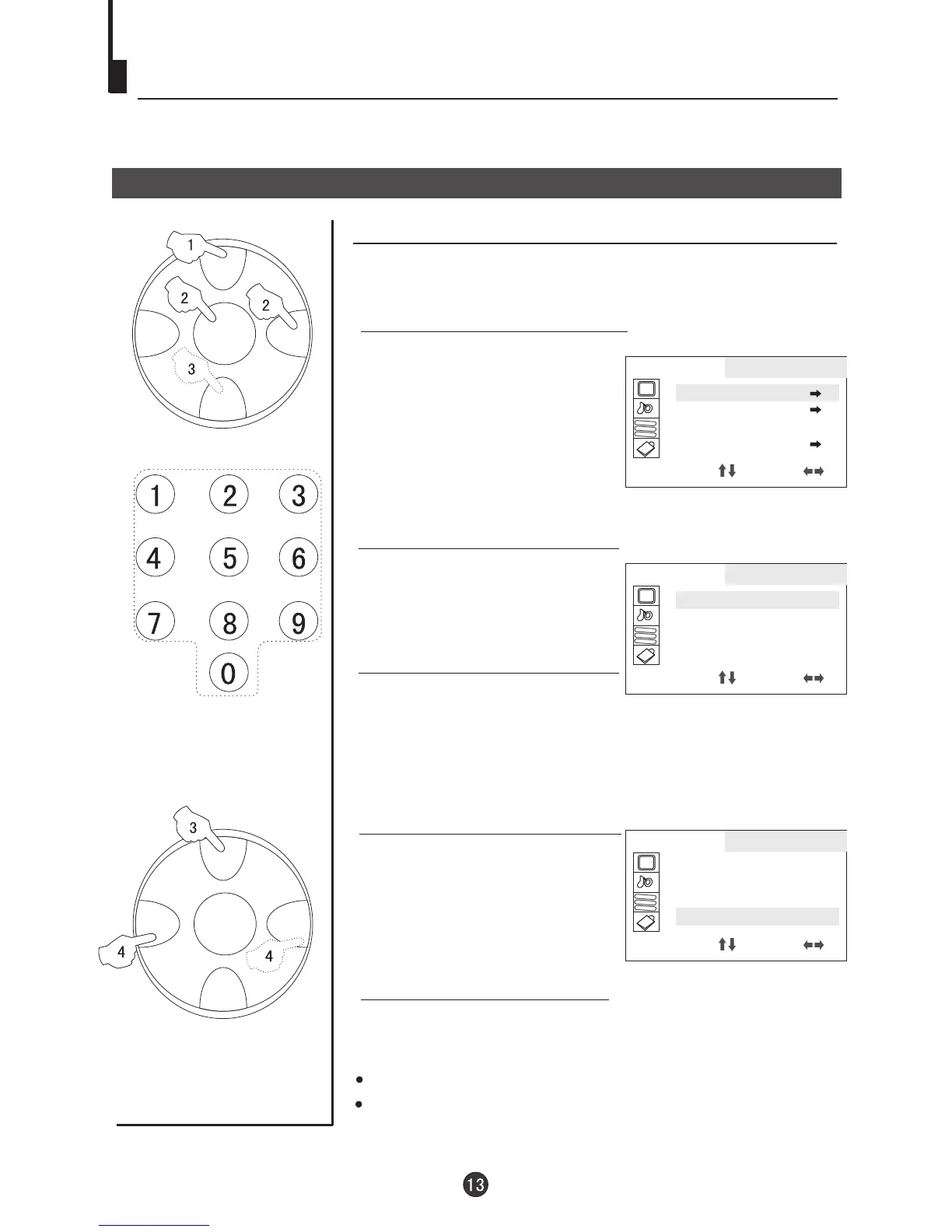
1. Press MENU button
continuously, until select
TUNING menu.
4. Press CH+/- button and move
the indicator to MFT.
4. Press VOL+/- button repeatedly to fine tune, until the
picture and the sound become satisfactory.
VOL- button is used to search the lower frquency channel.
VOL+ button is used to search the higher frequency channel.
Direct-digit Choosing
Button
2. Press CH+/- button to select
POS EDIT and VOL+ to enter.
AA
BB
CC
TUNING
POS EDIT
POS EX.
SEARCH UP
AUTO MEMORY
SELECT ADJUST
AA
BB
CC
TUNING
POSITION 1
BAND VL
SKIP ON
MFT UP
SELECT ADJUST
3. Press CH+/- button to select
POSITION and VOL+/- to select the channel
(Take channel 1 for example)
Note: the same way to adjust the BAND, and VL/VH/U will
appear alternatively..
AA
BB
CC
TUNING
POSITION 1
BAND VL
SKIP ON
MFT UP
SELECT ADJUST



 To Next Page