MENU
CH+
CH-
VOL- VOL+
Tuning(coutinued)
Skip
After the programs are presetted, you can skip some
programs so that to select your favorite channels only.
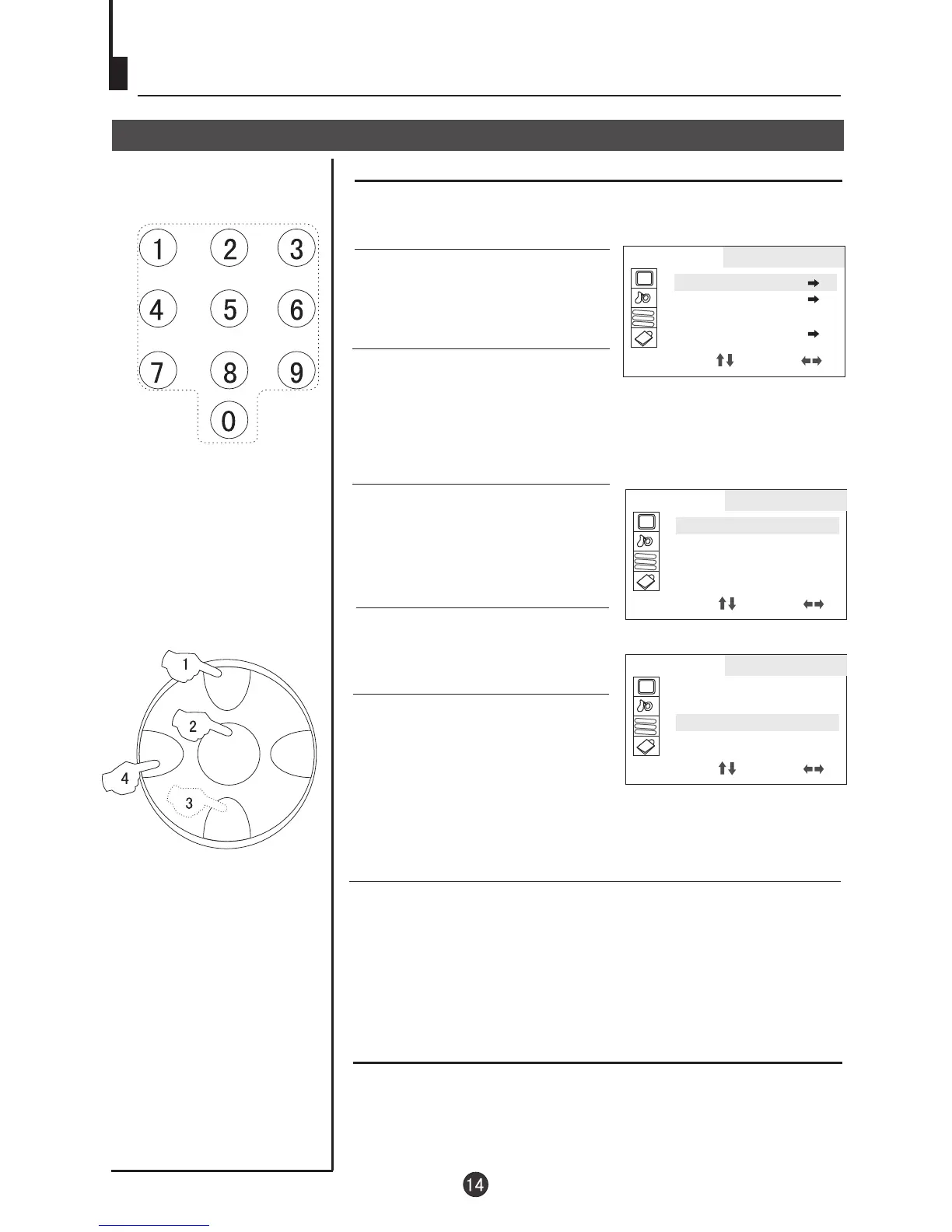
1. Press MENU button
continuously, until select
TUNING menu.
4. Press CH+/- button and move
the indicator to SKIP.
Skip
5. Press VOL+/- button to set it
ON.
5. Press MENU button to close the menu. When you select
channels with CH+/- button, this channel will be skipped.
However, you can also use the Direct-digit Choosing button on
the remote control to select this channel directly.
If you want to recover the skipped channel
1. Use Direct-digit Choosing button to select the number of the
channel to be recovered.
2. Do the above steps again.
3. Press VOL+/- button to set SKIP OFF.
Direct-digit Choosing
Button
2. Press CH+/- button to select
POS EDIT and VOL+ to enter.
3.Press CH+/- button to select
POSITION and VOL+/- to select
the channel(Take channel 1 for
example)
AA
BB
CC
TUNING
POS EDIT
POS EX.
SEARCH UP
AUTO MEMORY
SELECT ADJUST
AA
BB
CC
TUNING
POSITION 1
BAND VL
SKIP ON
MFT UP
SELECT ADJUST
AA
BB
CC
TUNING
POSITION 1
BAND VL
SKIP ON
MFT UP
SELECT ADJUST



 To Next Page