Fan
Manual Operation
Remote-controlled Operation
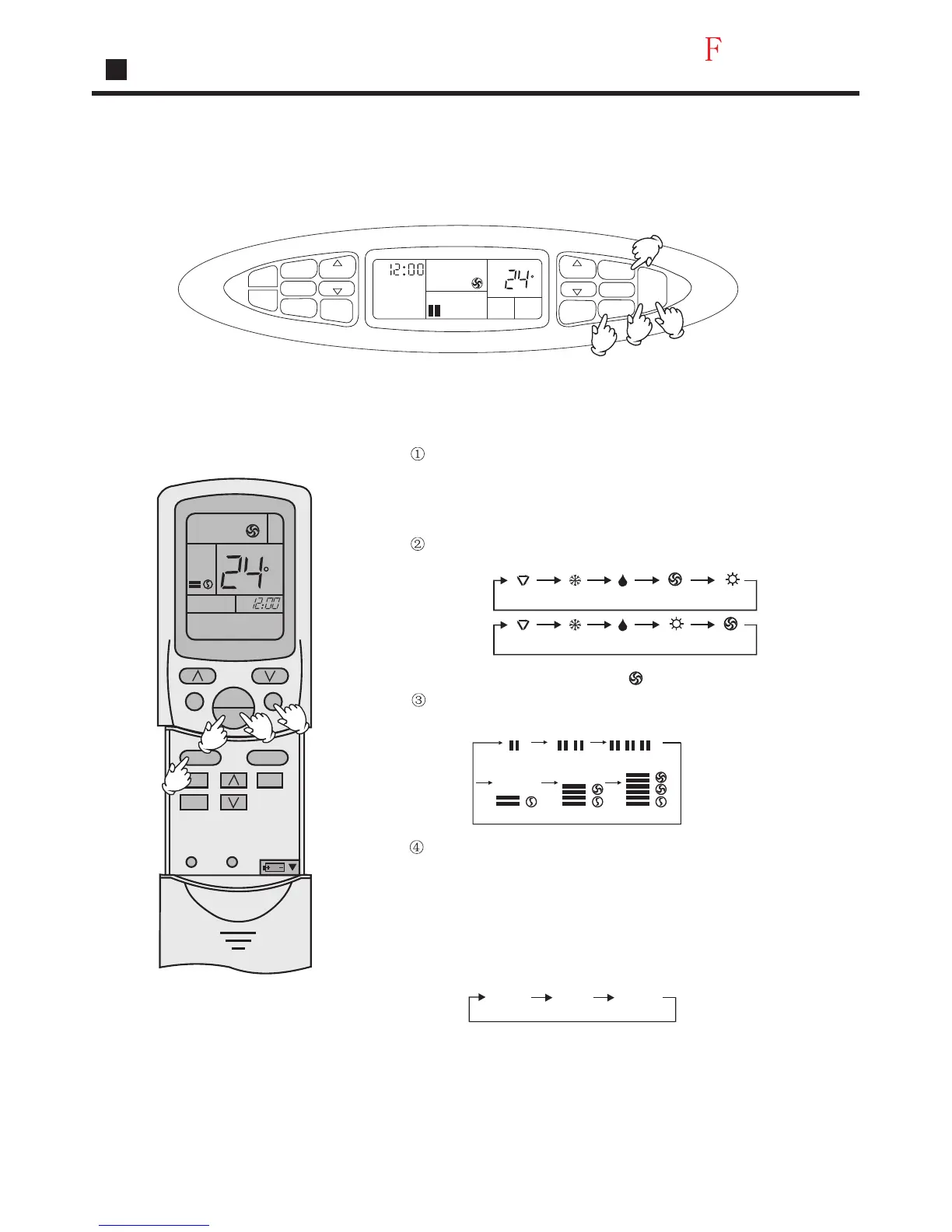
Press ON/OFF button
Unit starts running.
The previous status appears on the display
(except. TIMER, SLEEP and SWING mode)
Press MODE button. For each press, operation mode changes
as follows:
Press FAN button. For each press, fan speed changes as
follows:
Press ON/OFF button
Unit stops running, and when entering this mode for the
next time, it will show the previous setting.
Note:
In this mode , temp. can't be selected. temp . setting will not be
shown in LCD display. In Fan operation mode ."AUTO" fan speed
is not available. Operation cycles are as follows :
LOW MID HIGH
Select Fan operation shows" ", Fan operation starts
AM
TIMER
TIME
TEMP
TEMP
TIME
CLOCK
SET
SLEEP
SWING
FAN SPEED
MODE
ON
OFF
LOW
ROOM
TEMP
C
2
1
4
3
C
AM
TEMP
SWING
MODE
CLOCK
TIMER
SLEEP
SET
FAN
ON
OFF
RESETLOCK
1
3
4
2
Operation
23
AUTO
AUTO
Manual
Remote
controlled
COOL
COOL
DRY
DRY
FAN
HEAT
HEAT
FAN
Manual
LOW LOW MID HIGH
LOW MID
MID HIGH
LOW
Remote
controlled




 To Next Page