Control panel
EN
12
Notice
The “Delay function” can not be memorised.
9 - Time ± button
With this button the programme duration of pro-
gramme “Timer” can be selected.
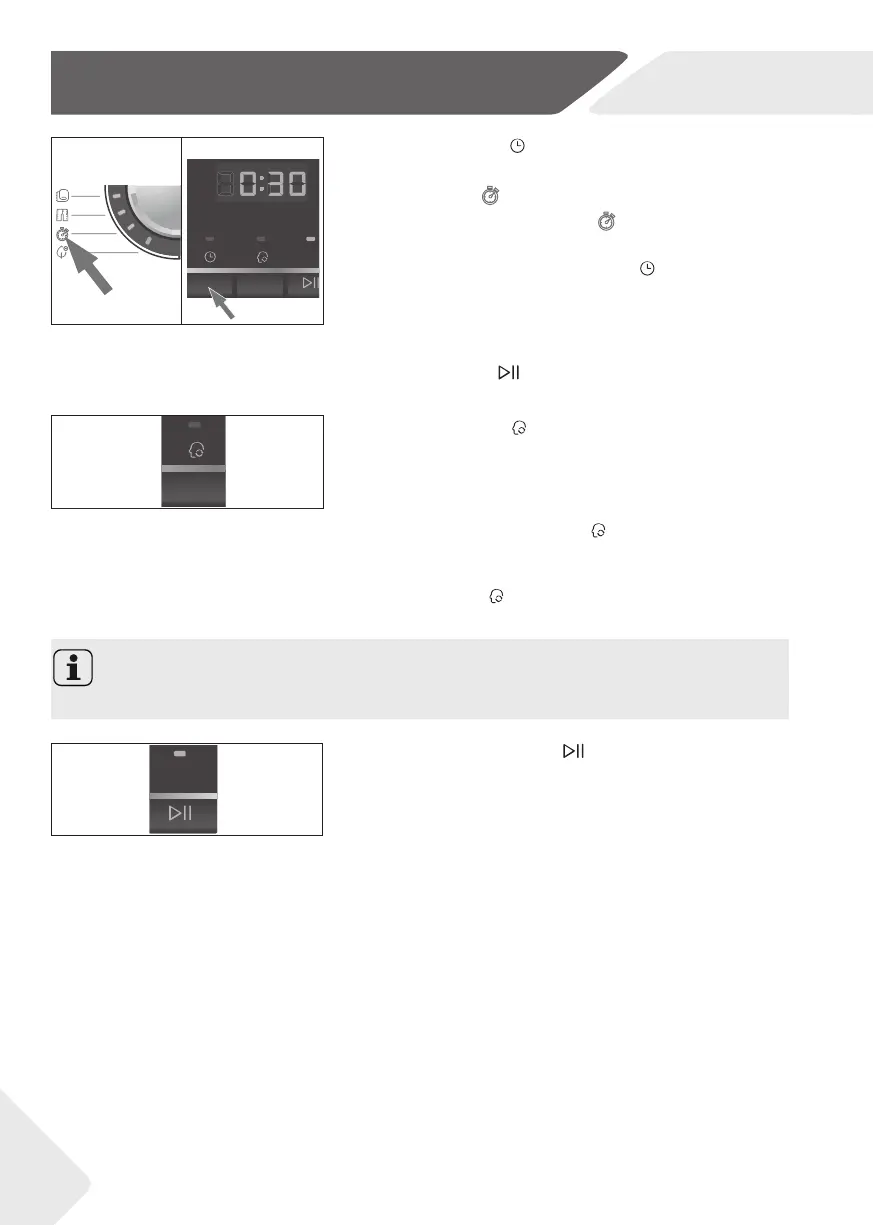
1. Set programme “Timer”
(fi g.12).The default
time is 30 min.
2. By pressing the “Time ±” button
(fi g.13) the time
can be increased or decreased with steps of 10
minutes. The shortest time is 10 min and the long-
est time is 02h:30 min. The indicator lights up.
3. Start the programme by pressing the „Start/
Pause“ button
.
12
13
10 - Memo button
A programme with all of its settings can be saved for
reuse by touching this button (fi g. 14).
1. Set the programme with all desired functions.
2. Press the button „Memo“
for 2 sec. The indica-
tor lights up.
When you want to use the stored cycle you just only
press the „Memo“
button. The indicator lights up and
the stored cycle is activated.
14
11- Start/Pause button
Press this button gently (fi g. 15) to start or interrupt
the currently displayed programme. During operation
its LED is shining, or if interrupted blinking.
15


 To Next Page