EN
Control panel
9
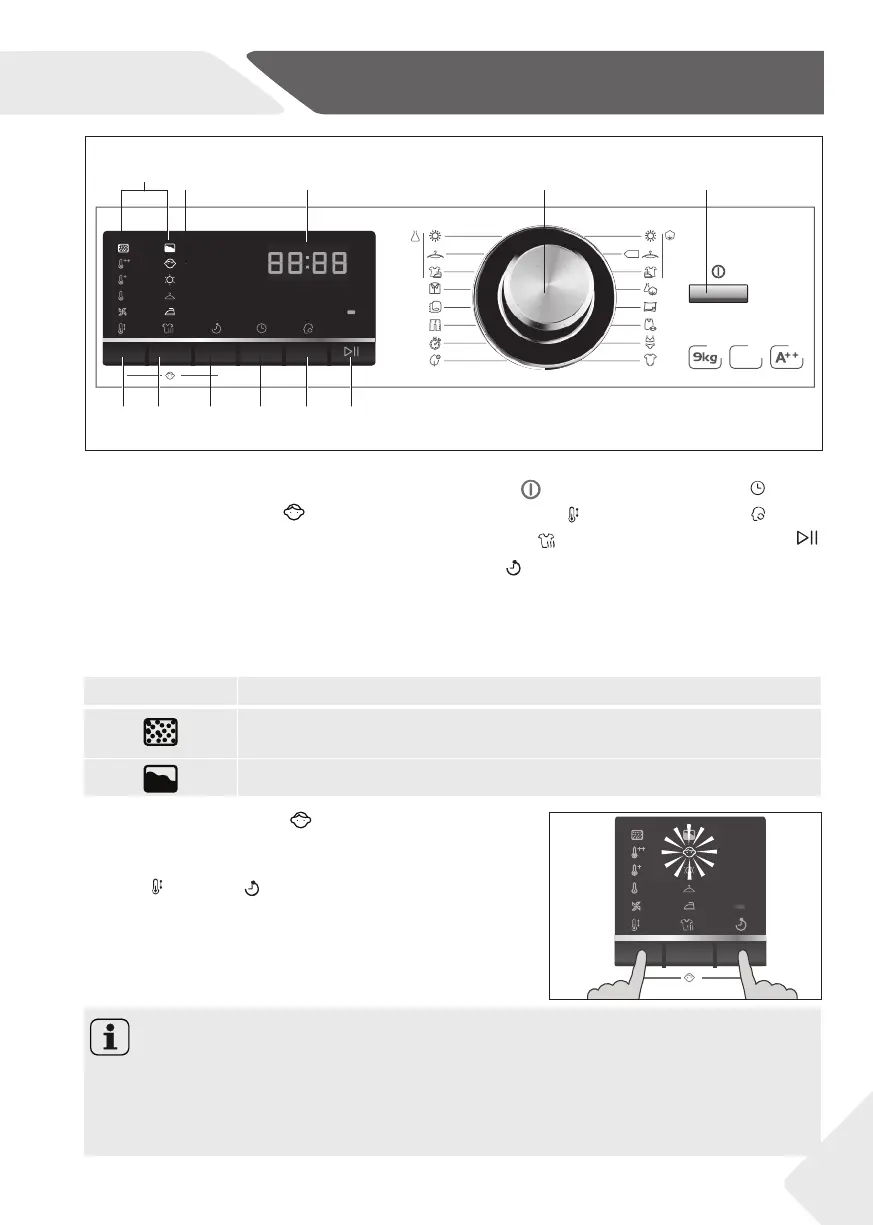
Fig.4: control panel
1-Maintenance indicators
The indicators light up in order to remind that the fi lter must be cleaned and the water
tank must be emptied (see CARE AND CLEANING).
Meaning of icons:
1 Maintenance indicators
2 Child-lock indicator
3 Display
4 Programme selector
5 On/Off button
6 Temperature button
7 Dry Level button
8 Delay button
9 Time ±button
10 Memo button
11 Start/Pause button
Heat
Pump
HD90-A636-E
Illuminated LED Meaning
Clean the lint fi lter in the fi lling opening and the condenser fi lter in
the base.
Empty the water tank or check it for correct positioning.
2-Child lock indicator
This option blocks all panel elements against activa-
tion. After starting a programme press simultaneously
“Temp“ +“Delay“ for about 3 seconds (fi g. 5); the
child lock indicator lights up. For unlocking please press
again the two buttons.
The icon fl ashes if a button will be pressed or the pro-
gramme selector will be twisted, when the child lock is
activated. The change is not running.
5
Notice
▶ When the cycle ends or the power supply is interrupted, the function will not be can-
celled automatically.
▶ We recommend to switch on this function if there are children in the household.
▶ The On/Off button can be activated during function child lock is selected.
1
6 7 8 9 10 11
2 3 4 5


 To Next Page