EN
Control panel
11
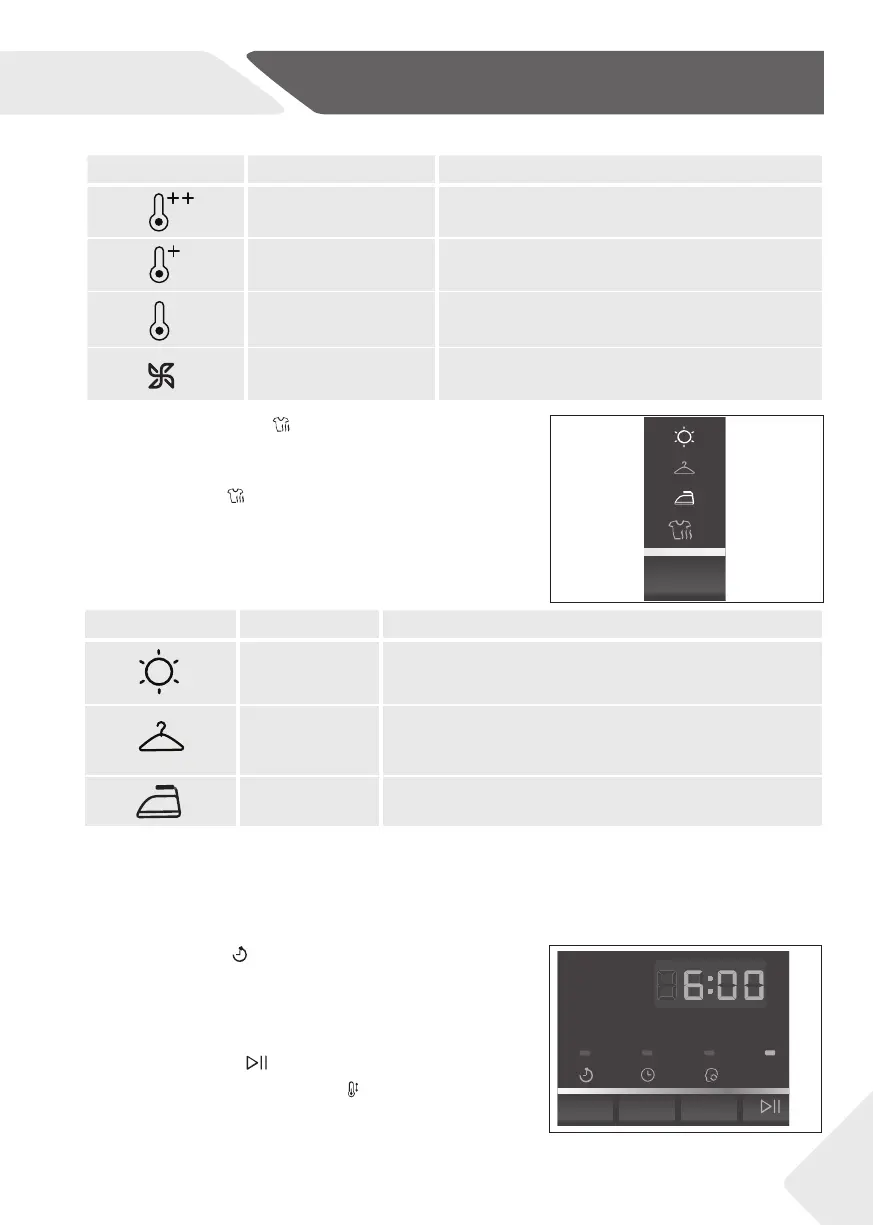
Illuminated LED Term Meaning
High temperature For heavy fabrics.
Middle temperature For normal fabrics.
Low temperature For easy-care fabrics.
Cool air For airing of dry, worn cloths.
Meaning of the symbols:
Illuminated LED Dry level Meaning
Extra dry
Dry level for thick or multi-layered textiles, which are
to be dried out.
Ready to Store
Dry level for linen, which should not be ironed, and
which you want to placed immediately into the cabi-
net (such as towels, non-iron synthetic fabrics etc.).
Ready to Iron
Light to medium weight fabric, which should be
ironed with the iron/ironing machine.
The selected dry level determines the residual moisture content of dried laundry. The
lower the desired residual moisture content, the longer the drying time.
The residual moisture content of dried laundry depends on several factors like e.g loading,
textile art, room temperature etc.
7-Dry Level button
With this button (fi g. 10), the desired dryness level can
be selected for some programs. Press sequentially the
Dry Level button until the desired symbol fl ashes on
the display.
10
Meaning of the symbols:
8-Delay button
Press this button (fi g. 11) to start the selected pro-
gramme with a delay. The delay could be increased in
steps of one hours from 1-19h. For example display of
: means start of programme cycle will be in 6 hours.
Press “Start/Pause” button to activate the time delay.
In conjunction with the “Temp.”
button, the child lock
function can be switch on/off (see CHILD LOCK INDI-
CATOR).
11


 To Next Page