EN
Daily use
19
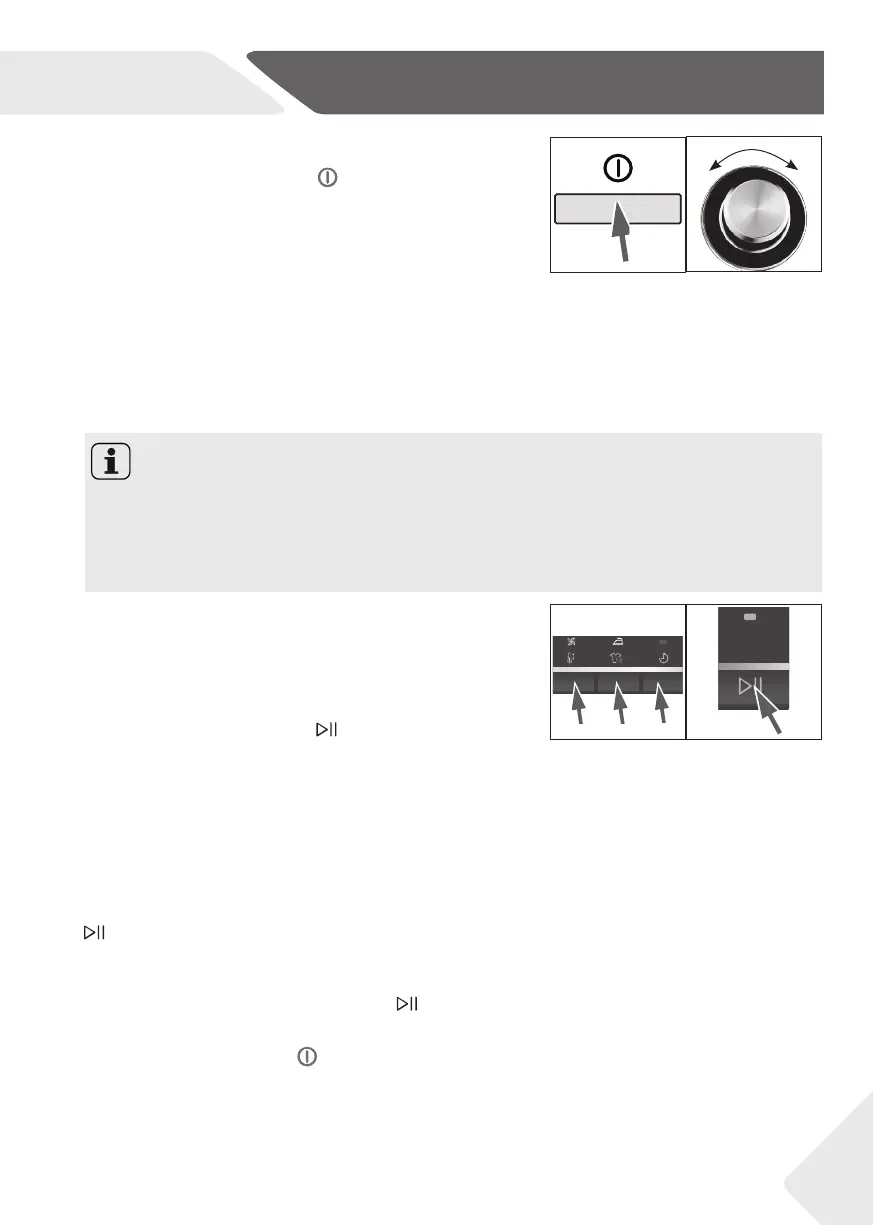
Switch on the appliance
Press the „on/off “- button to switch on the appli-
ance.(fi g.: 22).
22 23
Additional settings
Choose additional settings (fi g.: 24); see section
CONTROL PANEL.
Select a programme
To get the best drying results, select a programme
which fi ts the dry level and sort of laundry type.
Turn the programme knob to select the right pro-
gramme (fi g.: 23). The default settings light up in the
display. If there are options available, the option pro-
posed by the appliance will be displayed by a fl ashing
symbol. The display shows the time until the end of the
programme.
Start programme
Press “Start/Pause“ button to start (fi g.: 25).
The Appliance operates according to present set-
tings. Changes are only possible by cancelling the pro-
gramme.
After a few minutes the display will show to indi-
cate that AUTO load detection system is working (see
section SUGGESTIONS AN TIPS).
Interrupt/ change/ cancel a programme
To interrupt a running programme press “Start/Pause“
.
The LED of this button is fl ashing.
Changes or setting a new programme are now pos-
sible. Press the button “Start/Pause“
again to con-
tinue the programme with the new settings.
Hold the button „On/Off “
in order to cancel the pro-
gramme.
Notice
▶ After each switch-on, the appliance suggests the economical programme “Cotton-
Ready to Store“ for drying normal wet cotton laundry.
▶ The displayed remaining time is a default value, this time will be re-calculated depend-
ing on additional programme settings and the moisture content of the laundry. See
SUGGESTIONS AND TIPS.
2524


 To Next Page