EasyManua.ls Logo

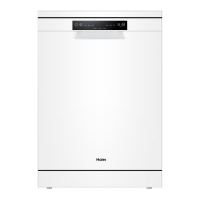
Haier HDW13V1 - User Manual

Haier HDW13V1
33 pages
Print Icon
To Next Page IconTo Next Page
Loading...
User Manual
Dishwasher
HDW13V1 Models
AA

Questions and Answers

  • J
    James MartinAug 15, 2025
    Why are the dishes not clean in my Haier HDW13V1 Dishwasher?
    • D
      Dr. Barbara Hughes MDAug 15, 2025
      If your dishes aren't coming out clean from your Haier Dishwasher, consider these potential causes: * Incorrect positioning of items in the baskets may prevent water from reaching all surfaces; ensure items are correctly placed. * Insufficient or no detergent in the dispenser; use the correct amount. * The selected programme may not be suitable for the load or food remnants. * Spray arms may be clogged or unable to turn freely. * Filters might be clogged or incorrectly assembled. * Too much rinse aid was released. * Too much detergent was added. * If using Multitab detergent tablets with a short programme, switch to a longer programme to ensure they fully dissolve.
  • L
    Lauren JonesAug 19, 2025
    Why are my dishes still wet after using my Haier Dishwasher?
    • W
      Wesley LevyAug 19, 2025
      If your dishes are still wet after a cycle in your Haier Dishwasher, it might be because the programme didn't include a drying phase or had a low-temperature drying phase. To help with drying, slightly open the dishwasher door (about 100 mm) and leave it ajar.
  • J
    Judith WarnerAug 22, 2025
    What does it mean when my Haier HDW13V1 is beeping and showing an alarm code?
    • J
      Jeffrey BrownAug 22, 2025
      If your Haier Dishwasher is beeping and displaying an alarm code, it could indicate that the filters are clogged or the drainage is blocked. If the filters are clogged, scoop out as much water as possible and continue the programme by pressing the START/PAUSE button. If the drainage is blocked, scoop out as much water as possible and ensure that the drain water-connection and piping are correct and not blocked. Then, continue the programme by pressing the START/PAUSE button. If the issue continues, it is recommended to contact customer care.
  • D
    Dylan HughesAug 26, 2025
    What to do if my Haier HDW13V1 Dishwasher programme does not start?
    • A
      Ashley AllenAug 26, 2025
      If the programme on your Haier Dishwasher doesn't start, there are several possible reasons. First, ensure the appliance door is fully closed. Check if the delay start function is activated and refer to the displayed time. Also, verify that the mains plug is correctly connected to the mains socket and the fuse in your house circuit is not damaged. If it is damaged, replace the fuse.
  • E
    Erik CurryAug 28, 2025
    What to do if my Haier HDW13V1 Dishwasher shows an alarm code?
    • S
      sandersstephanieAug 28, 2025
      If your Haier Dishwasher displays an alarm code, it could be due to several reasons: * The water tap might be closed; ensure it is open. * The water inlet hose may be kinked or bent; correct its position. * The aqua-stop system may be triggered (marker C is red), requiring hose replacement. * The filter in the water inlet hose could be clogged; clean it at both the tap and the rear of the appliance. * The water inlet might be clogged; check the water flow from the tap. * The water pressure may be too low; contact your local water authority.
  • J
    Justin JonesSep 1, 2025
    How to prevent dry water drop stains on glasses from my Haier Dishwasher?
    • B
      beckerkevinSep 1, 2025
      To prevent dry water drop stains on glasses and dishes from your Haier Dishwasher, the rinse aid dosage might be too low; try increasing the released quantity of rinse aid. Also, the quality of rinse aid or Multitab may be poor or too old, so consider changing the cleaning product.
  • T
    Timothy MckenzieSep 4, 2025
    What to do if the anti-flood device is on in my Haier HDW13V1 Dishwasher?
    • M
      Mr. Brian MathewsSep 4, 2025
      If the anti-flood device is activated on your Haier Dishwasher and the display shows an alarm code, it suggests there are water leakages in the appliance. Close the water tap and disconnect the appliance from the power supply if the water inlet valve is open and blocked. For drainage issues, contact Service.
  • C
    Cindy StewartSep 7, 2025
    Why are the dishes wet and matte after washing in my Haier HDW13V1?
    • B
      Benjamin MillsSep 7, 2025
      If dishes are wet and matte after washing in your Haier Dishwasher, the rinse aid dispenser may be empty; refill it and reset the rinse aid indicator. Alternatively, the quality of rinse aid or Multitab may be poor or too old, so consider changing the cleaning product.
  • G
    gwendolyn33Sep 12, 2025
    Why is the Rinse Aid Indicator lit on my Haier Dishwasher?
    • A
      Angel BrownSep 12, 2025
      The Rinse Aid Indicator is lit on your Haier Dishwasher because the rinse aid dispenser is empty. Refill the rinse aid until it is full.

Summary

Safety Information

Pre-Operation Safety Checks

Essential steps before first use to ensure safe operation and proper installation.

Dishwasher Programmes

Initial Setup and Settings

First-Time Use Steps

Guides through essential procedures before operating the dishwasher for the first time.

Operating Your Dishwasher

Starting and Managing Wash Cycles

How to start, pause, interrupt, and restart a wash programme.

Maintenance and Care

Troubleshooting Common Issues

Appliance Fails to Start or Stops

Solutions for common problems like door not closed or power connection issues.

Error Codes and Water Issues

Explains error codes (A10, A20, F30) related to water filling and draining.

Improving Washing Performance

Addresses issues like unclean dishes, streaks, and residue due to loading or settings.

Installation Guide

Appliance Placement Options

Instructions for free-standing and under-worktop installation types.

Connecting Water and Drainage

Detailed steps for connecting the fresh water inlet and drain water hoses.

Customer Support

Haier HDW13V1 Specifications

General IconGeneral
Appliance placementFreestanding
Delayed start timerYes
Child LockYes
Number of place settings13
Washing programsEco, Glass, Intensive, Normal
Delay start (max)24 hours

Related product manuals