Operation
Haier LCD HDTV EN-18
rated programs, some material may not be suitable for
children.
14+: In these type of rated programs, some content may
not be suitable for viewers under the age of 14.Parents
are strongly cautioned not to have their children view
14+ rated programs by pre-teens and early teens.
18+: Adults Only-these types of rated programs are only
for adult viewers only.
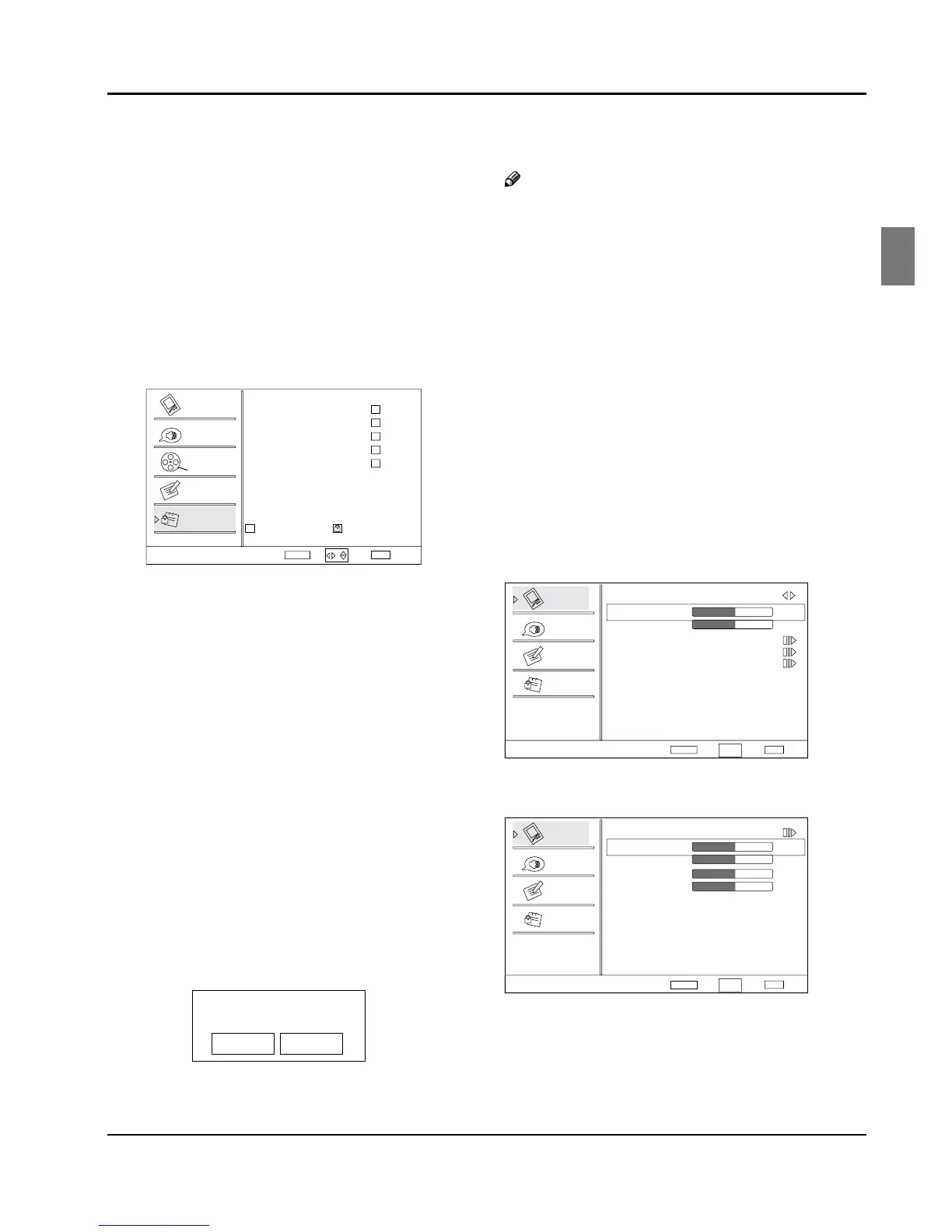
CA Fren Rating •
Press VOL+/ ENTER button to enter submenu as
follows.
Press CH+/- button to select the item you want to
lock. Then press ENTER button to conrm to lock
and press again to resume it.
Allowed RatingBlockedRating
CA Fren Rating
Select
Back
EXIT
Video
Audio
Channel
Lock
Function
Set
G
8 ans+
13
16
18
ans+
ans+
ans+
ENTER
/
Canadian French Rating Chart
G: These types of rated programs are generally suitable
for all audiences.
8 ans+: Children 8 years and above (French)
13 ans+: 13 years old and above(French)
16 ans+: 16 years old and above(French)
18 ans+: Adults Only-these types of rated programs are
only for adult viewers only.
Blocked Unrated •
Press CH+/- button to select On or O. Used to lock all
the channel not rated.
Password:
Change password Y : Press VOL+/ ENTER button to
enter the submenu, press digits button to input
the number of 0-9 twice in the New Password
and Conrm Password. Then you can change
the password when you input the same number
twice.
Clean All Y : Press VOL+/ ENTER button to enter the
submenu:
Ar e yo usur e?
OK Can cel
Press VOL+/- button to select OK or Cancel then OK to
conrm. If OK, the parameter will return to the factory
set.
Note
If there is any lock mark on the top of the set such R
as channel lock, parental lock and so on, you
can press OK to resume it .( Press OK to display
password menu and input your password.)
PC menu
Press A MENU button and CH+/- button to select
Video menu in PC mode.
Press
B VOL+/ ENTER button to enter the Video menu
and CH+/- button to go up and down to select the
desired option .
Press
C VOL+/ ENTER button to conrm and VOL+/-
button to increase and decrease the level to adjust
the selected option to your preference .
Repeat step 2 and step 3 until desired quality has
D
been achieved.
Video
Audio
Lock
Function
Video
Mode Custom
Brightness
Contrast
Color Temperature
Advanced Video
PC
50
50
Select
BackAdjust
EXITENTER
CH+/-
VOL+/-
PC Y : Press CH+/- button to select and VOL+/
ENTER button to conrm, the PC menu as below:
ENTER
Video
Audio
Lock
Function
PC
Auto Adjust
HPosition
VPosition
Phase
Clock
50
50
Select
BackAdjust
EXIT
50
50
CH+/-
VOL+/-
Aut • o Adjust: Press CH+/- button and then
press VOL+ button to adjust that automatically
adjusts the available options for the best viewing
conguration.
H Position: • Press CH+/- button and then press



 To Next Page