Introduction
Haier LCD HDTV EN-4
Introduction
Controls
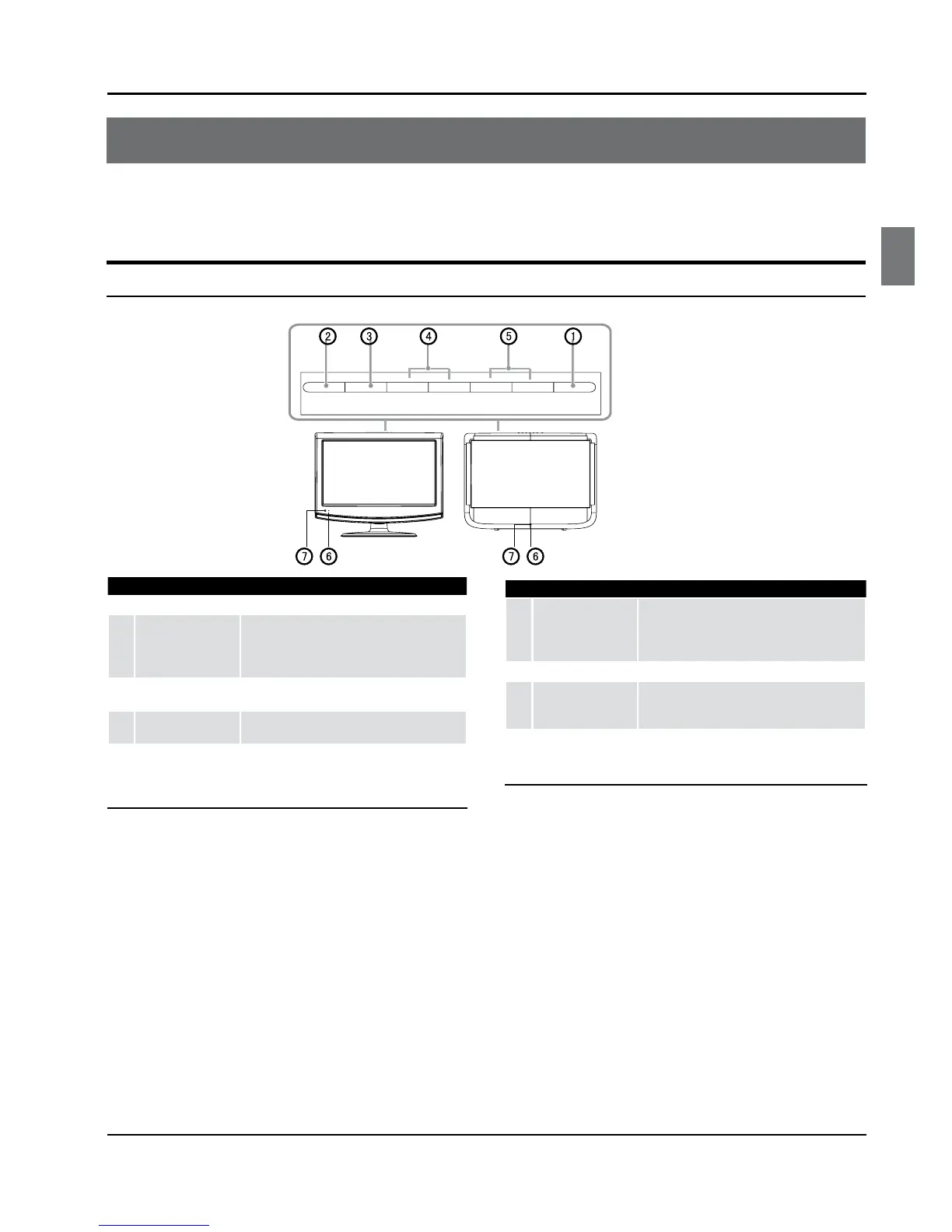
This is a simplied representation of the TV front panel, side panel control buttons and side inputs.
TV Side panel controls and connections
1
POWER Press to turn on and o the TV.
2
INPUT
Press to access the input source mode. Press
repeatedly to change the source to the one
you want to watch. In the MENU screen, the
INPUT button serves as the ENTER button.
3
MENU
Menu display. Press to access the on-screen
menu display.
4
VOL +/-
Press to adjust the volume. In the MENU screen,
these buttons serve as left/right buttons.
5
CH+/-
Press to scan through channels. To scan
quickly through channels, press and hold
down either+/-. In the MENU screen these
buttons serve as up/down buttons.
6
Power indicator
7
Remote Sensor
Receivers IR signals from the remote control.
Do not put anything near the sensor, which
may block the remote control signal.



 To Next Page