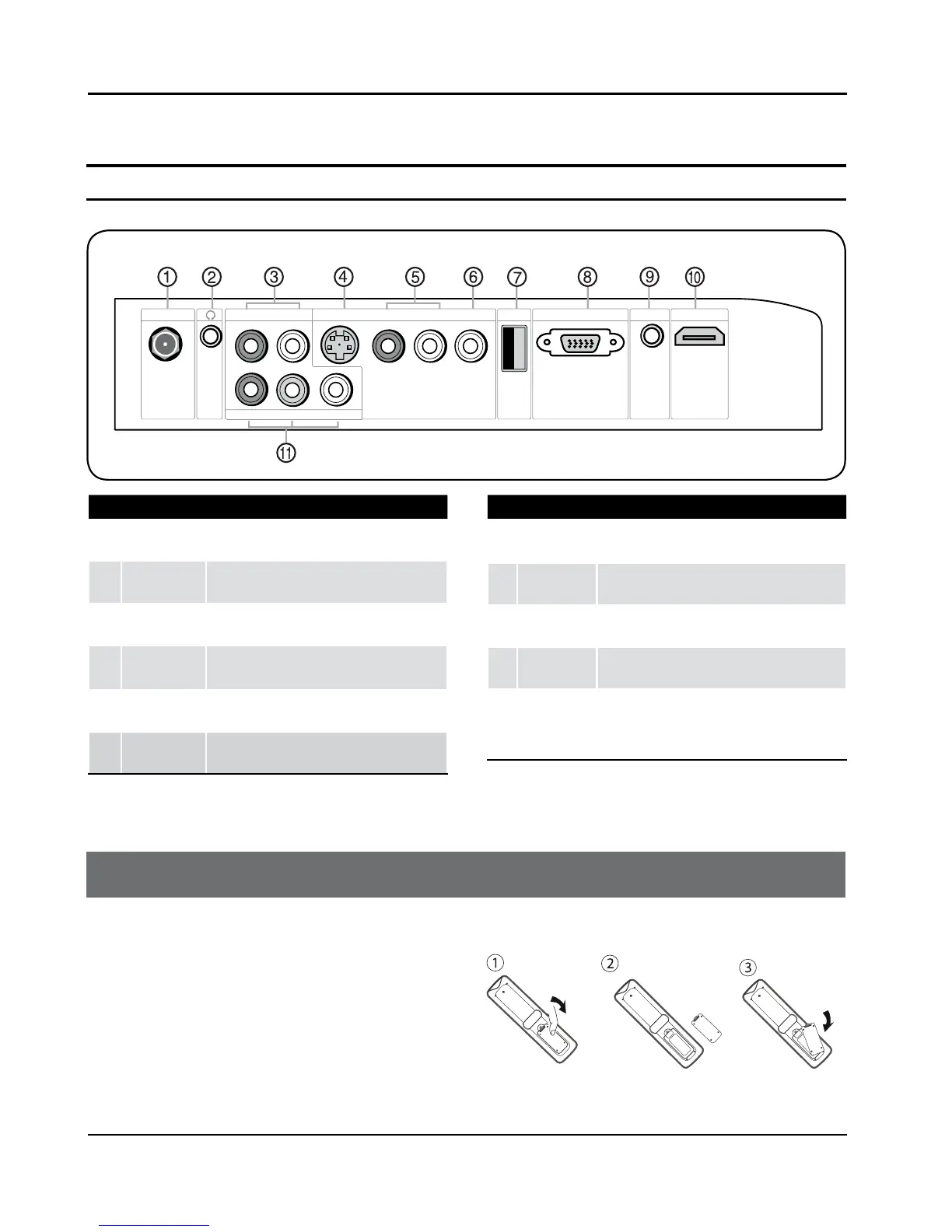
1
Antenna
Input
Connect cable or antenna signals to the TV,
either directly or through your cable box.
2
Headphone
jack
Headphone audio output terminal.
3
AUDIO In
Connect the audio L/R cables from the video
signal source to these jacks.
4
S-VIDEO In
Connect the S-Video cable from an external
signal source to this jacks.
5
AUDIO In
Connect the audio L/R cables from the video
signal source to these jacks.
6
VIDEO In
Connect the video signal from a video device to
this jack.
7
USB input
Connect a USB ash drive to view MPEG2 videos,
JPEG images or listen to MP3 songs.
8
PC Video In
Connect a video cable from a computer to this
jack.
9
PC Audio In
Connect the audio L/R cables from a computer to
this jack.
0
HDMI In
Connect a HDMI device to receive digital audio and
uncompressed digital video.
A
Component
Input
Connect a component video device to these jacks.
Remote Control
Battery loading
1. Slide open the cover of the battery compartment on
the back of the remote controller.
2. Load two (AAA) alkaline batteries in the compartment,
(plus and minus poles to respective mark)
3. Replace the cover of the battery compartment.



 To Next Page