Order No. TL1001S001V0
Issue
Service Manual
Rev.
9
4-4.Usage of operation buttons
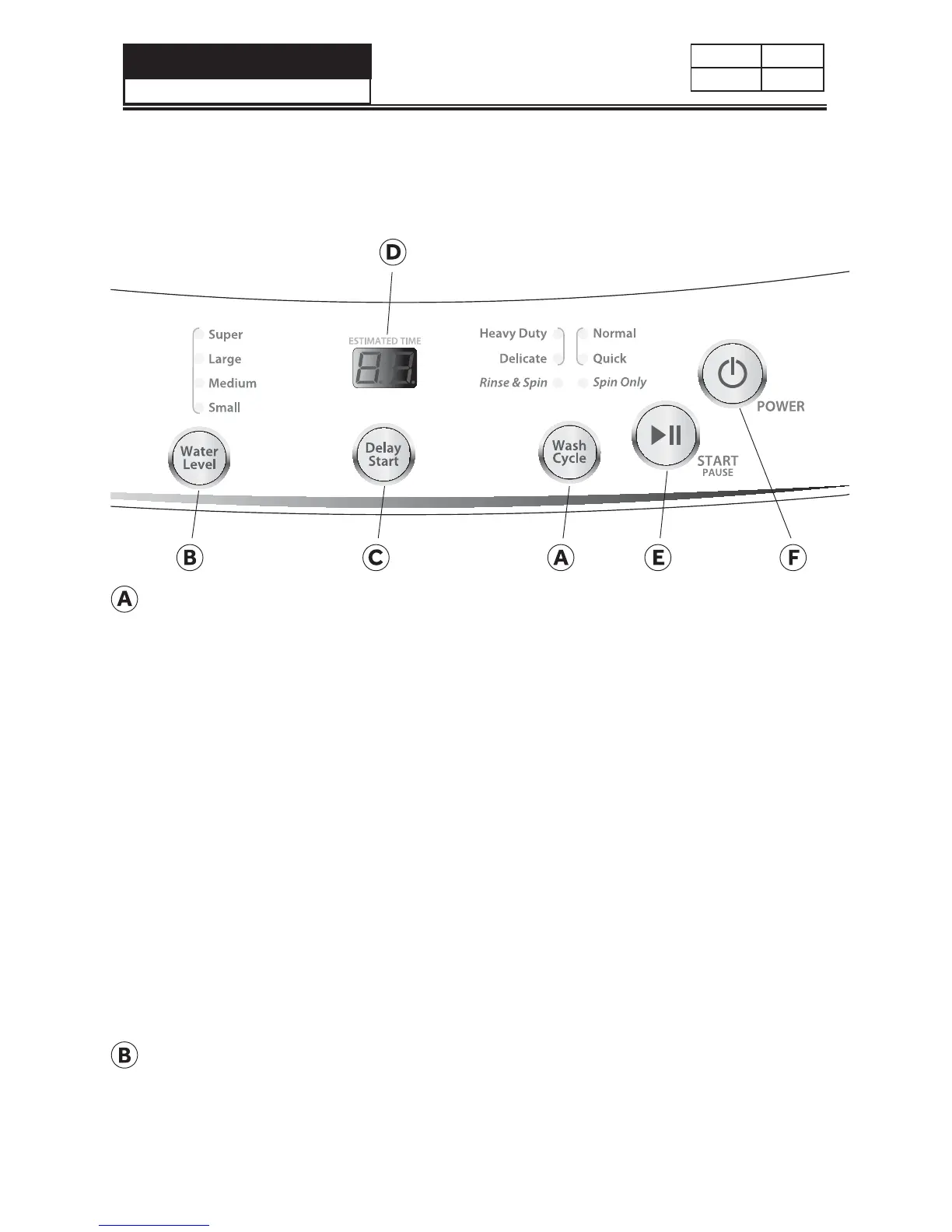
WASH CYCLE BUTTON
Ţ
Use this button to select the desired cycle for your wash load.
Ţ
The standard default settings of each cycle will be displayed; the default
settings can be changed by using the Setting button - Water Level.
Ţ
There are 6 cycles to choose from:
Heavy Duty - Use this cycle for heavily soiled durable garments. This cycle
can also be used for towels, sports gear, children’s clothes, etc.
Normal - Use this cycle for normally soiled cottons and mixed fabric loads.
Delicate - Use this cycle to wash lightly soiled garments and delicate clothes
that need gentle washing.
Quick - Use this cycle to wash small, lightly soiled loads that are needed in a
hurry.
Rinse & Spin - Use this cycle for removing excess detergent and refreshing
clean garments.
Spin Only - Use this cycle to extract water from sink washed or clean wet
garments.
SETTING BUTTON
Water Level Button
Ţ
Use this button to select an appropriate water level for your load. Small is
the lowest water level and Super is the highest.


 To Next Page
 Loading...