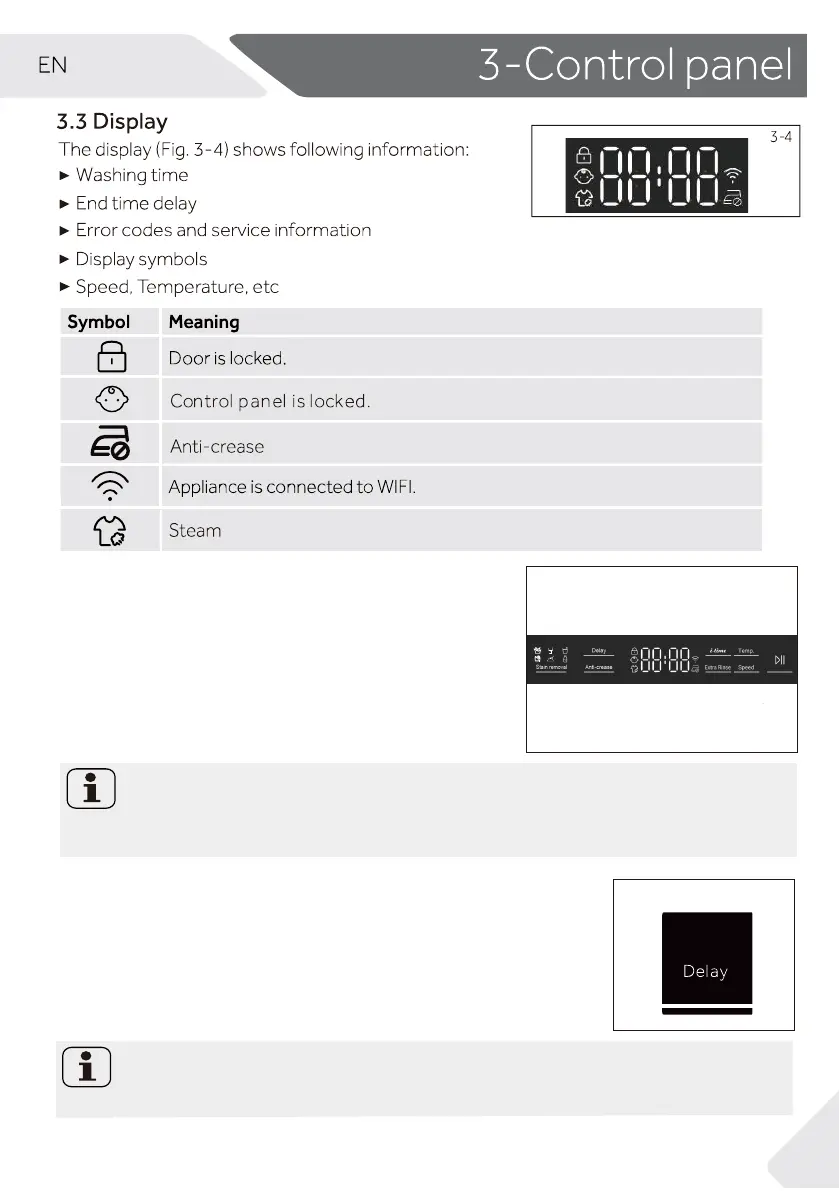
9
3.4 Function buttons
po lanoitidda elbane )5-3 .giF(snottub noitcnuf ehT
-
tions in the selected programme before the program-
me starts. The related indicators are displayed.
%\VZLWFKLQJRƩWKHDSSOLDQFHRUVHWWLQJXSDQHZSUR
gramme, all options are disabled.
If a button has multiple options, the desired option can
be selected by pressing the button sequentially.
3.4.1-Function button “ Delay“
Note: Factory settings
7RJHWWKHEHVWUHVXOWVLQHDFKSURJUDPPH+DLHUKDVZHOOGHƪQHGVSHFLƪFGHIDXOW
settings. If there is no special requirement, default settings are recommended.
Note: Liquid detergent
If using liquid detergent, it is not recommended to activate the end time delay.
3-5
3-6
Press
amme
rgorp eht trats ot)7-3 .giF(nottub siht
with a delay.
means end of programme
24h(End time will longer than original programme time),For exam-
cycle will be in 6 ho-
and 30
min
utes.
Press “Start/Pause” button to activate
me delay. It is not applicable to programme Spin,
the ti-
Refresh.
End time delay could be increased in steps of 30 minutes from 0.5-
ple display 6:30
urs
0




 To Next Page