6
l
Control card and
changing the tempera-
ture setting
PleaserefertotheHAKKOFM-203or
FM-206Instructionmanual.
l
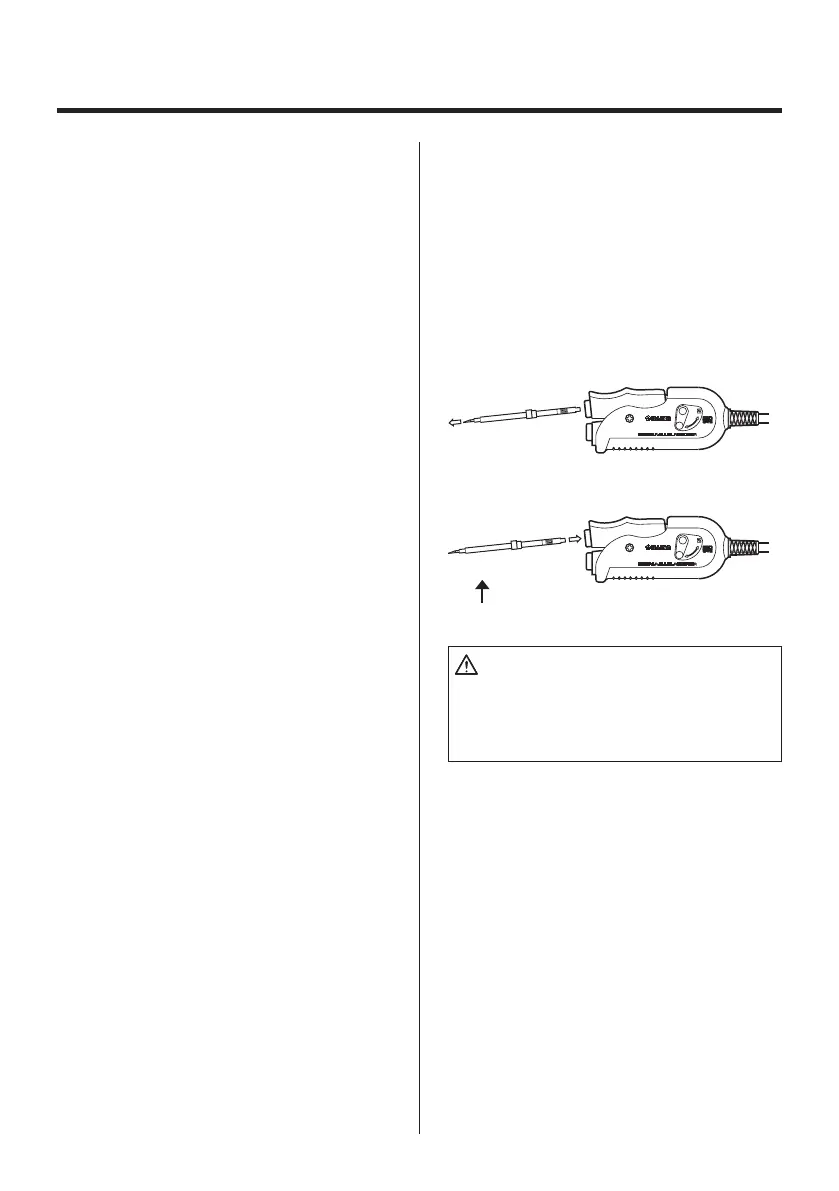
Replacing the tip
Removingandinsertingthetip:
Removingthetip:
Holdthehandleandpullthetipoutofthe
handpiecewiththeheatresistantpad.
Insertingthetip:
Beforeinsertingthetip;InserttheTipID
numberkeyintotheprocessgateuntilthe
buzzersoundsonce.
Hold head part and insert the tip into the
handpiece.Pushuntilthetipstops.
Hold this part to insert into the handpiece.
24V-140W
FM-2023
Hold the handpiece at the front to remove tip.
24V-140W
FM-2023
CAUTION:
ThetipcanbeveryHOT.Usetheheatresis-
tantpadforhandlinghottips,butdonothold
thehot portionof thetip,even withthepad,
forlongerthannecessary.



 To Next Page