EasyManua.ls Logo

Hamilton Beach HBH850 - User Manual

Hamilton Beach HBH850
156 pages
Print Icon
To Next Page IconTo Next Page
Loading...
www.commercial.hamiltonbeach.com
840173001
01/10
www.commercial.hamiltonbeach.com
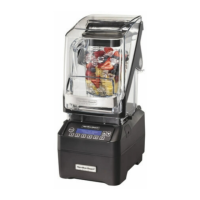
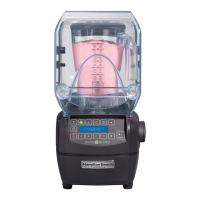
Summit Series Bar Blender
Operation Manual (2)
Mélangeur de bar série Summit
Manuel d’utilisation (10)
Mezcladora para bar Summit
Manual de operación (18)
Liquidificador Série Summit
Manual do Utilizador (26)
Frullatore per bar Summit
Manuale per il funzionamento (34)
Standmixer der Summit Serie
Bedienungsanleitung (42)
Summit Serie Barmixer
Gebruiksaanwijzing (50)
Summit Series Bar–blender
Betjeningsvejledning (58)
Summit-serien barblandare
Bruksanvisning (66)
Serie Summit Hurtigmikser
Brukerhåndbok (74)
Liquidificador Série Summit
Manual de Instrucções (106)
(114)
(122)
(130)
ES
PT
GB
FR
NL
DK
IT
DE
GR
RU
SE
NO
KR
SA
CN
JP
TU
BR
(82)
(90)
(98)
(138)
Summit
Summit
Summit
Summit
Summit
Summit
Summit

Questions and Answers

  • D
    Danielle HendersonAug 2, 2025
    What to do if my Hamilton Beach HBH850 fails to start and the display is blank?
    • K
      Kenneth RoachAug 2, 2025
      If your Hamilton Beach Blender fails to start, stops running, and the display is blank, here are a few things to check: * Ensure the main power ON (I)/OFF (O) button is set to ON (I). * Verify the unit is securely plugged into a working electrical outlet with the correct voltage and frequency. * Check if the fuse for the outlet has blown or if the circuit breaker has tripped. * Inspect the integrated circuit breaker on the left side of the blender base. If it repeatedly trips, contact Technical Services. * The blender has motor overload protection. If it overheats and stops, unplug it, let it cool for 15 minutes, and then plug it back in to resume.
  • Q
    qwebsterAug 10, 2025
    How to fix a Hamilton Beach HBH850 Blender that won't mix ingredients properly?
    • J
      Jared LarsonAug 10, 2025
      If ingredients are not mixing properly in your Hamilton Beach Blender, consider the following: 1. Ensure enough liquid is added; the mixture should be fluid. 2. Reduce the size of solid pieces. 3. Do not overfill the container past the highest marking. 4. Inspect the cutter assembly for damage or dullness; replace it if needed. 5. Verify the cutter assembly is correctly installed. 6. Select an appropriate speed for a fluid blend.
  • A
    Amy RichardsonAug 17, 2025
    What to do if my Hamilton Beach HBH850 won't start and a message appears on the display?
    • L
      Laura LloydAug 18, 2025
      If your Hamilton Beach Blender fails to start or stops while running and a message appears on the display, ensure that the jar is properly seated on the blender base. The blender will not operate unless the jar is correctly positioned.
  • J
    John HoltAug 25, 2025
    What to do if Hamilton Beach Blender doesn't respond to buttons or shows an error?
    • R
      Robert SheltonAug 26, 2025
      If your Hamilton Beach Blender doesn't respond to button commands or shows an error message, try turning the power off and then back on using the power switch. This will reset the controls. If the error message persists after restarting, the unit requires servicing.

Summary

IMPORTANT SAFETY INSTRUCTIONS

Safety Alert Symbols

Electrical Shock Hazard

Warning about potential electrical shock risks and safety precautions.

Cut Hazard

Warning about blade sharpness and necessary precautions to avoid cuts.

Burn Hazard

Cautionary advice when blending hot contents to prevent burns.

Sanitizing

Technical Services

Proper Disposal of Electrical Waste

Parts and Features

Loading Custom Programs via USB Port

Instructions for uploading custom programs using the USB port.

Properly Installing the Quiet Shield

Control Panel Overview

Blending Modes and Speed Selection

Explains AUTOBLEND, JUMP, LOW/HIGH, and PULSE functions for optimal blending.

Cycle Operation and Saving

How to start, stop, save, and recall favorite blending cycles.

Display and Navigation Controls

Information on understanding the display and using navigation buttons.

Power Switch

Details on the main power ON/OFF switch location and function.

Using the Controls

Selecting and Adjusting Blending Cycles

Step-by-step guide to using AUTOBLEND, JUMP, HIGH/LOW, and PULSE modes.

Saving and Recalling Favorite Cycles

Instructions for storing and accessing personalized blending settings.

Cycle Control and Diagnostics

How to stop cycles and access diagnostic information via the MORE button.

Special Control Functions

Customer Service and Cooldown Cycle

Accessing service contact details and initiating a motor cooldown cycle.

Managing Preset Cycles

How to select, edit, or check stored custom cycle settings.

Resetting to Factory Defaults

Procedure to reset all settings except cycle counts to factory presets.

Cycle Counts Management

Viewing Cycle History

How to display cycle counts for warranty, weekly, monthly, or daily periods.

Clearing Cycle Counts

Steps to reset cycle counts for specific periods or all stored cycles.

Troubleshooting Guide

Unit Fails to Start or Stops

Solutions for common problems related to the blender not starting or stopping.

Error Messages or Unresponsive Controls

Troubleshooting steps for display errors or unresponsive control panel buttons.

Mixing Problems

Guidance on how to resolve issues with ingredients not mixing properly.

Hamilton Beach HBH850 Specifications

General IconGeneral
BrandHamilton Beach
ModelHBH850
TypeCommercial Blender
Jar MaterialPolycarbonate
ColorBlack
Capacity64 oz (2 L)
ProgramsNo

Related product manuals