*#1
Owner’s Manual
28
SYSTEM CONFIGURATION
e System Con guration sets various options which inside of the
M-solo.
OPERATING PROCEDURE
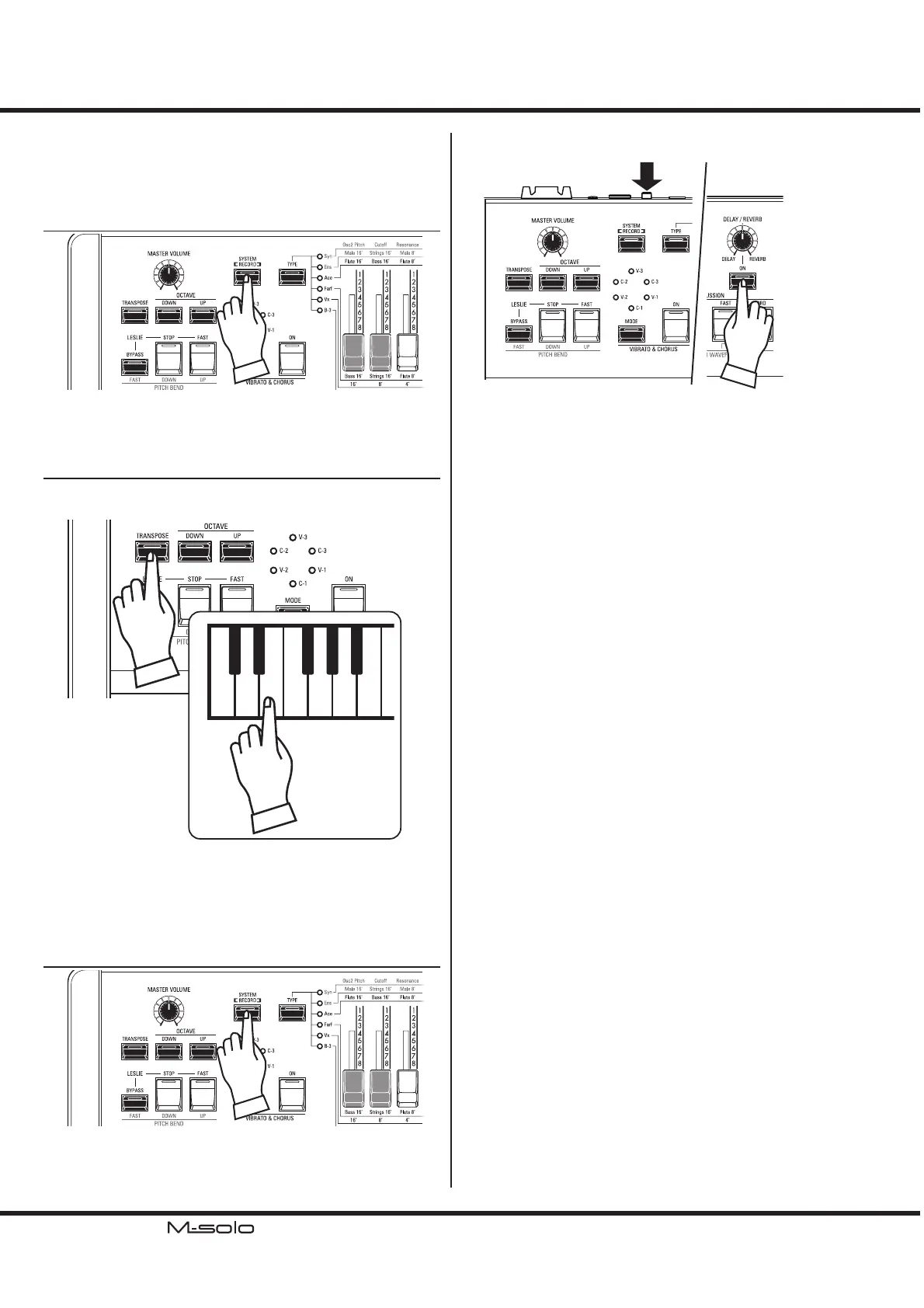
① ENTER THE SYSTEM CONFIGURATION
Press the [SYSTEM/RECORD] button to “ON.” Some LEDs
on the top panel blinks and this instrument entered the System
Con guration mode.
② EDIT THE PARAMETERS
Press a button which corresponding the Parameter to change.
e LED on the button changes from blink to “ON.”
1
2
3
4
5
6
0
1
2
3
4
5
6
e current Value is shown on the LEDs of the VIBRATO &
CHORUS MODE. Above left gure shows correspondence
between LEDs and value.
Press a key of the keyboard to change the Value. Above right
gure shows correspondence between key and Value.
③ RETURN TO THE PLAY MODE
Press again the [SYSTEM/RECORD] button to “OFF.” e
Values are recorded with ashing LED for a second, and this
instrument will returns to PLAY mode.
RESET TO THE FACTORY SETTING
To reset all the System Parameters and Patches, turn “ON” the
[POWER] button with Pressing and Holding the REVERB
[ON] button.
e reset procedure is nished if LED on the REVERB [ON]
button ashes for a second.


 To Next Page