*#1
Owner’s Manual
30
MIDI/USB
WHAT IS “MIDI”?
MIDI
“MIDI” (Musical Instrument Digital Interface) is the musical
instrument industry standard for exchanging performance
information between electronic musical instruments as well as
sequencers, e ects, lighting and sound reinforcement gear, etc.
e MIDI standard allows instruments made by di erent man-
ufacturers to communicate with each other.
Many types of data can be transmitted and received, includ-
ing performance information, Parameter settings, and global
commands.
USB
USB (Universal Serial Bus) is an industry standard for connec-
tion, communication and interfacing between computers, pe-
ripherals and other electronic devices. e M-solo implements
Type “B” connector, which is for connect to the host computer.
WHAT MIDI/USB CAN DO ON THE
M-solo
e MIDI implementation of the M-solo allows you to record/
playback performances to an external sequencer or computer.
e USB MIDI of the M-solo compliant with USB Audio
Class 1.0.
INSTRUMENT TYPES AND NOTE
MESSAGE
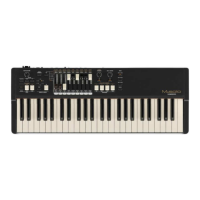
is instrument uses Virtual Multi Contact system, it has a
relation between playing keyboard and MIDI note message
which shown below;
TW ..................... The sounding begins gradually when the key is pressed at
shallow point, fully sounding and sending MIDI note mes-
sage at deep point of the pressing. The keyboard velocity
a ects how long all the Virtual Multi Contacts are turned
ON or OFF.
Vx, Farf, Ace
............................ It sounds at shallow point of the key pressing, the MIDI
note message is sent by deep point of the pressing. The
keyboard velocity does not a ect to the sound.
Ens, Syn
............................ It sounds and sends MIDI note message at deep point of
the key pressing. The keyboard velocity does not a ect to
the sound.
MIDI IMPLEMENTATION
CHANNEL VOICE MESSAGES
Note Off
Status 2nd Byte 3rd Byte
8nH kkH vvH, or
9nH kkH 00H
n=MIDI Channel Number: ..... 0H - 5H (Ch. 1 - 6)
kk=Note Number: .................... 00H - 7FH (0 - 127)
vv=Velocity(disregard): ............. 00H - 7FH (0 - 127)
Note On
Status 2nd Byte 3rd Byte
9nH kkH vvH
n=MIDI Channel Number: ..... 0H - 5H (Ch. 1 - 6)
kk=Note Number: .................... 00H - 7FH (0 - 127)
vv=Velocity: ............................. 00H - 7FH (0 - 127)
Control Change
Expression (CC#11)
Status 2nd Byte 3rd Byte
BnH 0BH vvH
n=MIDI Channel Number: ..... 0H - 5H (Ch. 1 - 6)
vv=Expression: ......................... 00H - 7FH (0 - 127)
Leslie Fast (CC#92)
Status 2nd Byte 3rd Byte
BnH 5CH vvH
n=MIDI Channel Number: ..... 0H - 5H (Ch. 1 - 6)
vv=Control Value: .................... 00H - 7FH (0 - 127)
0 - 63=Off, 64 - 127=On
Oscillator Waveform (CC#68 44H)
Value: ....................................... 01, 02, 04, 08H (1, 2, 4, 8)
01: Triangle, 02: Sawtooth, 04: Square, 08:Pulse
Octave (CC#70 46H)
Value: ....................................... 3FH - 41H (-1 - +1)
Transpose (CC#71 47H)
Value: ....................................... 3AH - 46H (-6 - +6)
Instrument Type (CC#72 48H)
Value: ....................................... 00H - 05H (0 - 5)
00: TW, 01: Vx, 02: Farf, 03: Ace, 04: Ens, 05: Syn
Percussion Switch (CC#73 49H)
Value: ....................................... 00H - 7FH (0 - 127)
0 - 63=Off, 64 - 127=On
Percussion Volume (CC#74 4AH)
Value: ....................................... 00H - 7FH (0 - 127)
0 - 63=Normal, 64 - 127=Soft
Percussion Decay (CC#75 4BH)
Value: ....................................... 00H - 7FH (0 - 127)
0 - 63=Slow, 64 - 127=Fast
Percussion Harmonic (CC#76 4CH)
Value: ....................................... 00H - 7FH (0 - 127)
0 - 63=Second, 64 - 127=Third
Vibrato & Chorus Switch (CC#77 4DH)
Value: ....................................... 00H - 7FH (0 - 127)
0 - 63=Off, 64 - 127=On
Vibrato & Chorus Mode (CC#78 4EH)
Value: ....................................... 00H - 05H (0 - 5)
00: V-1, 01: C-1, 02: V-2, 03: C-2, 04: V-3, 05: C-3
Leslie Bypass (CC#79 4FH)
Value: ....................................... 00H - 7FH (0 - 127)
0 - 63=Effect, 64 - 127=Bypass
Leslie Stop (CC#80 50H)
Value: ....................................... 00H - 7FH (0 - 127)
0 - 63=Slow, 64 - 127=Stop
USB AUDIO CLASS
The M-solo is compliant with USB AUDIO Class
1, the generic device driver which comes pre-
installed on both Windows or Mac OS. This
means you can use the USB TO HOST Port to
connect the M-solo to a computer and transmit
and receive a MIDI data stream without an
exclusive device driver.


 To Next Page