Training Workbook: HAPPY HCD-1501 Operation and Maintenance
Education Department
Chapter 2: Machine Setup & Orientation
6
Machine Setup
Control Panel 2
Design Transfer
• Sewing Controls
Understand the functions
of these key sewing
controls.
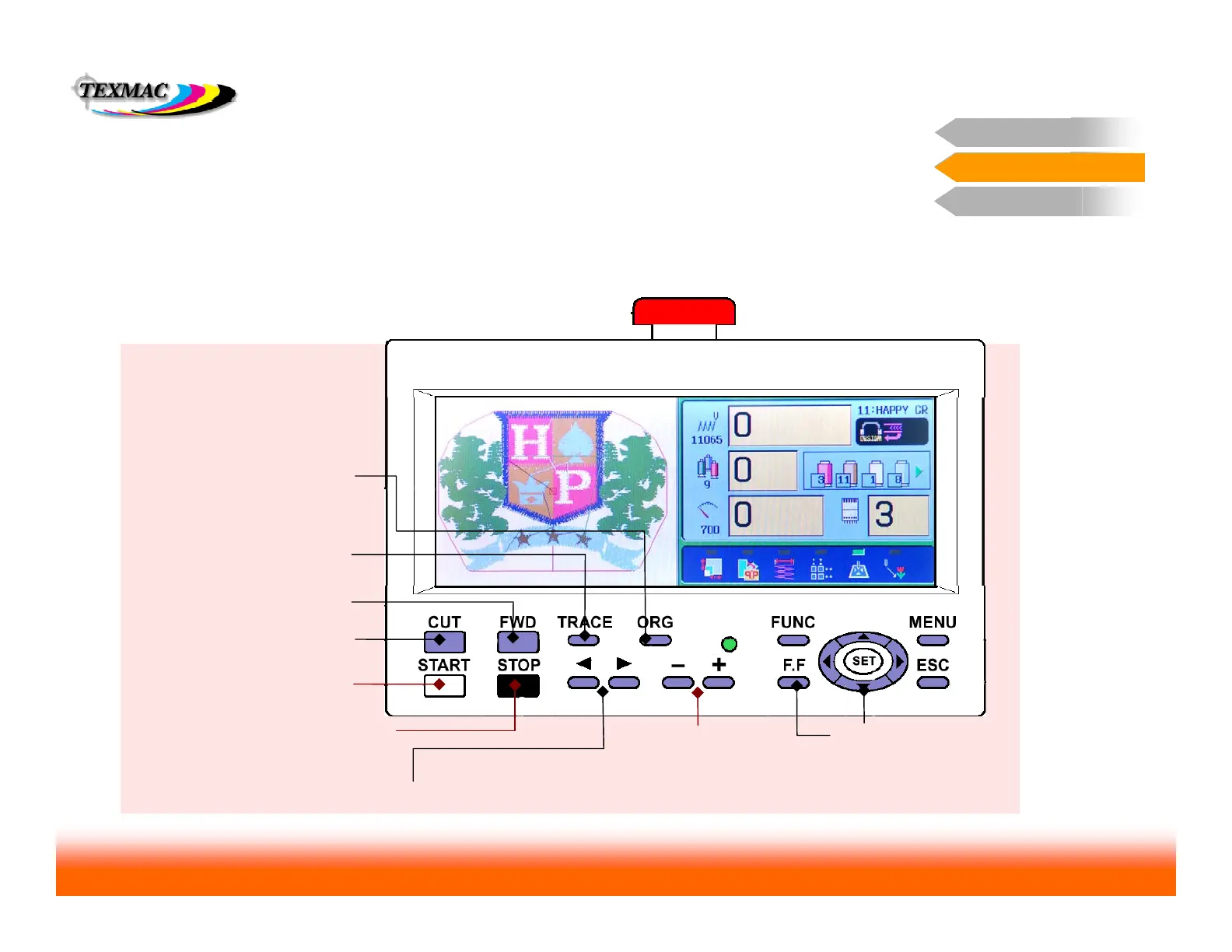
Sewing Controls
Basic Sewing Controls
On this page, learn the function of the important
sewing controls.
CUT cuts current thread and tucks
end into thread holder.
START starts sewing. Bypasses
trace. Sews in “creep” mode when
held down.
FWD advances sewing position
forward while machine is stopped.
STOP stops sewing. Also when stopped
moves sewing position backwards.
Useful after thread breaks.
Needle Select Keys change the currently-selected needle while machine is stopped.
TRACE only traces when design is
at Origin. Does slow trace when
held continuously.
ORG returns the sewing arm and
the sewing position to design Origin
point. Origin symbol re-appears.
Speed control – adjusts
max sewing speed.
Sewing arm movement
move pantograph arm with
the 4 blue arrow keys, hold
FF at same time for quick
movement
Color Code
Items in black – function only when
machine is stopped.
Items in red – function when machine is
running or stopped.
Control Panel 2



 To Next Page