Training Workbook: HAPPY HCD-1501 Operation and Maintenance
Education Department
Chapter 2: Machine Setup & Orientation
9
Machine Setup
Control Panel 2
Design Transfer
Frame position
Frame Type
O Set
Top
Needle Jump
Log – in
Turn-off
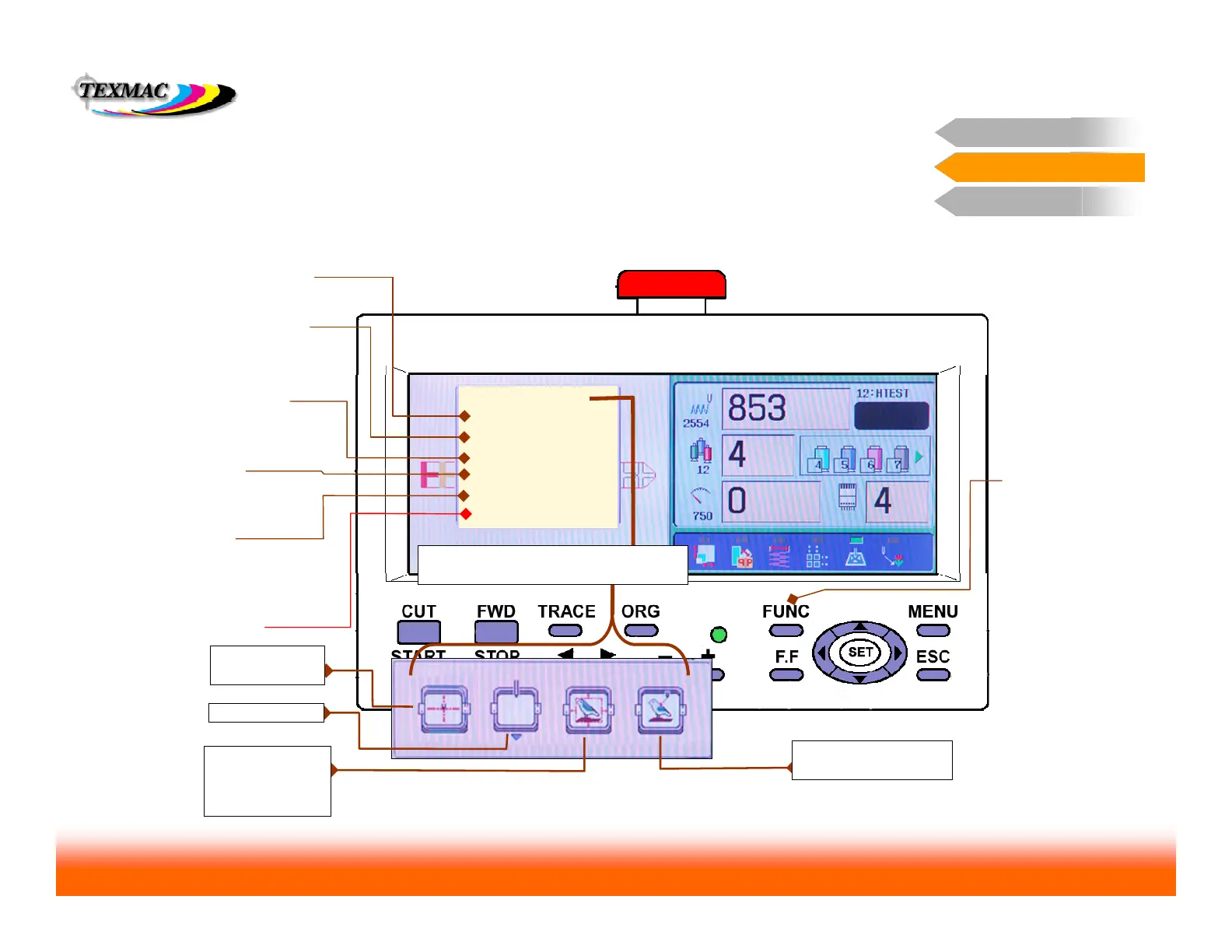
The FUNC menu allows quick access for key machine functions directly in the
main drive screen.
O Set: Positions the
origin (design) at the
current arm position.
TOP positions the hoop at
the top of the pattern.
Repeating returns hoop to
previous position.
Frame Type select here to tell the machine
to switch between tubular, cap, or border
frame sewing modes.
Access this
menu by
pressing the
FUNC key.
LOG-IN: Set this to
log the machine on to
a Happy machine
network.
The Function Screen
Control Panel 2
TURN-OFF: Always
try to power down the
machine from this
option, not at the
power switch.
CENTER centers
the hoop.
FRAME OUT
CENTER DESIGN
centers the hoop
and centers the
design in the hoop.
POSITION moves hoop
to current stitch position.
FRAME POSITION displays the submenu
shown. Functions are shown below.
Needle Jump alternatively
disengages (jump mode) or
engages (drive mode)
needle bar



 To Next Page