Training Workbook: HAPPY HCD-1501 Operation and Maintenance
Education Department
Chapter 2: Machine Setup & Orientation
7
Machine Setup
Control Panel 2
Design Transfer
Control Panel 2
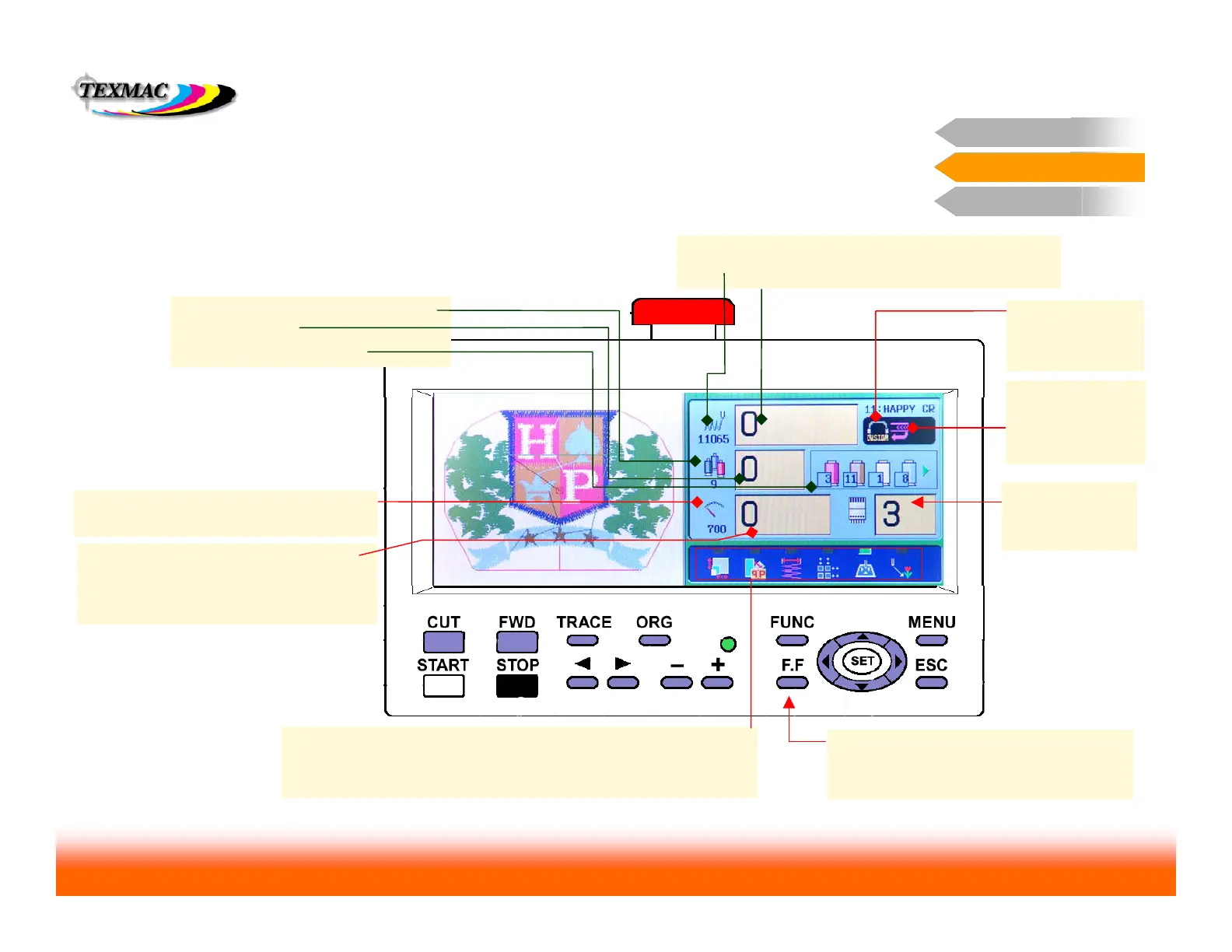
Information Display on the main Drive screen
This screen shows information about the design, its
position and fit, and current sewing status
# of Stitches in design
current stitch position in design
Total # of color blocks in the design
current block #
origin indicator –
indicates that sewing
position is at the
design origin, before
the trace.
Main Screen Information
Control Panel 2
next 4 colors in sequence
Max allowed speed – set this with the + and –
keys up to 1200 spm.
Actual sewing speed – machine sews at
speeds up to max allowed speed, but varies
according to stitch length. Longer stitches
take more time, requiring a slower speed.
Indicator lights: serve as reminders for any edits that may have been
done to the design from the control panel (in order from left to right,
scale, rotate, satin pull compensation, repeat, auto origin return, offset
Current Hoop:
shows what type of
hoop is currently in
use on the machine.
Show design position & fit in hoop: pressing
FAST at this screen shows a map on the right
side of the design position & size(in blue)
against the sewable area of the hoop (in red)
Active needle:
shows the currently
selected needle #



 To Next Page