EasyManua.ls Logo

Happymodel Mobula8 2S - User Manual

Default Icon
2 pages
Print Icon
To Next Page IconTo Next Page
Loading...
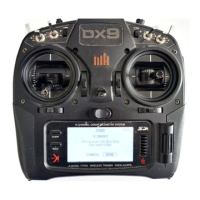
1)Turn on your radio transmitter and connect the battery to the Mobula8 2S . Then
place Mobula8 2S horizontally on the ground.
2)Prepare your goggles, and match the channel with the VTX_table
*RX2/TX2/+5V/GND pads could be used for External Serial Based equipment.
3)The default ARM/DISARM switch was set to "AUX1", usually it's Channel5 of
your radio. You can customized a switch for AUX1(Channel5). Then Toggle Aux1
switch to arm the motors, the Red LED at the bottom of the ight controller
would get solid once armed, happy ying.
4)Please make sure the MIXES of your radio settings is match the Channel Map
of betaight settings,otherwise it won't be able to armed. The default channel
map is "TAER1234", you can also set it to "AETR1234" if necessary.
X12 ELRS Pro v1.1 5-IN-1 AIO ight controller built-in 2.4G ELRS V3.0 and OPENVTX
VTX Power up to 400mw
ELRS V3.0 (Default), could ash elrs rmware for the receiver by wi
EX1103 KV110000 motors
CaddxFPV Ant FPV camera
Smooth and powerful
Compatible for 1S-2S Lipo/LIHV battery
Recommend 2S 450mah/550mah/650mah battery (Not include)
Brand Name: Happymodel
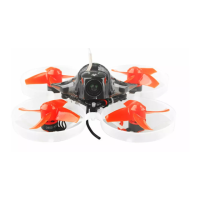
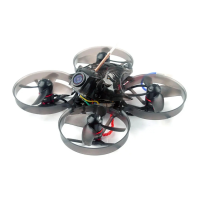
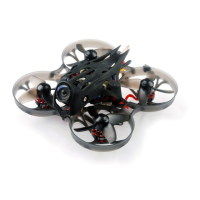
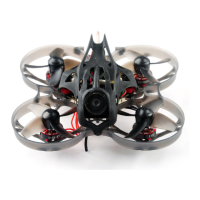
Item Name: Mobula8 UART ELRS 2S 85mm Micro FPV whoop drone
Wheelbase: 85mm
Size: 120mm*120mm*50mm
Weight: 43g
Receiver option:
2.4GHz UART EXPRESLRS
Mobula8 Frame
X12 ELRS pro V1.1 AIO ight controller
EX1103 KV11000 brushless motor
Gemfan Hurricane 2023 tri-blade propellers(4cw+4ccw)
Caddx ANT 1200TVL Camera
Onboard 5.8G Openvtx 0mw~400mw VTX
Canopy for 14mmx14mm camera
Screw driver
Qty
1
1
4
1
1
1
1
1
2) Please make sure your ExpressLRS tx module rmware is v3.x.x. And go to
ExpressLRS.lua from TOOLS menu of your radio transmitter. Then hit [Bind]
to binding with the onboard ExpressLRS receiver. The RGB LED should blinking
slowly rst then turn to solid, that means binding was successfully.
3)"Telemetry" from receiver tab must enable for this ight controller
1) Supply power to the ight controller by plug USB, then immediately unplug
USB when the RGB LED turned on, and then repeat one time again. When the FC
is powered on for the third time, the RGB LED light will start to double-ash,
which means that the onboard uart receiver enters into the binding mode
Bind procedure video for your refrence :https://bit.ly/47qGOBu
AUX1
Question and Answer IconNeed help?

Do you have a question about the Happymodel Mobula8 2S and is the answer not in the manual?

Summary

Product Overview and Specifications

Key Features

Lists key attributes and compatibility of the X12 ELRS Pro v1.1 AIO flight controller.

Technical Specifications

Details physical dimensions, weight, and compatibility of the drone.

Package Contents

Lists all items included in the Mobula8 drone package.

Binding and Radio Configuration

ExpressLRS Binding Procedure

Step-by-step guide to bind the ExpressLRS receiver using WiFi and radio transmitter.

Receiver and Telemetry Setup

Configuring UART for receiver and enabling telemetry in Betaflight.

Arming;Disarming Motor Switch

Setting up the ARM/DISARM switch and ensuring correct radio channel mapping.

Flight Controller Wiring and Ports

Connection Diagram

Visual guide showing pinouts and component connections on the flight controller.

Betaflight Ports Configuration

Configuring serial ports for receiver, ESC telemetry, and VTX in Betaflight.

Configuration Settings

Voltage and Current Meter Settings

Configuring voltage and amperage meter scales and offsets.

Default PID and Filter Settings

Adjusting PID loop constants and filter parameters for flight tuning.

BluJay ESC Settings

Adjusting common ESC parameters like startup power and motor timing.

VTX Band and Channel Setup

Configuring VTX band, channel, and power level via radio administrator menu.

Motor and ESC Operations

Motor and Propeller Setup

Instructions for mounting propellers and setting motor direction.

ESC Protocol and Features

Selecting ESC protocol and configuring features like motor stop.

Firmware Update and Drivers

Flight Controller Firmware Update

Steps for updating firmware using STM32 Virtual COM Port driver.

Driver Installation and Replacement

Installing STM BOOTLOAD driver and replacing with WinUSB using Zadig.

Overview

The Happymodel Mobula8 is a 2S 85mm Micro FPV Whoop drone designed for an immersive flying experience. This drone offers a range of customizable features and settings to suit various piloting styles and preferences.

Function Description

The Mobula8 is a small, lightweight FPV drone equipped with a flight controller, ESCs, motors, and a VTX (Video Transmitter). It is designed for both indoor and outdoor flight, providing real-time video feedback to the pilot through FPV goggles. The drone's primary function is to offer an agile and responsive flying platform for recreational FPV flying, freestyle maneuvers, and possibly even some light racing.

Usage Features

The Mobula8 offers extensive customization and control options through its flight controller and associated software.

Flight Controller Configuration:

The drone utilizes a flight controller that supports Betaflight, a popular open-source firmware for FPV drones. This allows pilots to fine-tune various aspects of the drone's performance.

  • PID and Filter Settings: Pilots can adjust Proportional, Integral, and Derivative (PID) gains for Roll, Pitch, and Yaw axes, which directly impact the drone's stability and responsiveness. Dynamic Damping and Stick Response settings further refine how the drone reacts to control inputs. Various filters, including Gyro Lowpass, Gyro Notch, D Term Lowpass, D Term Notch, and Yaw Lowpass filters, can be configured to reduce noise and vibrations, leading to smoother flight performance. The Gyro RPM Filter is particularly useful for minimizing motor noise interference.
  • Board and Sensor Alignment: The flight controller's orientation relative to the drone's frame can be adjusted in degrees for Roll, Pitch, and Yaw, ensuring accurate sensor readings. The Gyro update frequency and PID loop frequency can also be set, with 2.00kHz recommended for a stable experience.
  • Motors and ESC Settings: The drone uses a Quad X mixer configuration. The manual specifies the correct propeller orientation (PROP OUT) for motors #1, #4 (standard) and #2, #3 (reversed). Motor direction can be reversed if needed. The ESC/Motor protocol is DSHOT300, and features like MOTOR_STOP (prevents motors from spinning when armed), ESC_SENSOR (telemetry over a separate wire), Bidirectional DShot, and Motor Idle percentage can be configured. The number of motor poles (magnets on the motor bell) is also specified.

VTX (Video Transmitter) Configuration:

The Mobula8's VTX allows for real-time video transmission to FPV goggles.

  • Band, Channel, and Power Level: The VTX supports various bands (BOSCAM_A, BOSCAM_B, BOSCAM_E, FATSHARK, RACEBAND, LOWRACE) and multiple channels within each band, offering flexibility in finding a clear video frequency. The power level of the VTX can also be adjusted. Due to a known firmware issue, VTX band, channel, and power level settings might need to be configured via the VTX Administrator menu in ExpressLRS.LUA on the radio controller, rather than directly through the flight controller software. This ensures proper functionality and avoids potential conflicts.

ELRS (ExpressLRS) Receiver Configuration:

The drone is equipped with an ELRS receiver, providing robust and low-latency control.

  • Binding and Configuration: The ELRS receiver needs to be bound to the pilot's radio controller. The manual mentions accessing the VTX Administrator menu via ExpressLRS.LUA on the radio controller, which is crucial for setting up the VTX. This integration allows for seamless control and video transmission management.

BLHeli_S ESC Settings (Blujay Firmware):

The ESCs (Electronic Speed Controllers) are responsible for controlling the motors. The manual refers to Blujay ESC settings, which offer further motor control customization.

  • Common Parameters: Settings like Minimum Startup Power (Boost), Maximum Startup Power (Protection), Temperature Protection, Motor Timing, Demag Compensation, and RPM Power Protection (Rampup) can be adjusted. These parameters influence motor startup, efficiency, and protection against overheating or damage. If using a 1S battery, adjusting the startup power might be necessary to prevent motors from spinning with difficulty.

Maintenance Features

Regular maintenance and firmware updates are essential for optimal performance and longevity of the Mobula8.

Firmware Updates:

The flight controller firmware can be updated using Betaflight Configurator.

  • Driver Installation: Before updating, pilots need to install the latest STM32 Virtual COM Port Driver and STM BOOTLOAD Driver.
  • DFU Mode: The flight controller can be put into DFU (Device Firmware Upgrade) Mode either by soldering a boot pad and plugging in USB, or by initiating a flash within Betaflight Configurator.
  • Driver Replacement: Zadig tools might be required to replace STM32 Bootloader drivers with WINUSB drivers for proper communication.
  • Flashing Firmware: Once drivers are correctly installed and the flight controller is in DFU mode, Betaflight Configurator can be used to select the appropriate firmware target (STM32F411) and version, then flash the new firmware.

General Maintenance:

  • Voltage and Current Monitoring: The manual provides settings for Voltage Meter (Scale, Divider Value, Multiplier Value) and Amperage Meter (Scale, Offset) to ensure accurate monitoring of battery voltage and current draw. This helps in understanding battery health and flight efficiency.
  • Propeller Replacement: The manual specifies the correct propeller orientation, which is crucial for efficient flight. Regularly checking and replacing damaged propellers is a standard maintenance task.
  • Component Inspection: Periodically inspecting all components, including motors, ESCs, wiring, and the frame, for any signs of damage or wear is recommended to prevent unexpected failures during flight.

The Happymodel Mobula8 is designed to be a versatile and enjoyable FPV drone, offering a rich set of features for both novice and experienced pilots to explore and customize.

Happymodel Mobula8 2S Specifications

General IconGeneral
Frame MaterialPlastic
Wheelbase85mm
Battery2S 450mAh
Flight ControllerF4 Flight Controller
ESC5A BLHeli_S
Receiver OptionFrsky, Flysky
VTX25mW
CameraCaddx ANT
Motors0802 19000KV

Related product manuals