13
FINAL INSTALLATION
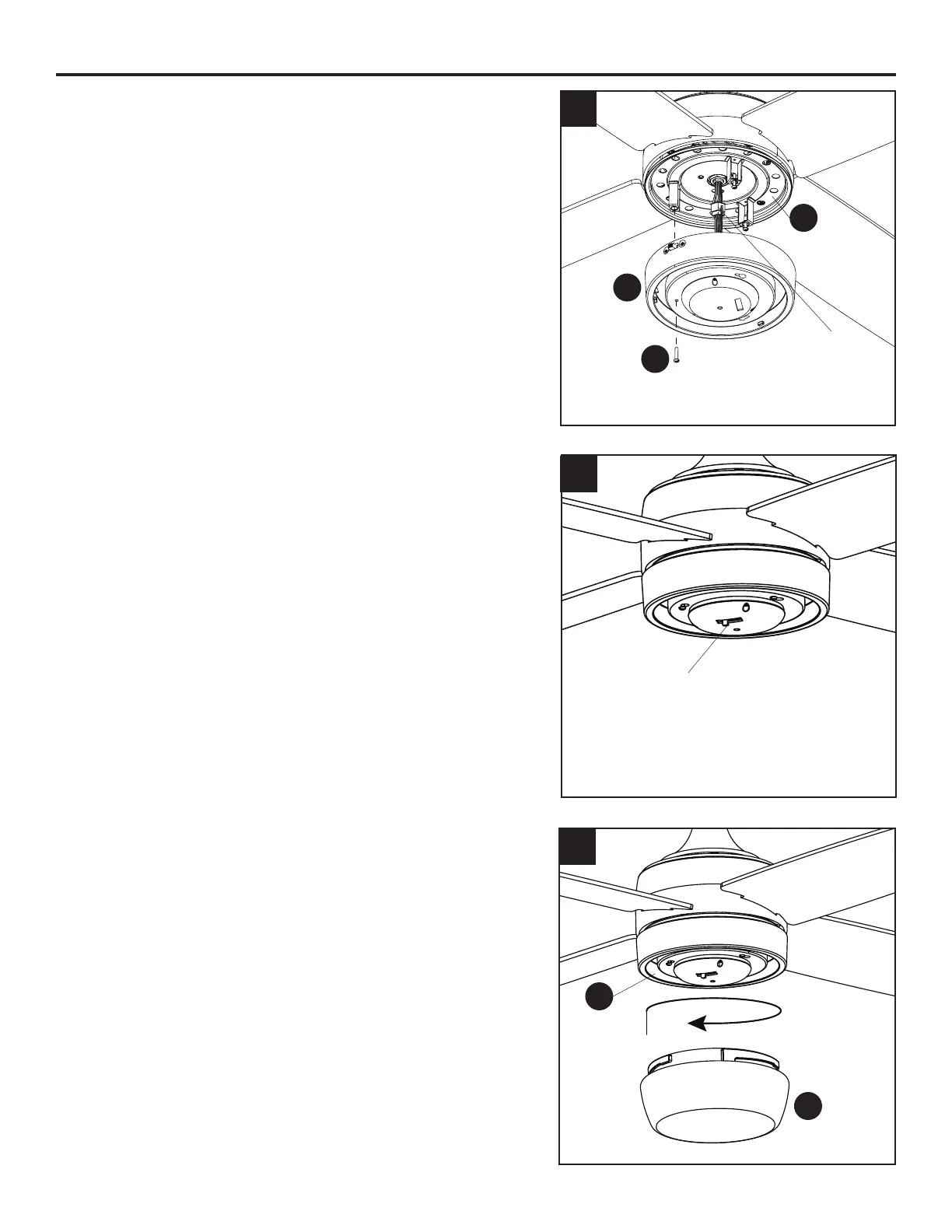
4. Remove one and loosen the other two light pan
screws (N) from the underside of the light pan (M).
Connect the 6-pin connector from the fan to the 6-pin
connector from the light kit (O). Align the key slot in
the light kit (O) with the loosened screws in the light
pan (M). Turn light kit (O) clockwise and replace the
previously removed light pan screw (N). Tighten all
screws.
5. The LED has ve color settings that range from 2700K
(soft white) to 6500K (cool white). The factory setting
for the LED is 2700K. If desired, adjust the LED color
switch change the color temperature.
6. Lift the glass bowl (P) into the light kit (O) and turn in a
clockwise direction until it is secure. CAUTION: Avoid
cross-threading the glass during installation. Improper
installation could cause the glass bowl (P) to be
dicult to remove or fall, which could cause serious
injury.
4
5
O
6
P
O
N
LED Color Switch
M
6-Pin Connector






 To Next Page