15
OPERATING INSTRUCTIONS
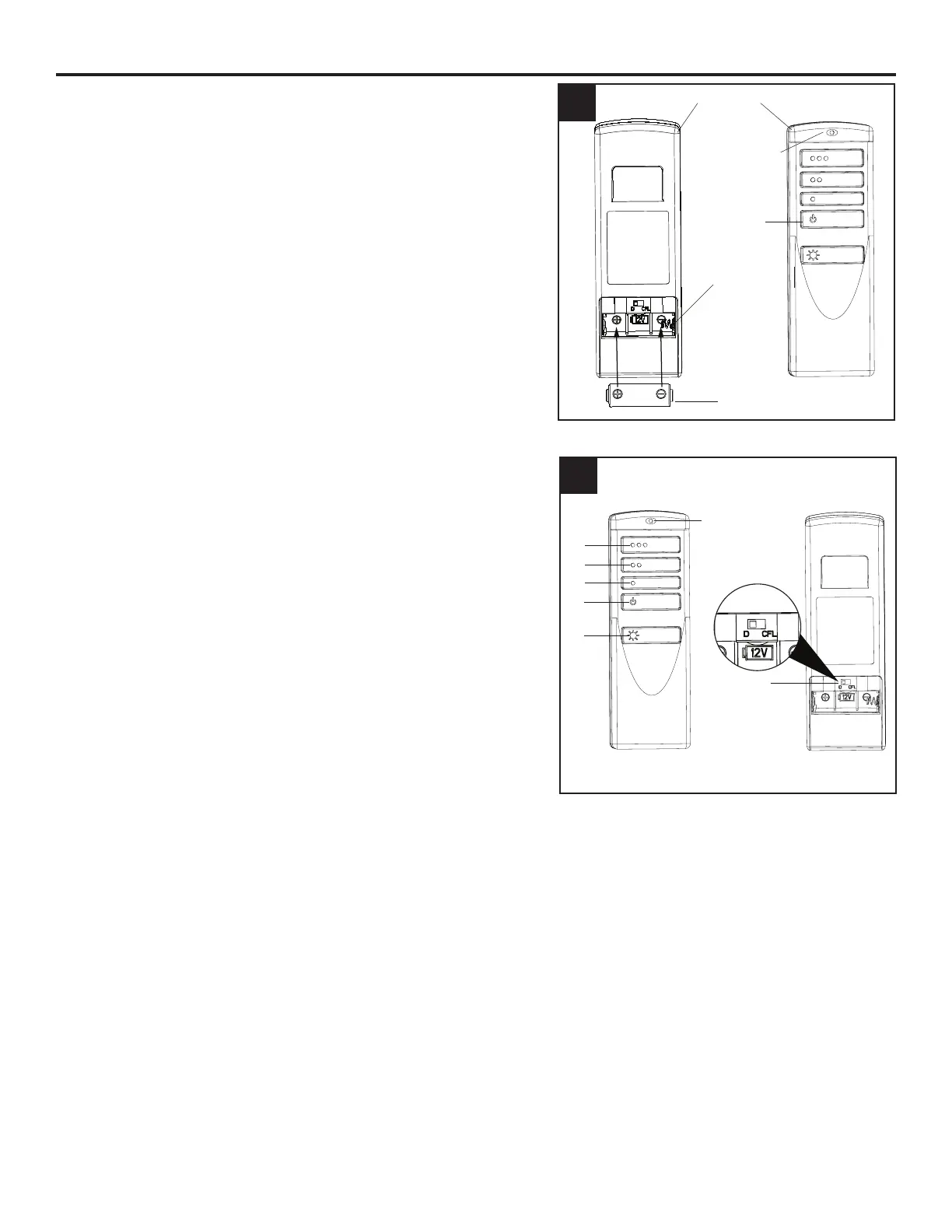
1. Remove the battery cover from the back of the remote
found in remote pack (R). Insert the battery from remote
pack (R) into the remote; ensuring the polarity of the
battery matches the polarity indicated in the battery
compartment -- positive (+) to positive (+) and negative
(-) to negative (-). Replace the battery cover and press
the fan power button on the remote to ensure the LED
indicator illuminates and the remote turns on the fan.
Note: If remote doesn’t turn on the fan, see
TROUBLESHOOTING (page 18).
2. To operate the fan using the remote, press and release
the following buttons:
1 - High fan speed
2 - Medium fan speed
3 - Low fan speed
4 - Fan Power - Turns the fan o.
Light Delay O mode - Press and hold the fan
power button (4) for ve seconds, which will turn
o light after one minute. The LED indicator on the
remote will ash four times to conrm mode setting.
5 - Light Control: Tap light control button to turn the light
o and on. Press and hold light control button to dim
or brighten the lights.
6 - D/CFL Switch - set to “D” at the factory. The switch
should remain in the “D” position to ensure the
halogen bulb is dimmable.
1
2
3
4
5
6
2
1
Remote
Front
Back
Battery
Battery
Compartment
2
LED Indicator
LED Indicator
Fan Power






 To Next Page