13
OPERATING INSTRUCTIONS
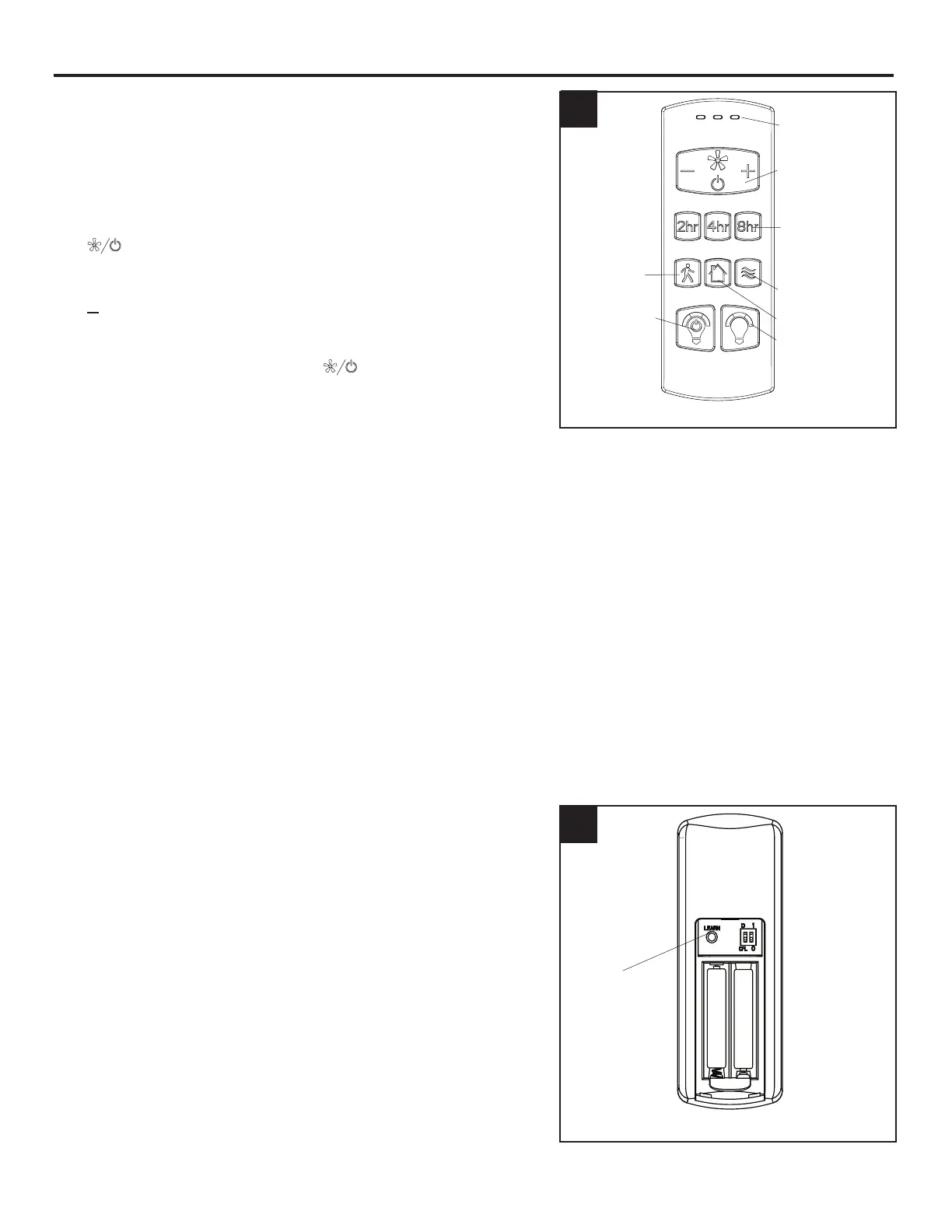
1. To operate the fan using remote control, press and
release the following buttons:
LED Indicator - Indicates the three speeds of the fan. It
should illuminate when any remote button is pressed. If
not, replace the 1.5 V, AAA batteries.
Fan Power button has three options:
( ) - Turns the fan o or turns on fan at previously
selected speed.
(
+
) - Increase fan speed
( ) - Lower fan speed
Sleep Timers - Turn o fan after 2 hours (2hr), 4 hours
(4hr), or 8 hours (8hr). Press ( ) button to deactivate.
Light Delay - Delays turning o light for one minute
which allows safe exit from room. Light blinks to
conrm function is active. Press Light Control button to
deactivate and turn the light o.
Home Shield™ - Simulates occupancy while away from
home. Fan remains o and the light randomly turns on
for a minimum of ve minutes and a maximum of 20
minutes. The light remains o for 60 minutes between
events. Press and hold button to activate. Light will blink
to conrm Home Shield is active. Press any button to
cancel.
Variable Breeze - Simulates a natural breeze, as if you
were outside.
Light Control - Tap button to turn the light o and on.
Press and hold button to dim or brighten the lights.
Light Color - Press and hold button to cycle through the
color temperatures from 2200K (warm white) to 6500K
(daylight).
2. LEARN - Syncs remote control from remote pack (L) to
receiver (see troubleshooting for instructions).
2
Front
Back
2
LED
Indicator
Fan Power
Sleep Timer
LEARN
Variable Breeze
Home Shield
Light Delay
Light Control
Light Color
1







 To Next Page