EasyManua.ls Logo

Harman Kardon OMNI BAR+ - User Manual

Harman Kardon OMNI BAR+
38 pages
Print Icon
To Next Page IconTo Next Page
Loading...
OWNER’S MANUAL
EN/
WIRELESS AUDIO SYSTEM
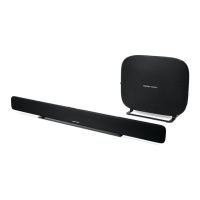
OMNI BAR+
OMNI ADAPT+

Questions and Answers

  • M
    Maria WoodJul 27, 2025
    How to fix Harman Kardon OMNI BAR+ Speakers that do not turn on?
    • L
      Lori SteeleJul 27, 2025
      If your Harman Kardon speaker isn't turning on, verify that it's properly plugged into a working AC power outlet. If the outlet is controlled by a switch, make sure the switch is turned on.
  • M
    Michele ArmstrongAug 2, 2025
    Why I am unable to connect Harman Kardon speaker to my Wi-Fi network?
    • B
      brandonpetersenAug 2, 2025
      If you're having trouble connecting your Harman Kardon speaker to your Wi-Fi network, ensure that the speaker is within range of your Wi-Fi router or access point. If it's too far, try adjusting the speaker's position or consider using an Ethernet connection.
  • T
    Terry RamseyAug 8, 2025
    Why am I having trouble connecting my Harman Kardon OMNI BAR+ Speakers in a wireless 5.1 surround configuration?
    • J
      Jennifer RomanAug 8, 2025
      If you are experiencing issues connecting your Harman Kardon speakers in a wireless 5.1 surround configuration, be sure to use a 5GHz Wi-Fi network for the setup. Wireless 5.1 surround will not function with a 2.4GHz Wi-Fi network.
  • J
    Jason PhillipsAug 14, 2025
    What to do if Harman Kardon speaker does not appear in the Controller app?
    • A
      Amanda OwenAug 14, 2025
      If your Harman Kardon speaker isn't showing up in the Controller app, ensure that the speaker is connected to your Wi-Fi network and is within Wi-Fi range. Also, confirm that your phone or tablet and the speaker are both connected to the same network.
  • S
    schultzrichardAug 21, 2025
    What to do if only one speaker in a Harman Kardon wireless 5.1 system has audio output?
    • T
      tnelsonAug 21, 2025
      If only one speaker in your Harman Kardon wireless 5.1 system is producing sound, check that all speakers are connected to AC power and are within range of the Wi-Fi network.

Summary

Safety and Precautions

Line Voltage Verification

Ensure the product is connected to the correct AC voltage to prevent hazards.

Controls and Connectivity

Setting Up Your Omni System

Initial Setup and Video Guides

Guides through initial setup steps and provides video tutorials for assistance.

Connecting to Wi-Fi

Explains various methods to connect the speaker to your Wi-Fi network.

Wireless 5.1 Surround Setup

Instructions for setting up a wireless 5.1 surround sound system.

Source Selection and Bluetooth Pairing

Guides on configuring audio sources and connecting via Bluetooth.

Connecting External Audio Sources

Details on connecting external audio sources like TVs and analog devices.

Managing Your Audio System

Wireless Music Streaming

System Software and Settings

Troubleshooting and Support

Troubleshooting Speaker Operation

Solutions for issues like no power, controller visibility, or no sound.

Troubleshooting 5.1 Surround Setup

Troubleshooting steps for problems related to wireless 5.1 surround system setup.

Troubleshooting Placement & Wi-Fi

Advice on speaker placement, Wi-Fi extenders, and AUX-in audio issues.

Harman Kardon OMNI BAR+ Specifications

General IconGeneral
TypeSoundbar
Audio Channels3.1
Frequency Response40Hz - 20kHz
HDMI Video Inputs1
Bluetooth version4.2
Wireless SubwooferYes
SubwooferIncluded
ConnectivityBluetooth, HDMI, Optical
HDMI Video Output (with Audio Return Channel)1
Multiroom SupportYes

Related product manuals