Revision C • 10/07
HARRIS CORPORATION
4-1
4
The RMX
digital
Server physically consists of
a single-board computer (SBC) with an integral
Flash Disk to store the operating system, configura-
tion files, setup files and user-created session files.
The SBC is part of the KSU Card assembly.
The RMX
digital
Server stores these file types:
• Sessions (.ses suffix)
• Macros (.mac suffix)
• Console setup (.ini suffix)
• Console configuration (.cfg suffix)
The RMXd
igital
Server also functions as an FTP
(File Transfer Protocol) server. This allows files to
be easily transferred between a networked Win-
dows® computer and the console using an FTP
program. A computer networked with the console
is generically referred to as the “setup computer,”
which serves as the editing interface for the RMX-
digital
Server files.
All .ini and .cfg files on the RMX
d
Server
are maintained using VistaMax Control Center
(VMCC)—an editor program included on the 99-
5000 CD-ROM. It is installed and runs on the setup
computer. Using the program is covered later in
this chapter and in Appendix A.
Because RMX
digital
uses the same operating
system as BMX
digital
consoles and VistaMax
frames, only one setup computer running VMCC
is required to maintain all of the files on all of the
VistaMax devices that are networked together in
the VistaMax LAN.
RMX
d
File Structure
The RMX
digital
console’s setup and configu-
ration files must be properly saved into specific
folders to ensure proper operation. The following
screen shot shows the folders and files in the user-
accessible area of the flash disk. Except for
Release.txt, all RMX
d
server files are located
within the Storage Card folder.
An FTP program is used to access the console’s
flash disk. Internet Explorer can be used, but FTP
Voyager, a dedicated FTP file management pro-
gram (a demo version is included on the 99-5000
CD-ROM), is recommended. The default factory
IP address assigned to each RMX
digital
console
is 192.168.100.22. Enter this IP address into the
FTP Site address field in FTP Voyager in order to
view the console files on a new console.
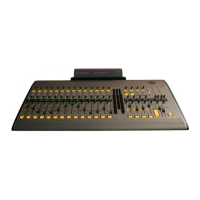
Inside the Storage Card folder is a Data folder,
an nqx.ini file, and three other system files that
should not be changed. Inside the Data folder are
the SesFiles, SysFiles and Ref folders. The Ref
folder is never changed.
RMX
digital
Server Setup
Files and Folders on the RMXdigital Server
Storage Card and Data folder contents


 To Next Page