Magazine Operation
Loading the Magazine
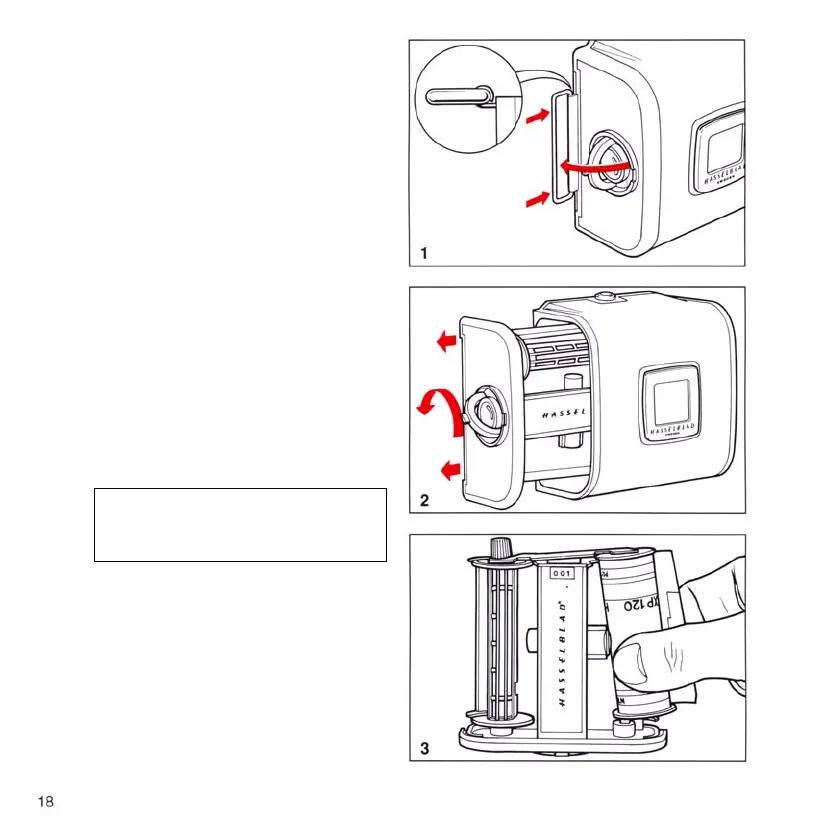
Themagazinemaybeloadedon,orothecamera.
Ifitistobeloadedothecamerathenthemagazine
slidemustbeinserted,itsatsidetowardstherear.
Thisfacilitatesremovalofthelmholderforloading.
Follow the procedure below.
1. Foldoutthelmholderkey.
2. Turn the key counter-clockwise and with-
drawthelmholder.
3. An empty take-up spool should be placed un-
der the splined knob of the spool clamp bar.
Insertarolloflmundertheotherendofthe
bar, ensuring that it is turned the same way as
in the illustration. Be careful to remove all the
papertapethatsurroundsanewrolloflm.
4. Turn the lm holder key clockwise to open
thelmclamp.Pull8-10cm(3-4in.)ofpa-
perbackingothelmrollandslidetheedge
under the clamp.
5. Insert the tongue of the backing paper into the
slot in the take-up spool.
6. Turn the splined knob clockwise until the
arrow on the paper backing is opposite the
triangular index on the spool clamp bar, but
no further.
7. Turn the lm holder key counter-clockwise
andinsertthelmholderintothemagazine-
jigglingitalittleifitdoesnotclickintoplace.
Lock the lm holder into the magazine by
turning the key clockwise.
8. Foldoutthelmcrankandrotateitclockwise
about ten turns until it stops. Turn the crank
counter-clockwise and fold it in.














 To Next Page