16
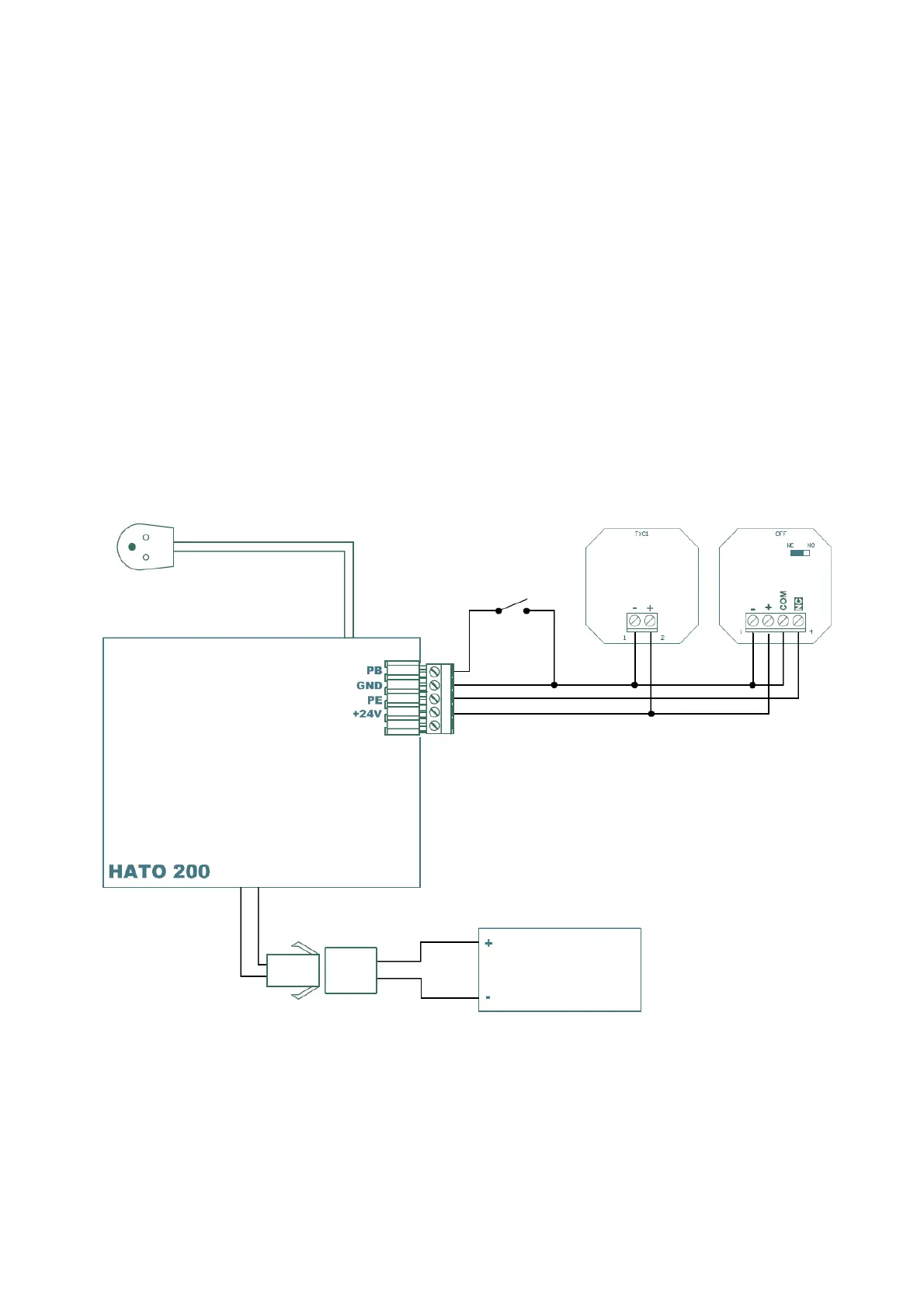
4.3 Installation of photocells
Before setting the photocell function, make sure that the device is properly installed. The receiver
of the photocells must work in the NC mode - if there is no obstacle between the transmitter and
the receiver, the receiver's output contacts should be closed.
(1) Press and hold the DOWN button, the mark will appear on the display
" - " , followed by " H " or " | | "
" H " means that the drive supports the photocells
" | | " means that the drive does not react to the photocells
(2) Pressing the UP button activates the photocells (" H " lights up )
Pressing the DOWN button disables the photocells support ("| |" is lit)
(3) After setting the correct option, press the SET button and the system enters the normal
operation mode
Installing photocells prevents the gate from closing when there is an obstacle in its light (eg a car).
Use photocells specifically designed for garage doors.
4.4 Enable/disable auto closing.
(1) Press and hold the UP button, the display will show "-" followed by a number from 0 to 9.
(2) Pressing the UP button once extends the auto-close time by one minute. Pressing the DOWN
button once reduces the closing time by one minute. The current closing time is shown on



 To Next Page