49
www.coreservice.co.uk
Hotline: +44 01904 947568
Email support@coreservice.co.uk
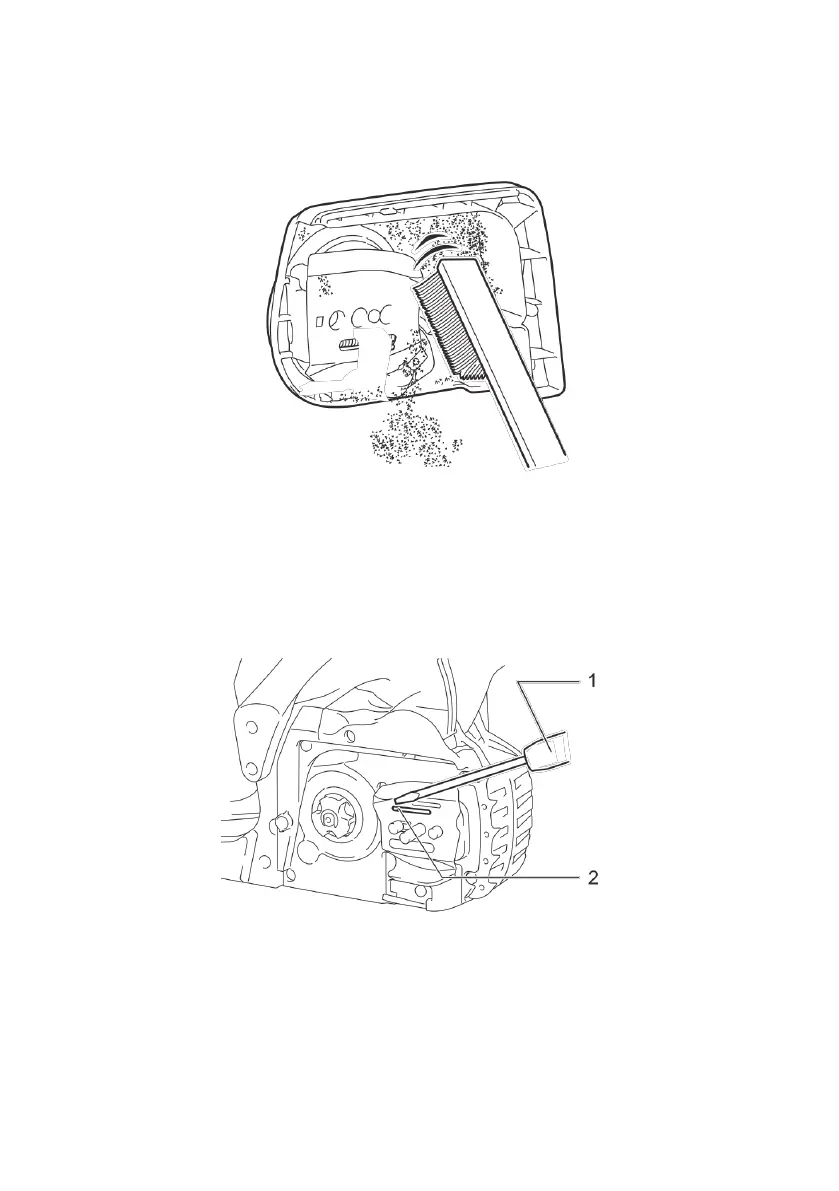
Cleaning the sprocket cover
Chips and saw dust will accumulate inside of the sprocket cover. Remove the sprocket cover and
saw chain from the tool then clean the chips and saw dust.
Cleaning the oil discharge hole
Small dust or particles may build up in the oil discharge hole during operation. The dust particles may
impair the oil to flow and cause insufficient lubrication on the whole saw chain. When a poor chain oil
delivery occurs at the top of guide bar, clean the oil discharge hole as follows.
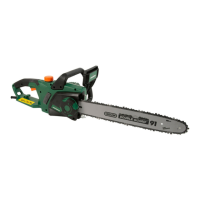
1. Remove the sprocket cover and saw chain from the tool.
2. Remove the small dust particles using a small slotted screwdriver or similar tool.
1.Slotted screwdriver 2.Oil discharge hole
3. Insert the battery packs into the tool. Pull the switch trigger to blow built-up dust or particles off
the oil discharge hole by discharging chain oil.
4. Remove the battery packs from the tool. Reinstall the sprocket cover and saw chain on the tool.


 To Next Page