Only use spare parts supplied by Hayward
®
brand
Page 6 on 22Xxxxxx xxxx
EN
English
USING THE CONTROL PANEL
Before operating the pump for the rst time, the pump’s internal clock and operational schedules must be programmed.
Refer to Setting the Clock, page XX and Programming Custom Schedules, page XX for instructions regarding the
programming of this pump for scheduled operation.
The pump can be programmed and controlled from the control panel. Pump features and settings are also accessed using
this keypad.
Note: Functionality may vary based on other active features such.
Keypad Lockout.
Note: Always close the keypad cover after use. This will prevent damage to the control panel and other drive components.
• WARNING: Only press keypad buttons with your ngers. Using screwdrivers, pens or other tools to program the pump
will damage the keypad.
• CAUTION: If power is connected to the pump motor, pressing any of the following buttons referred to in this section could
result in the motor starting. Failure to recognize this could result in personal injury or damage to equipment.
1
2
3
1
2
7 6
5
3
4
8
6
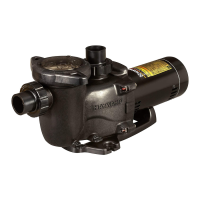
Press Button Description:
1 SPEED 1: Press to select Speed 1(2400 RPM), and the LED light
indicates that the current speed 1 is running
2 SPEED 2: Press and select Speed 2(1500 RPM). When the LED is
on, it indicates that the current speed 2 is running
3 SPEED 3: Press and select speed 3(2000 RPM), and the LED light
indicates that the current speed 3 is running
4 SPEED 4: Press and select Speed 4(1000 RPM). When the LED is
on, the speed 4 is running
5 Quick Clean key: Quick clean key
6 Start/Stop key: Start or stop the pump. When the indicator light is on,
it indicates that the pump is running or in the specied mode. When
the light blinks, it means that the pump is not running and the current
time has not reached the start time of the next scheduled mode.
7 When the frequency converter is shut down, enter the main menu
directory.
8 Display button: used to switch between display contents when the
water pump is running.
9 Arrow keys
"+" on key: Increase the speed or time when adjusting
"-" under key: reduce the speed or time when adjusting
· left key: Move cursor to left
· right key: Move cursor to right
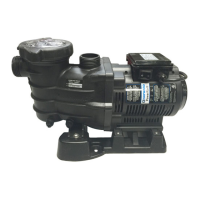
Display LED Description:
1 Control Panel: used to view the current speed, time, duration, power
consumption and other functions.
2 Display mode LED indicator light: with the display button to display
the corresponding LED, the information displayed on the digital tube
corresponds to a specic point. Blinking indicates the current editable
parameter.
3 Power LED indicator: When the LED light shines, it means that the
pump has been energized.





 To Next Page