EasyManua.ls Logo

Hayward MaxFlo VS 500 - User Manual

Hayward MaxFlo VS 500
36 pages
Print Icon
To Next Page IconTo Next Page
Loading...
IS23520VSP Rev-D
Hayward Pool Products
620 Division St, Elizabeth, NJ 07207
Phone: (908) 355-7995
www.hayward.com
MaxFlo VS
500
Owner’s Manual
Model SP23520VSP
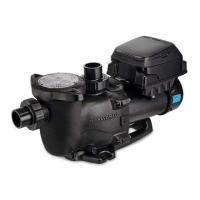
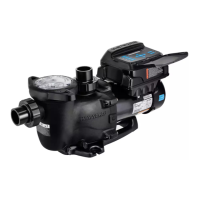
MaxFlo VS 500 Variable Speed Pump
Hayward’s MaxFlo VS 500 variable speed pump delivers incredible energy savings via its advanced
hydraulic design combined with a totally enclosed, permanent magnet motor. MaxFlo VS 500 is easily
installed either as a programmable stand-alone pump or with a Hayward or third party controller and
features an easy-to-use digital control interface that can be mounted in four different positions on the
pump or removed and mounted on the wall for total user convenience.
Note: To prevent potential injury and to avoid unnecessary service calls, read this manual carefully and
completely. Unless otherwise stated, instructions in this manual apply to both pump models.
SAVE THIS INSTRUCTION MANUAL

Questions and Answers

  • A
    Autumn CollinsAug 22, 2025
    How to fix low flow in my Hayward MaxFlo VS 500?
    • C
      courtneydunnAug 22, 2025
      If your Hayward Swimming Pool Pump has low flow, a clogged or restricted strainer or suction line could be the cause. Correct the piping size for undersized pool piping. Check for a plugged or restricted discharge line of filter, or a valve partially closed. Backwash as per manufacturer’s instructions. Re-tighten the suction and discharge connections using PTFE tape. Inspect other plumbing connections, and tighten as required. A plugged, restricted, or damaged impeller may be the cause, so replace the impeller including a new seal assembly.
  • J
    johnsonericAug 26, 2025
    How to troubleshoot a Hayward MaxFlo VS 500 Swimming Pool Pump motor that will not start?
    • R
      Renee SmithAug 26, 2025
      If your Hayward Swimming Pool Pump motor will not start, ensure the terminal board connections match the wiring diagram on the pump data plate label and that the pump is wired for the available field supply voltage (230VAC). Inspect for any improper or loose wiring connections, open switches or relays, tripped circuit breakers, or blown fuses, and correct as necessary. Manually check the motor shaft rotation for free movement and absence of obstructions, resolving any issues found.
  • C
    Christina HernandezAug 27, 2025
    How to stop my Hayward MaxFlo VS 500 Swimming Pool Pump from interfering with home automation equipment?
    • E
      Emily FosterAug 28, 2025
      If your Hayward Swimming Pool Pump is interfering with home automation or power line communication equipment, ensure the terminal board connections match the wiring diagram on the pump data plate label. Also, check for and correct any improper or loose wiring connections. Consider installing a noise filter (available from your home automation/power line communication equipment vendor) to prevent equipment interference.
  • J
    Julie BishopAug 30, 2025
    What causes a 'Check System DC voltage too high' error on my Hayward MaxFlo VS 500?
    • T
      Timothy NashAug 30, 2025
      If the system DC voltage is too high on your Hayward Swimming Pool Pump, verify that the line voltage is within 10% (207-253 VAC) of the pump's rated voltage at the terminal block.
  • D
    daniel16Sep 2, 2025
    What causes a 'Check System DC voltage too low' error on my Hayward MaxFlo VS 500?
    • S
      Scott RichardsSep 2, 2025
      If the system DC voltage is too low on your Hayward Swimming Pool Pump, verify that the line voltage is within 10% (207-253 VAC) of the pump's rated voltage at the terminal block. Also, verify that power supply connections are properly made at the circuit breaker as well as at the terminal block.
  • R
    Robin MurraySep 5, 2025
    What does 'Check System Drive is overheated' mean on my Hayward Swimming Pool Pump?
    • C
      Chad CollinsSep 5, 2025
      If you receive a 'Check System Drive is overheated' error on your Hayward Swimming Pool Pump, make sure the motor airflow path is free from obstructions. Also, check the ambient temperature and compare it against the motor nameplate (50°C/122°F).
  • R
    Robert ChungSep 7, 2025
    What does 'Check System Drive overload' mean on my Hayward MaxFlo VS 500 Swimming Pool Pump?
    • D
      donna90Sep 7, 2025
      If you receive a 'Check System Drive overload' error on your Hayward Swimming Pool Pump, check the impeller, diffuser, shaft seal, and motor for any issues or binding.
  • M
    Maria EvansSep 10, 2025
    What does 'Check System Pump failed to start' mean on my Hayward MaxFlo VS 500?
    • J
      Jamie JohnsonSep 10, 2025
      If you receive a 'Check System Pump failed to start' error on your Hayward Swimming Pool Pump, check the impeller, diffuser, shaft seal, and motor for any issues or binding.
  • F
    fitzgeraldkaylaSep 10, 2025
    How to reduce noise from my Hayward MaxFlo VS 500 Swimming Pool Pump?
    • K
      Kevin AliSep 12, 2025
      If your Hayward Swimming Pool Pump is noisy, try correcting the suction condition or throttling return lines, if practical. Ensure the pump is mounted on a level surface and securely fastened to the equipment pad. Clean the pump housing. Any seal leaks should be replaced immediately.
  • R
    Rebecca OneillSep 13, 2025
    How do I fix a 'Check System Communication failed' error on my Hayward MaxFlo VS 500?
    • A
      alejandro58Sep 13, 2025
      To address a 'Check System Communication failed' error on your Hayward Swimming Pool Pump, verify the connections between the user interface and the motor/drive.

Summary

Important Safety Instructions

General Information

Introduction

Overview of the manual's purpose and adherence to instructions.

Primary Features

Lists key characteristics of the MaxFlo VS 500 variable speed pump.

Product Dimensions

Provides physical measurements of the Hayward MaxFlo VS 500 pump.

Energy Efficiency Overview

Installation and Wiring

Site Preparation, Plumbing, and Electrical

Covers pump location, mounting, pipe sizing, plumbing, electrical, grounding, bonding, and wiring.

Control Interface and Remote Wiring

Orienting, wall mounting, and wiring for remote control and stop functions.

Final Installation Procedure

Comprehensive steps to complete the pump installation process.

Wiring Diagrams

Input Power and Control Interface Wiring

Diagrams for connecting main power and the digital control interface.

Remote Control and Stop Wiring

Wiring for external relays, automation controls, and remote stop switches.

Startup and Operation

Preparation and Initial Startup

Covers pre-operation checks, priming, user interface, and initial setup screens.

Configuration and Timer Programming

Setting pump parameters, schedules, and timer functions.

Advanced Features and Modes

Using preset speeds, diagnostics, quick clean, and remote stop.

Maintenance and Storage

Routine Maintenance Tasks

Guidelines for cleaning strainer baskets and keeping the motor clean.

Storage and Winterization Procedures

Steps for safely storing the pump during freezing temperatures or long periods.

Shaft Seal Replacement

Disassembly Steps

Procedures for removing the motor assembly, impeller, and ceramic seat.

Seal Installation and Reassembly

Installing the new shaft seal, impeller, diffuser, and motor assembly.

Replacement Parts Information

Parts Diagram and Listing

Illustrated diagram and detailed list of pump replacement parts.

Troubleshooting Guide

General Pump Problems

Solutions for common issues like motor not starting or overheating.

System Error Messages

Explanation of check system codes and troubleshooting steps.

Warranty and Product Registration

Limited Warranty Information

Details on the product's warranty coverage and terms.

Product Registration Process

Instructions for registering the product for warranty purposes.

Hayward MaxFlo VS 500 Specifications

General IconGeneral
ManufacturerHayward
ModelMaxFlo VS 500
TypeVariable Speed Pump
Voltage115/230 V
Maximum Flow Rate90 GPM
Energy Efficiency CertificationENERGY STAR Certified
Wet End MaterialThermoplastic
Flow RateUp to 90 GPM
Warranty3 Years
Port Size2 in.
Motor FrameNEMA
Connection Size2 in.
Horsepower1.65 HP
Energy EfficiencyUp to 80% energy cost savings vs. single speed
ControlDigital control panel with programmable speeds

Related product manuals