4
Vedpak 98_Version 6_12.2017
160775
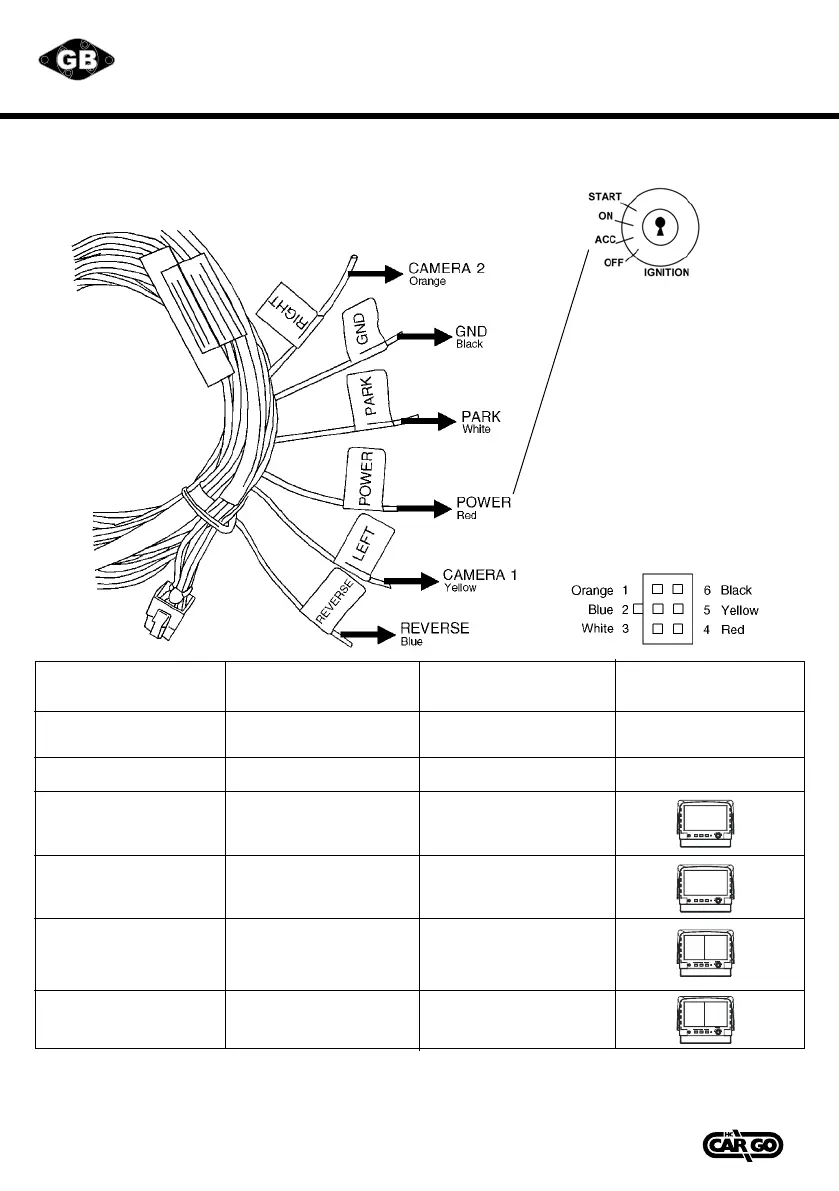
CONTROLCABLE DESCRIPTION:
Cableconguration
WIRE COLOUR
Red
Black
White
Blue
Orange
Yellow
FUNCTION
Acc power
(DC 9.6-DC32V.)
GND
Parking control
Reverse control
Camera 2
Camera 1
REMARKS
Active GND
Active Power Level.
Connect to reverse light.
Active Power Level.
Connect to direction
light (R).
Active Power Level.
Connect to direction
light (L).
ON SCREEN VIEW
1. Activation of the trigger cables for reverse, right or left overrides any selection of images and shows the
triggered camera.
2. *When pull the hand break, user need to press SOURCE button again to display AV IN picture.
Don’t connect the red wire
(power wire) of this product
directly to the battery.
Connect the red wire of this
product to the ACC of the
ignition key switch. Failure to
do so may result in permanent
damage of the product.
4 5
Vedpak 98UK_Version 5_010909
160775
CONTROLCABLE DESCRIPTION:
Cable configuration
WIRE COLOUR
Red
Black
White
Blue
Orange
Yellow
FUNCTION
Acc power
(DC 9.6-DC32V.)
GND
Parking control
Reverse control
Camera 2
Camera 1
REMARKS
Active GND
Active Power Level.
Connect to reverse light.
Active Power Level.
Connect to direction
light (R).
Active Power Level.
Connect to direction
light (L).
ON SCREEN VIEW
1. Activation of the trigger cables for reverse, right or left overrides any selection of images and shows the triggered camera.
2. *When pull the hand break, user need to press SOURCE button again to display AV IN picture.
Don’t connect the red wire
(power wire) of this product
directly to the battery. Connect
the red wire of this product
to the ACC of the ignition key
switch. Failure to do so may
result in permanent damage of
the product.
Jump Source
Po we r
Menu
AV
Jump S our c e
Power
Menu
CAM R
Jump Sourc e
rewoP
Menu
AV
Jump Source
Power
Menu
CAM R
CAM R
CAM B
CAM A
CAM R


 To Next Page
 Loading...