73
Vedpak 98_Version 6_12.2017
160775
Ved aktivering at triggerkablet til bakkameraet vises billedet altid i 4:3 format for at få det rigtige størrelsesforhold.
Ved at kalde billedet frem via source knappen kan man få billedet fra bakkameraet i 16:9 format.
SOURCE knap: Bakkamera:
4
16
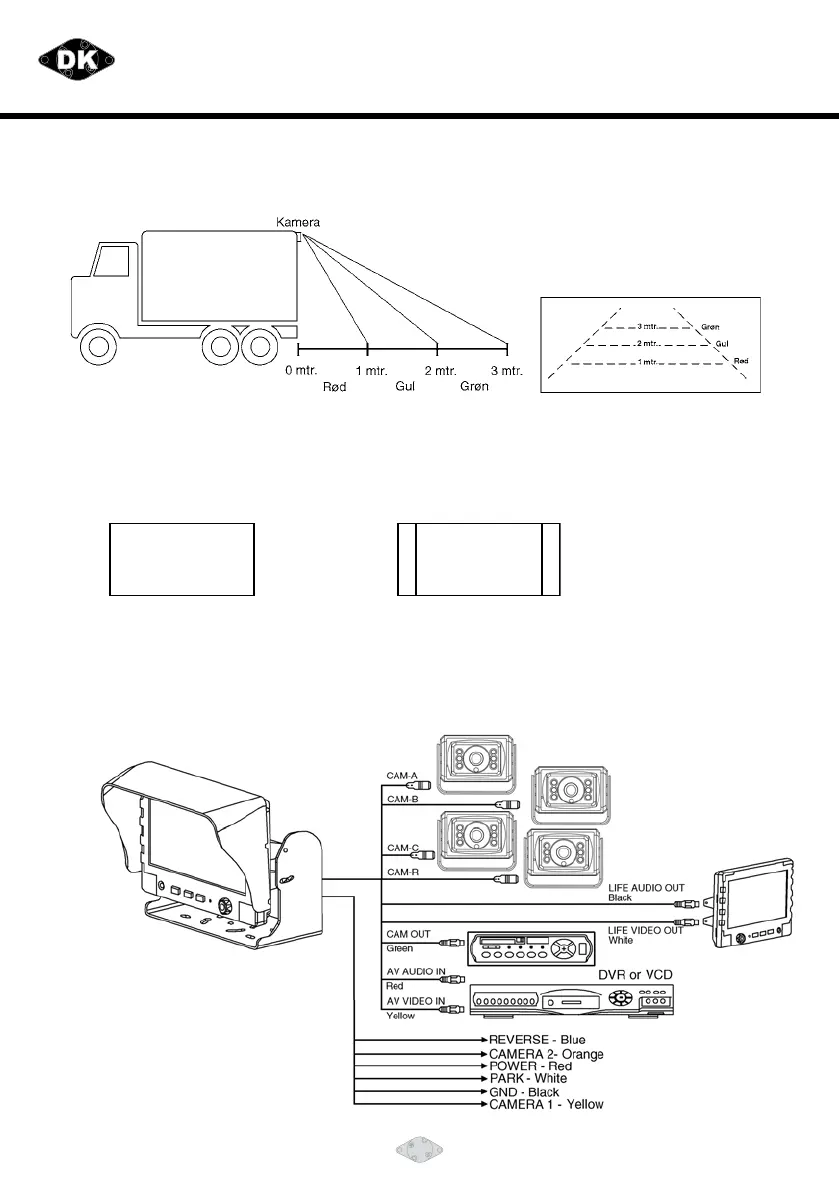
INDSTILLING AF BAKKAMERA:
1. Monter kameraet.
2. Afmærk afstandene 1, 2 og 3 mtr. på jorden.
3. Juster vinklen på kameraet således at afstandsstregerne i kameraet rammer
afmærkningen på jorden.
14
Vedpak 98UK_Version 5_010909
160775
15
VEHICLE INSTALLATION:
1. Install camera R (for rear view).
2. Use a measuring tool to mark out the distance behind the vehicle.
3. Adjust the viewing angle of the camera so that the distance gauge shown from the TFT
match to the distance behind the vehicle.
Switch to Rear view with source button, the screen always display on 16:9
While rear viewing, the screen always display on 4:3 to correct size percentage
SOURCE button: Rear viewing:


 To Next Page