START-UP PROCEDURE
PART 10. START-UP PROCEDURE (CONTINUED)
return to the home screen on the display. This completes the essential programming in
Appliance Setting Programs. If other values need to be changed in this section such as the
display time, refer to the Control Overview section Part 9.
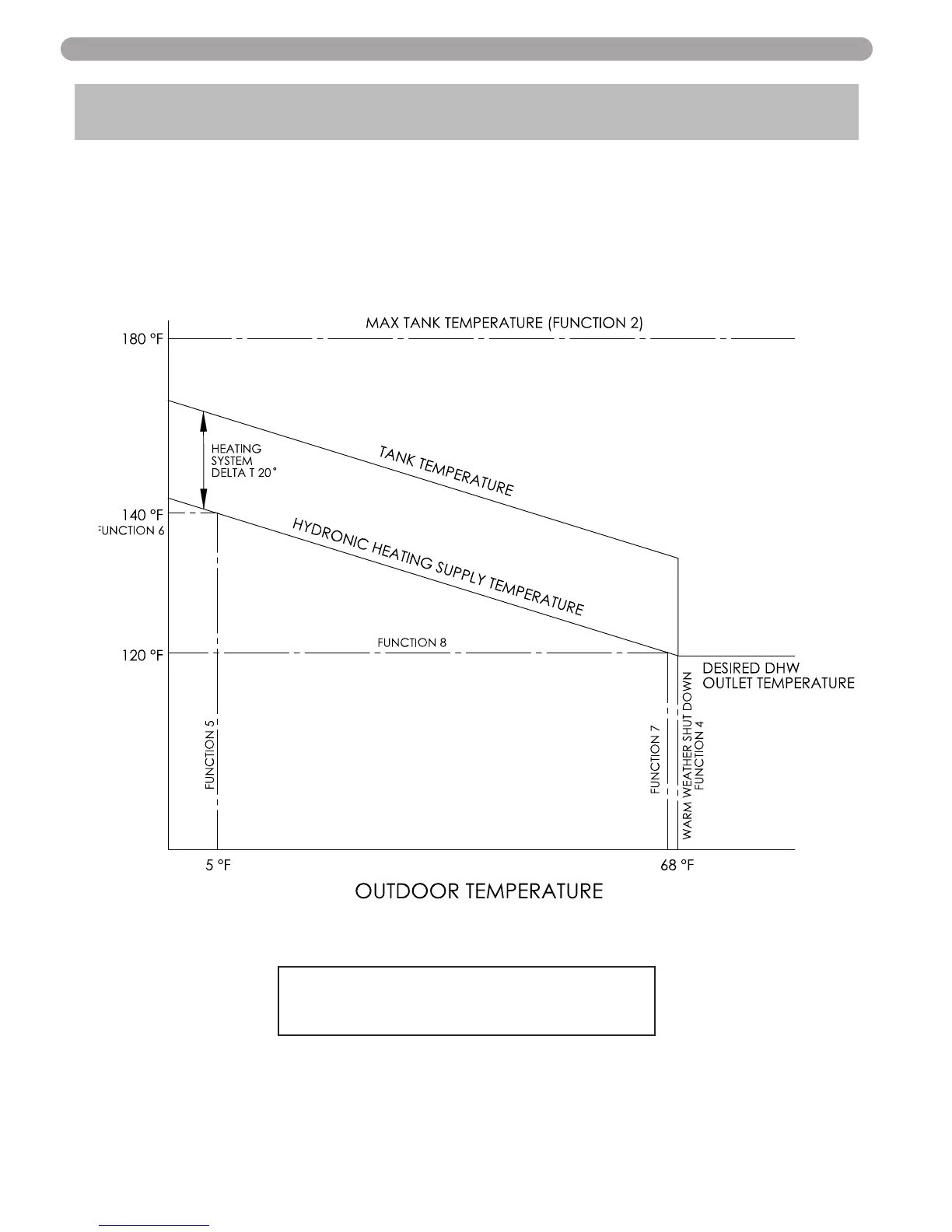
10) To further optimize the system performance and efficiency a proper outdoor reset curve
should be set. The figure below shows how each functions purpose and how it will affect the
systems performance. The values below show the systems default, and can be adjusted to
optimize your systems performance.
11) Press and hold enter for 4 seconds until you see the screen to enter the log in access code
screen.
ENTER MENU CODE
000
12) Use the left and right arrow to move the blinking zero to the left and right. Next using the up
and down arrow keys on the display log in your access code of 925 to confirm code. Next
press the ENTER to access System Setting Program Navigation menu. Once the code is
confirmed, you can now start to set the System Settings. Use the left and right arrow keys
on the display to navigate through the System Setting Program.
51
LP-314-P
12/15/09
Fig. 10-1


 To Next Page