EasyManua.ls Logo

Heathkit IO-4205 - Page 30

Heathkit IO-4205
208 pages
Print Icon
To Next Page IconTo Next Page
To Previous Page IconTo Previous Page
Loading...
Page
28
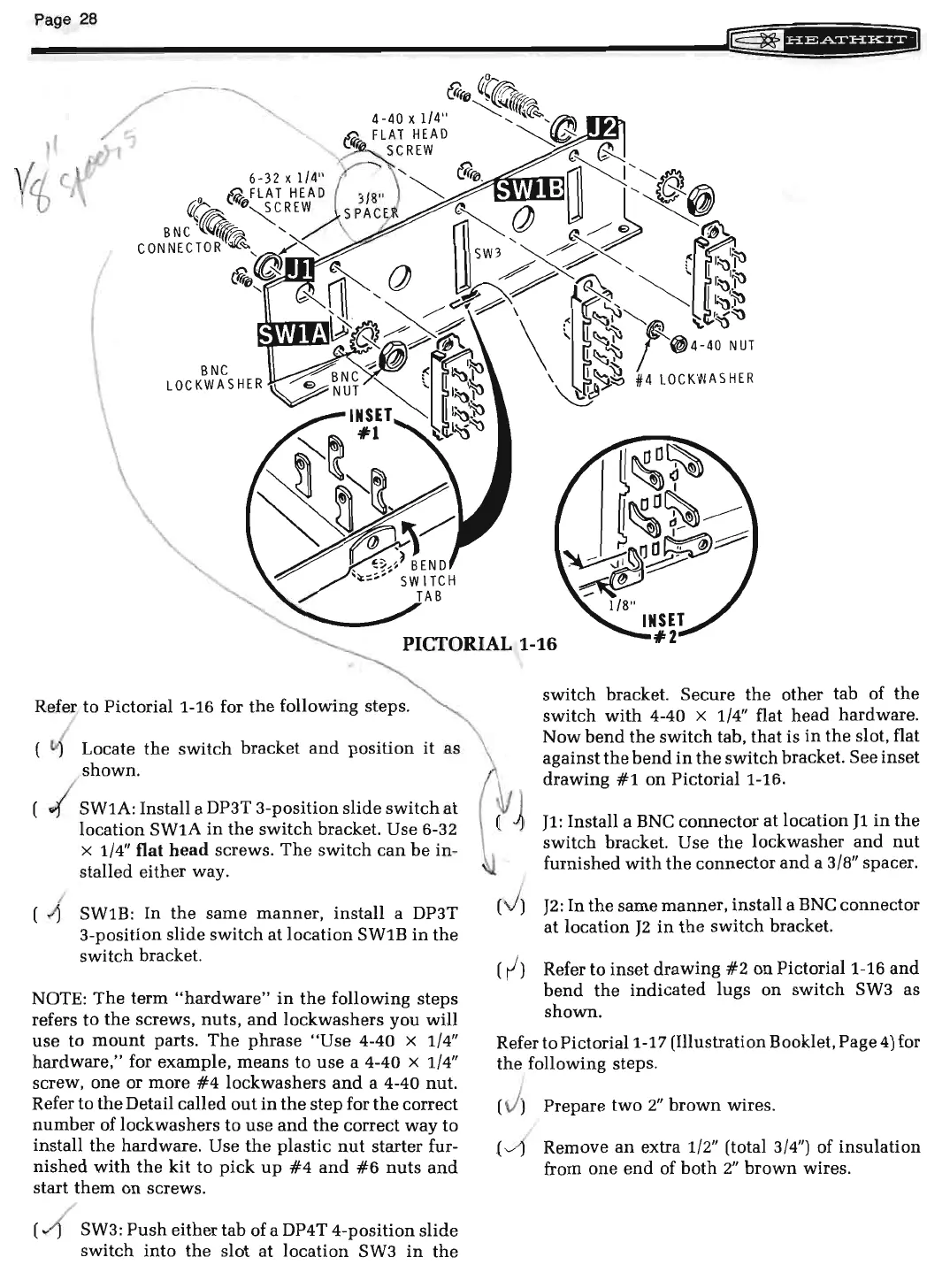
Refer to Pictorial 1-16 for
the
following steps.
(
~
Locate
the
switch
bracket
and
position
it
as
shown.
I SW1A: Install a DP3T
3-position
slide
switch
at
location
SW1A
in
the
switch
bracket. Use 6-32
x 1/4"
flat head screws.
The
switch
can
be
in-
stalled
either
way.
( .;{ SW1B:
In
the
same
manner,
install
a DP3T
3-position
slide
switch
at
location
SW1B
in
the
switch
bracket.
NOTE:
The
term
"hardware"
in
the
following
steps
refers
to
the
screws,
nuts,
and
lockwashers
you
will
use
to
mount
parts.
The
phrase
"Use
4-40 x 1/4"
hardware,"
for example,
means
to
use
a 4-40 x 1/4"
screw,
one
or
more
#4
lockwashers
and
a 4-40
nut.
Refer
to
the
Detail called
out
in
the
step
for
the
correct
number
of
lockwashers
to
use
and
the
correct
way
to
install
the
hardware. Use
the
plastic
nut
starter fur-
nished
with
the
kit
to
pick
up
#4
and
#6
nuts
and
start
them
on
screws.
SW3:
Push
either
tab of a DP4T
4-position
slide
switch
into
the
slot
at
location
SW3
in
the
(
~
switch
bracket.
Secure
the
other
tab of
the
switch
with
4-40 x 1/4" flat
head
hardware.
Now
bend
the
switch
tab,
that
is
in
the
slot, flat
against
the
bend
in
the
switch
bracket.
See
inset
drawing
#1
on
Pictorial1-16.
J1
: Install a BNC
connector
at
location
J1
in
the
switch
bracket. Use
the
lockwasher
and
nut
furnished
with
the
connector
and
a 3/8" spacer.
J2:
In
the
same
manner,
install
a BNC
connector
at
location
J2
in
the
switch
bracket.
Refer
to
inset
drawing
#2
on
Pictorial1-16
and
bend
the
indicated
lugs
on
switch
SW3 as
shown.
Refer to
Pictorial1-17
(Illustration Booklet, Page
4)
for
the
following steps.
( J)
Prepare
two
2"
brown
wires.
-
~
Remove
an
extra 1/2" (total 3/4") of
insulation
from
one
end
of
both
2"
brown
wires.

Related product manuals