EasyManua.ls Logo

Heathkit IO-4205 - Page 73

Heathkit IO-4205
208 pages
Print Icon
To Next Page IconTo Next Page
To Previous Page IconTo Previous Page
Loading...
Page
71
= :
jcHASSisl
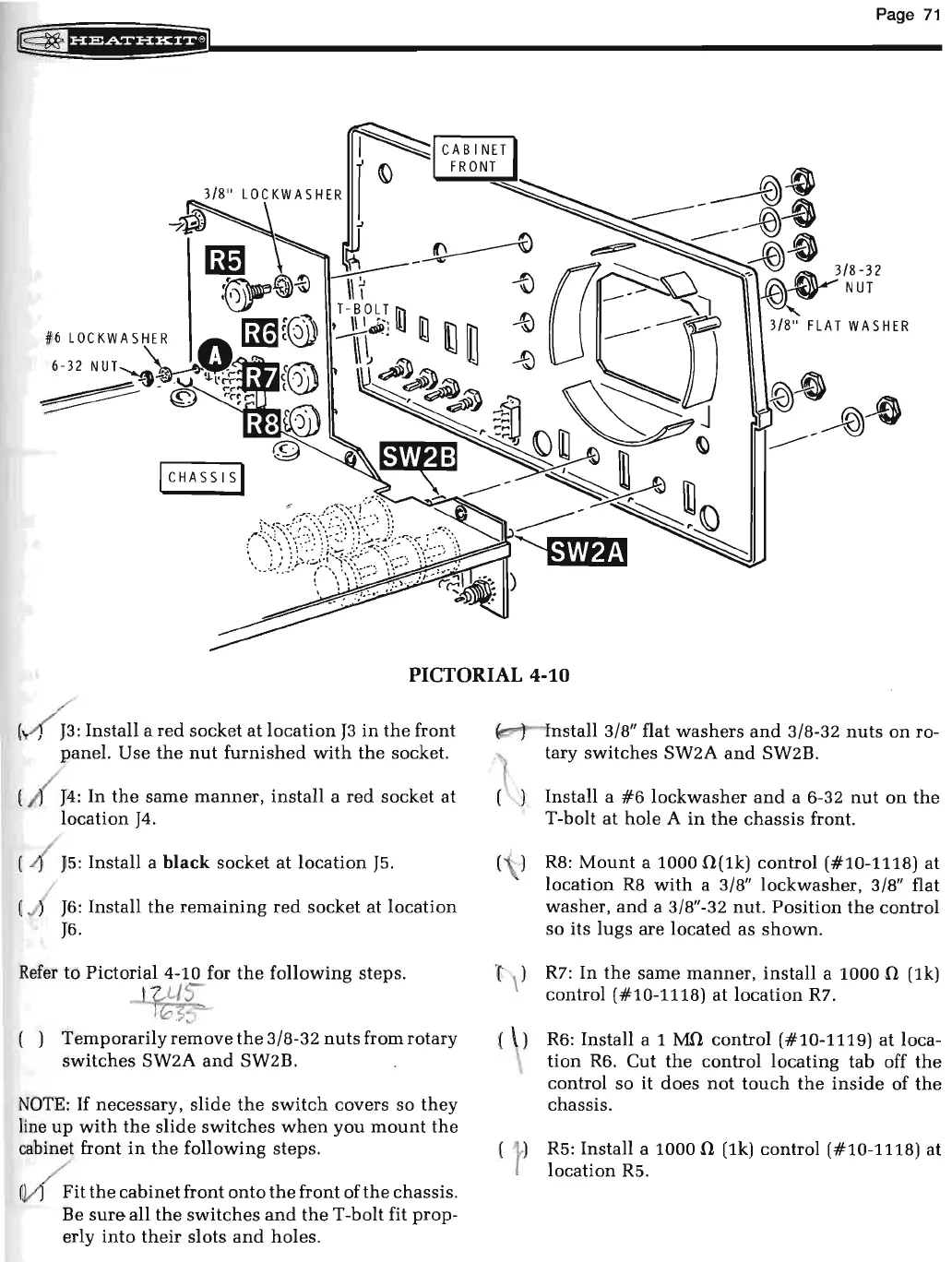
PICTORIAL
4-10
(
~
:
Install a
red
socket
at
location
J3
in
the
front
panel. Use
the
nut
furnished
with
the
socket.
(
/
~
4:
In
the
same
manner,
install
a
red
socket
at
location
J4
.
(
.(
J5:
Install a black socket
at
location
J5.
(
.J
J6:
Install
the
remaining
red
socket at
location
J6.
Refer
to Pictorial 4-10 for
the
following
steps
.
.J_U-/s-
10'5:>C>--
( )
Temporarily
remove
the
3/8-32
nuts
from rotary
switches
SW2A
and
SW2B.
NOTE:
If
necessary,
slide
the
switch
covers so
they
line
up
with
the
slide
switches
when
you
mount
the
cabinet front
in
the
following
steps
.
~
it
the
cabinet
front
onto
the
front of
the
chassis.
Be
sure
all
the
switches
and
the
T -bolt fit
prop-
erly
into
their
slots
and
holes.
( )
Install 3/8" flat
washers
and
3/8-32
nuts
on
ro-
tary
switches
SW2A
and
SW2B.
Install a
#6
lockwasher
and
a 6-32
nut
on
the
T-bolt
at
hole A
in
the
chassis
front.
R8:
Mount
a 1000
0(1k)
control (#10-1118)
at
location
R8
with
a 3/8" lockwasher, 3/8" flat
washer,
and
a 3/8"-32 nut.
Position
the
control
so its
lugs
are
located
as
shown
.
l'
\l R7: In
the
same
manner,
install
a 1000 n (1k)
control (#10-1118)
at
location
R7.
( )
R6
: Install a 1
MO
control (#10-1119)
at
loca-
tion
R6. Cut
the
control locating tab off
the
control so it does
not
touch
the
inside
of
the
chassis.
R5: Install a 1000 0 (1k) control ( #10-1118) at
location
R5.

Related product manuals