EasyManua.ls Logo

Heathkit IO-4205 - Page 72

Heathkit IO-4205
208 pages
Print Icon
To Next Page IconTo Next Page
To Previous Page IconTo Previous Page
Loading...
1-'age
70
FRONT
PANEL
0
0
()
0
DO
NOT
,.......,__
REMOVE
:.a__L.~V~II
PROTECTIVE BACKING
FROM
THESE
AREAS
0
l
5"
0
\
0
~
D
oD
~if
¥
~1
I
f--l/4
" f
l/4"....
0
:.~~
o
:
~:..:
0 o
-1
l -
3/8"
~o_o~lo
__
o~--~--~
0§0
1
~
W
---~o~
I
BOTTOM
EDGE
1/4
"
-l
~.
L
l/4
"
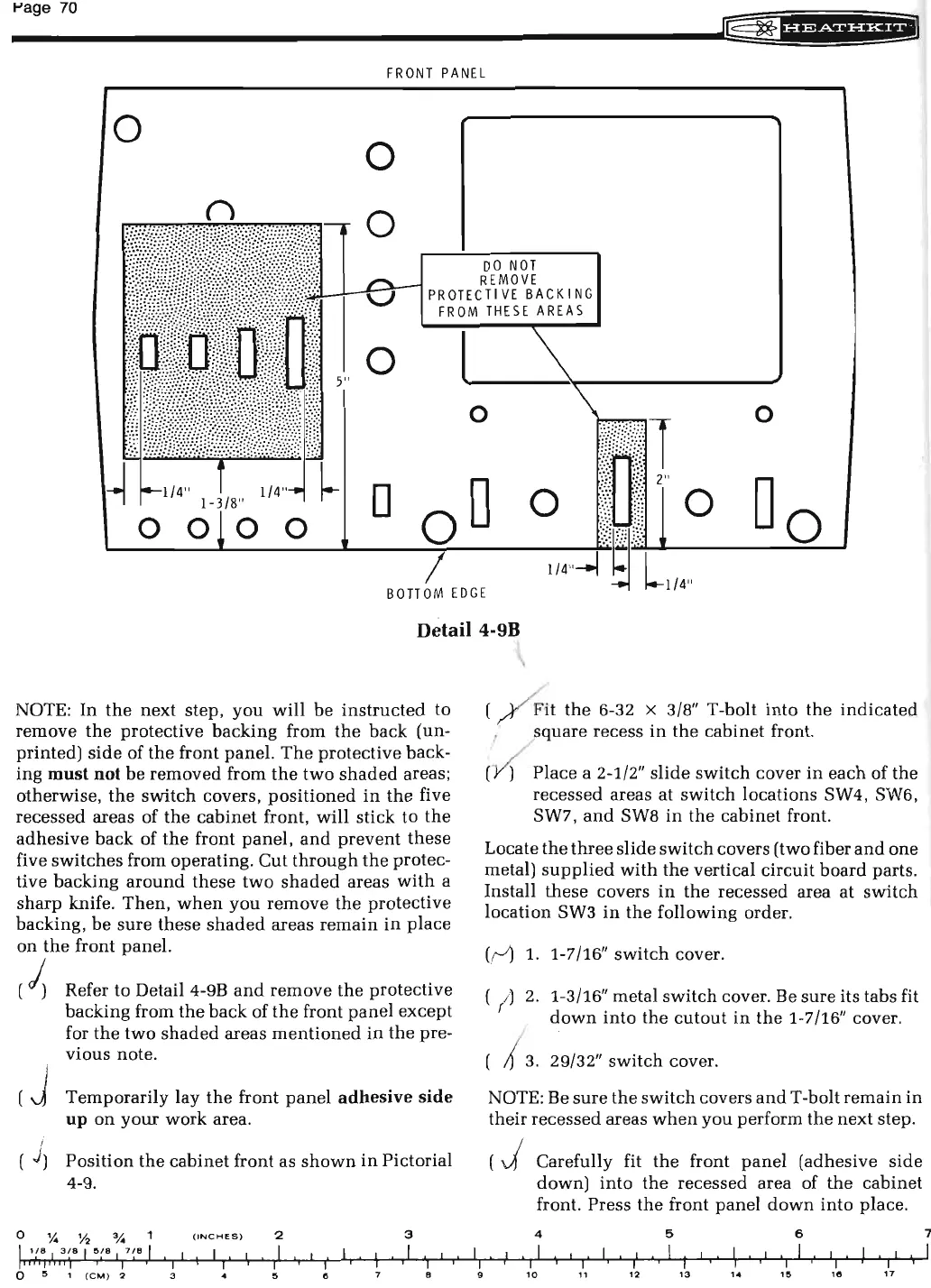
Detail 4-9B
NOTE:
In
the
next
step,
you
will
be
instructed
to
remove
the
protective
backing
from
the
back
(un-
printed)
side
of
the
front
panel.
The
protective back-
ing
must
not
be
removed
from
the
two
shaded
areas;
otherwise,
the
switch
covers,
positioned
in
the
five
recessed areas of
the
cabinet
front,
will
stick to
the
adhesive
back
of
the
front
panel,
and
prevent
these
five
switches
from operating.
Cut
through
the
protec
-
tive backing
around
these
two
shaded
areas
with
a
sharp
knife.
Then,
when
you
remove
the
protective
backing,
be
sure
these
shaded
areas
remain
in
place
on
the
front panel.
(
~
Refer to Detail 4-9B
and
remove
the
protective
backing from
the
back
of
the
front
panel
except
for
the
two
shaded
areas
mentioned
in
the
pre-
vious note.
( )
0
',4
Temporarily
lay
the
front
panel
adhesive
side
up
on
your
work
area.
Position
the
ca
binet
front as
shown
in
Pictorial
4-9.
%
o/.
(INCHES
) 2
3
I 1 ! 8 I
3
~
8
I
5(a I
7/8
I I I I
I
I
I
I
I
I
I
I
I
I
I
I
I
I
I
I I
I
I
I
''"''''')
0
5
1
(CM
) 2 3 5 e 8
I
I
I
I
9
( Fit
the
6-32 x 3/8" T-bolt
into
the
indicated
1
square
recess
in
the
cabinet
front.
(
~
Place
a 2-1/2"
slide
switch
cover
in
each
of
the
recessed areas at
switch
locations SW4, SW6,
SW7,
and
SW8
in
the
cabinet
front.
Locate
the
three
slide
switch
covers (two fiber
and
one
metal)
supplied
with
the
vertical
circuit
board
parts.
Install
these
covers
in
the
recessed area
at
switch
location
SW3
in
the
following order.
((-~
1.
1-7/16"
switch
cover.
( 1)
2.
1-3/16" metal
switch
cover. Be
sure
its tabs fit
down
into
the
cutout
in
the
1-7/16" cover.
( /
3.
29/32"
switch
cover.
NOTE: Be
sure
the
switch
covers
and
T -bolt
remain
in
their
recessed
areas
when
you
perform
the
next
step.
(J
I I
I
Carefully fit
the
front
panel
(adhesive
side
down)
into
the
recessed area of
the
cabinet
front. Press
the
front
panel
down
into
place.
4
5 6
I
I
I I
I
I
I
.
I
I
I I
I I
I
I
I
I
I
I
I
I
I
I
I
I
I
I
I
I
10
11
12
13
1~
15
"'
17
7
I

Related product manuals