15
Slimline Series
Section Header
Setting the Clock
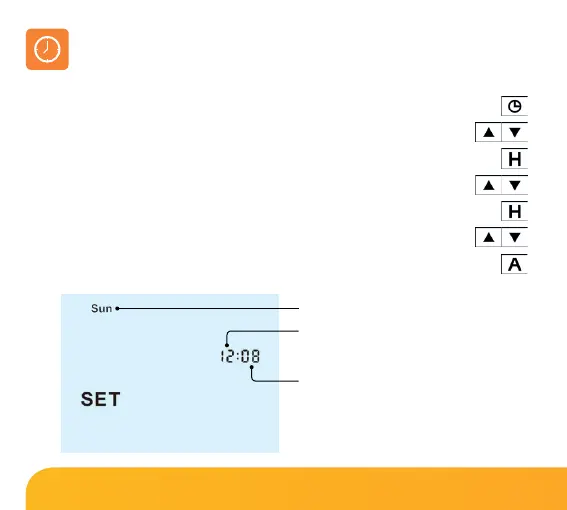
To set the clock, follow these steps.
• With the thermostat turned ON, press the Clock key three times
*
....................
• Use the Up/Down keys to set the hours .............................................................
• Press H to confirm settings ...............................................................................................
• Use the Up/Down keys to set the minutes ........................................................
• Press H to confirm settings ..............................................................................................
• Use the Up/Down keys to set the day of the week .........................................
• Press A to confirm settings and return to main display ..........................................
Day
Hours
Minutes
*
Note: When configured in
programmable without hot
water control (Feature 17 =01),
press the clock key twice to enter
clock setting screen.














 To Next Page