7
and Red are for left and right audio connections and the Yellow is for video. Modern flat
panel digital TV sets and home music systems are usually equipped with corresponding
color-coded RCA jacks to assist correct connections. Make sure that you have a CD+G
disc in the karaoke system playing when you are making this connection. You will know
you have the proper settings on your TV as soon as you see the lyrics on the screen.
Video connection
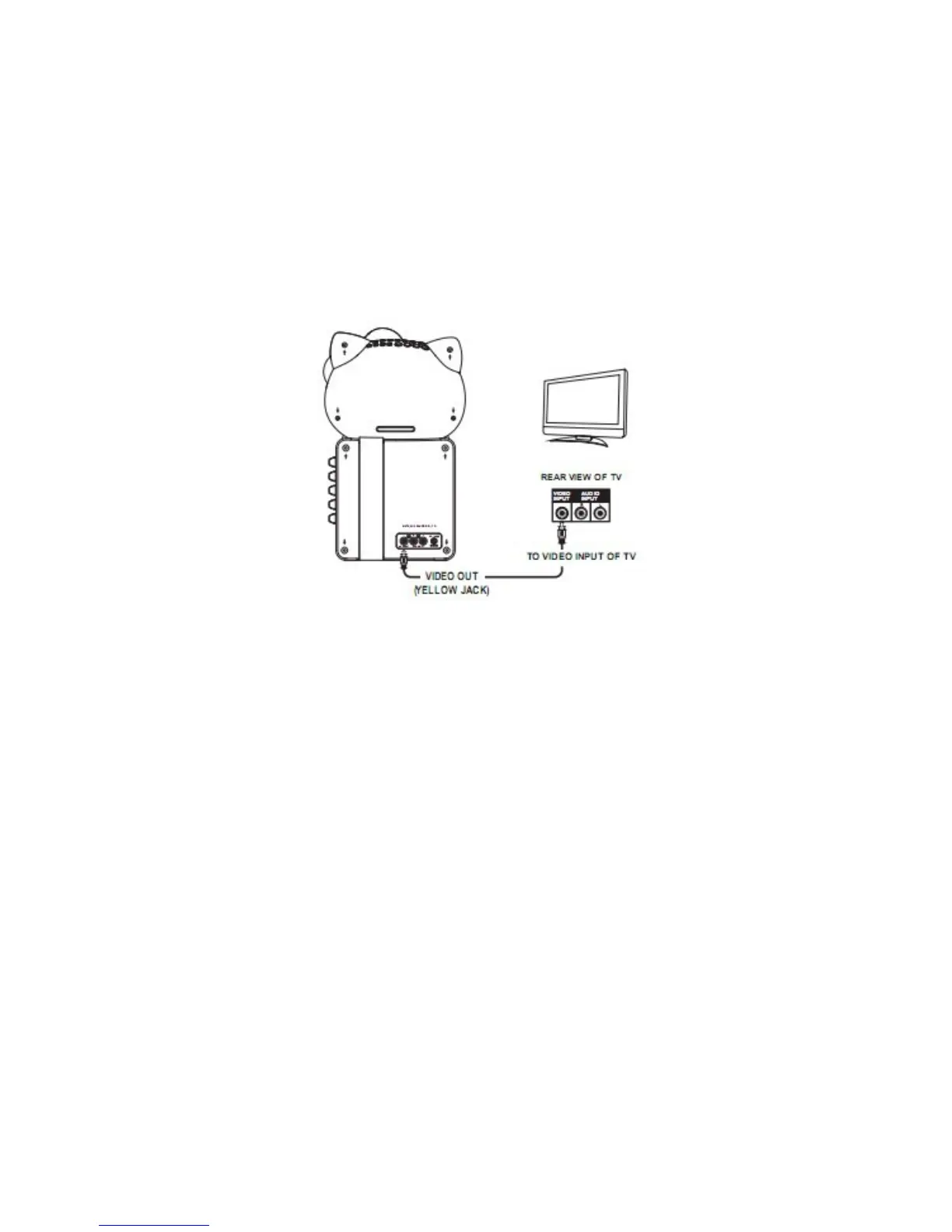
Please follow the steps below to display CD+G lyrics on the TV screen:
1. Locate the color-coded patch cords.
2. Connect video cable (Yellow) to the VIDEO OUT on the back of the karaoke system.
3. Connect the other end of the video cable (Yellow) to the VIDEO/AV INPUT on your
TV.
If your television does not have the required Video Input, you will need a RF modulator
(Radio Frequency Modulator), which connects through your TV Antenna or cable line and
serves as your Video Input.
The RF Modulator can be purchased at almost any consumer electronics retailer. If you
are connecting the video from the karaoke system to a television video input jack, you
must specify the source the TV is to display. Your TV user guide can tell you how to
display the video signal from the 'Video In' jack.
If you do not have the manual for your TV, we suggest calling the TV manufacturer's
customer service department. Only the manufacturer will be able to tell you accurately
how to configure your TV to display the video signal coming from the 'Video Input' jack.
Note: Some projection TV sets do not properly display the standard blue background
used on most CD+Gs. If the background color is inconsistent or flashing, please try
connecting your karaoke system to a standard CRT/LCD television instead.
Common ways to configure your TV
1. You karaoke system is designed to connect to your TV. The karaoke system is
constantly sending the video and audio signals to the 'VIDEO OUT' and 'AUDIO
OUT' jacks whenever you play a CD+G disc. So, load a CD+G into your karaoke
system before you start making these connections. You will see lyrics on the TV
screen as soon as you have completed the setup correctly.


 To Next Page