8
2. The setup of your TV is the most difficult part of making the connection for displaying
your lyrics. In most homes, the TV has either a cable connected or antenna in use.
Once you connect your karaoke system to the TV, you must 'tell' your TV to display
the input from the karaoke system instead of the usual input from the cable or
antenna.
3. Check your TV user manual for the easiest way to setup your particular
entertainment system. If you do not have your manual, you can always call your TV
manufacturer for that information or try their website for online assistance. We have
listed below the most common ways of setting up a TV:
♦ In the setup menu for configuring the TV there may be an 'Input Selection'
option where you may choose between 'Cable/Ant.', 'Video 1', or 'Video 2' etc.
as the input source.
♦ Try looking for a 'Video' channel between the highest channel and the lowest
channel on your TV (i.e. between 2 and 99 may be 'VIDEO' or 'INPUT').
♦ Look for a button on the remote control for the TV you are connecting to that
says 'VIDEO', 'VIDEO 1', 'AUX', 'EXT', 'LINE 1. The 'LINE-IN' button will
display the Video input source.
Audio connection
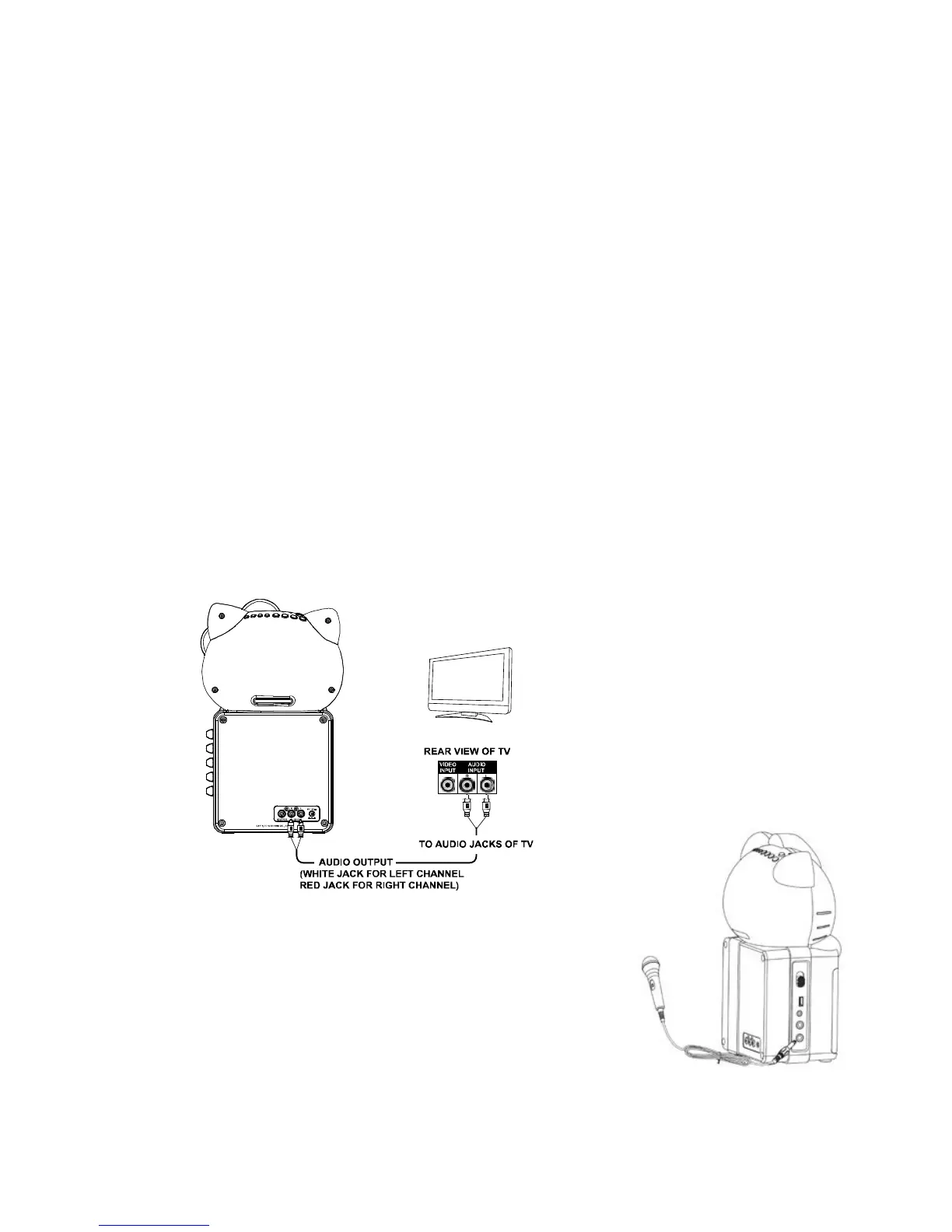
Connect the unit to your TV or home stereo system using the White and Red
connections on the supplied patch cord. Plug the white end of the patch cord into the
white AUDIO OUT jack on the unit. Plug the red end of the patch cord into the red AUDIO
OUT jack on unit. Now connect the other end of the cable's white (left channel) and red
(right channel) plugs to your TV or home stereo system's 'AUDIO IN' or 'AUX IN' jacks.
CONNECTING A MICROPHONE
1. Plug a microphone (one microphone is included) into the
MIC 1 or MIC 2 JACK on the lower left side of your unit.
The mic output will be mixed with an audio source from
CD/CD+G/USB flash drive.
2. Slide ON/OFF switch on microphone to “ON” before
singing and always slide to “OFF” after use.
CAUTION - Tapping or dropping the microphone while it is on can cause permanent
damage to it. Never grip and swing the microphone around by the connecting cord.


 To Next Page