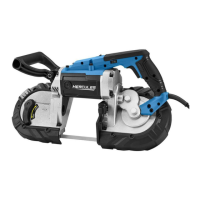
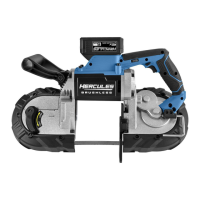
The HERCULES 20V 5" Deep Cut Variable Speed Band Saw is a powerful, cordless tool designed for various cutting applications. It is part of the HERCULES 20V battery system, offering portability and flexibility in the workspace. The band saw is designed for deep cuts, making it suitable for materials up to 5 inches by 5 inches.
Function Description
The primary function of this band saw is to make precise cuts in various materials, including wood, stainless steel, angle iron, pipe, tubing, and plastic. It operates using a continuous band blade that rotates around two wheels, guided by a guide bar system. The tool is powered by a 20V Li-ion battery pack (sold separately), providing cordless operation.
Key functional components include:
- Trigger and Trigger Safety Lock: These control the activation and deactivation of the saw, ensuring safe operation by preventing unintentional starting. The safety lock must be pressed before the trigger can be engaged.
- Speed Dial: This allows the user to adjust the blade speed, providing variable speed control to match the cutting requirements of different materials and applications.
- LED Work Light: An integrated LED light illuminates the workpiece, improving visibility in dimly lit areas and enhancing cutting accuracy.
- Guide Bar: This adjustable component helps stabilize the blade and guides it through the material, ensuring straight and accurate cuts. The guide bar can be adjusted up or down using the Guide Bar Adjustment Button.
- Tension Lever: This lever is crucial for installing and tensioning the blade, ensuring it is taut and properly seated on the blade wheels for safe and effective cutting.
- Auxiliary Handle: Provides an additional gripping point for two-handed operation, enhancing control and stability during use.
- Hanger: A convenient feature for storing the tool when not in use.
Usage Features
The HERCULES band saw is designed for user-friendly operation with an emphasis on safety and control.
- Cordless Operation: Being battery-powered, the tool offers freedom of movement without the restriction of power cords, making it ideal for job sites or areas without immediate access to power outlets.
- Blade Selection: The tool accommodates specific blade dimensions (44-7/8" x 1/2" x .025") and allows for selection of blades with different teeth per inch (TPI) to optimize cutting performance for various materials. For example, blades with 3-4 TPI are suitable for wood resawing, while 24 TPI blades are better for thinner stainless steel or plastic.
- Blade Installation and Tensioning: The manual provides clear instructions for installing and tensioning the blade. Users must ensure the blade is centered on the guide bearings and fits evenly around the blade wheels. The tension lever is used to make the blade taut, which is critical for safe and effective cutting.
- Workpiece Setup: It is essential to secure the workpiece using a vise or clamps to prevent movement during cutting, ensuring both safety and accuracy. The work area should be clean, well-lit, and free from distractions.
- Cutting Technique: When starting a cut, the guide bar should be set against the workpiece with the blade at a slight angle. Minimal force should be applied to start a groove, allowing the tool's weight to do most of the work. Forcing the tool can lead to blade damage or injury. The speed dial allows for adjustment of cutting speed, which should be matched to the material being cut.
- Safety Precautions: The tool incorporates several safety features, including a trigger safety lock. Users are strongly advised to wear ANSI-approved safety goggles, heavy-duty work gloves, and long-sleeved shirts or coats when handling or working near the blade. The manual emphasizes the importance of reading and understanding all safety warnings before operation.
Maintenance Features
Proper maintenance is crucial for the longevity and safe operation of the HERCULES band saw.
- Regular Inspection: Before each use, the tool should be inspected for general condition, including checking for loose hardware, misalignment or binding of moving parts, cracked or broken parts, and any other condition that might affect its safe operation. The battery pack should also be checked for leaks, swelling, or cracks.
- Cleaning: After each use, external surfaces of the tool should be wiped with a clean cloth. If the tool is not used for long periods, the blade should be removed.
- Blade Maintenance: Keeping cutting tools sharp and clean is essential for optimal performance and to prevent binding. Dull or damaged blades should be replaced as needed. For blade installation, replacement, or tensioning, users should refer to the specific sections in the manual.
- Battery Pack Care: Battery packs should be recharged only with the specified charger. They should be stored away from other metal objects to prevent shorting. Damaged or modified battery packs should not be used.
- Professional Servicing: Procedures not specifically explained in the manual, especially those related to internal damage or wear, must be performed only by a qualified technician. The manual explicitly states that battery packs should only be serviced by the manufacturer or authorized service providers.
- Storage: After use, the tool should be turned off, the battery pack removed, cleaned, and stored indoors out of children's reach.
- Label and Nameplate Maintenance: Important safety information is conveyed through labels and nameplates on the tool. These should be maintained and replaced if unreadable or missing.
- Troubleshooting: The manual provides a troubleshooting guide for common issues such as the tool not starting, operating slowly, decreased performance, excessive noise, overheating, or issues with cuts. This guide helps users identify possible causes and offers likely solutions, often emphasizing blade replacement, battery charging, or professional service.


 To Next Page
 General